
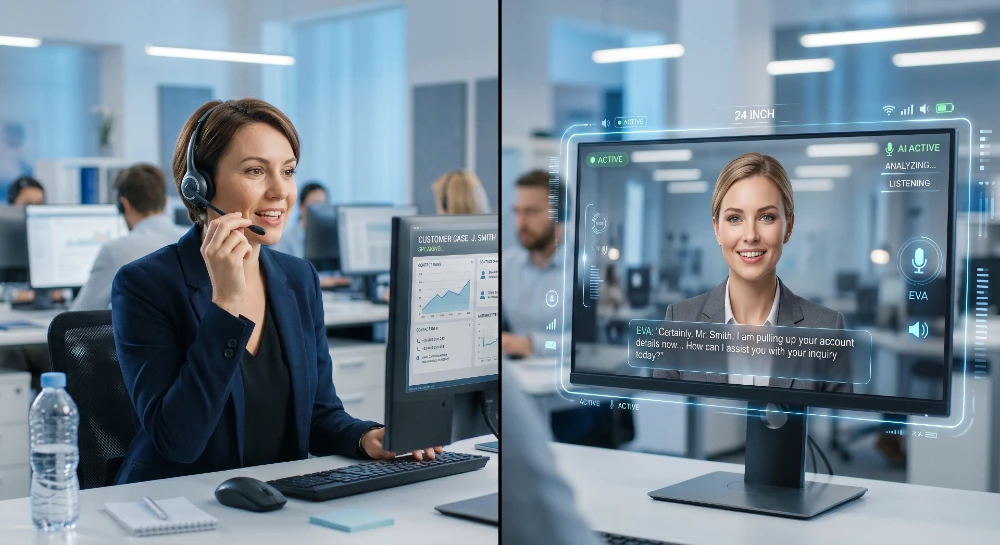
You’ve seen the demos. An AI rep that looks and talks like a real person, handles calls, answers questions, and never burns out. The problem isn’t that these don’t exist they do. The problem is that the market is flooded with half-baked tools that look good in pitch decks and fall apart at go-live.
Here’s how to find the ones that actually work.
- Best overall starting point: Synthesia and HeyGen are the two most production-ready ai avatar services right now for virtual assistant deployments both support custom avatars, API access, and multi-language output at scale.
- Best for: Teams that need a talking face on a customer-facing screen support desks, onboarding flows, reception screens, or async video responses; skip it if your use case is pure voice-only or text chat.
- Key insight that matters most: Don’t confuse “avatar video generator” with “interactive AI avatar” they’re different products at completely different price points; interactive ones require an LLM layer on top.
- Biggest mistake to avoid: Buying an avatar platform before confirming it integrates with your CRM, ticketing system, or telephony stack most don’t out of the box.
- When to choose an alternative: If you need real-time phone call handling instead of screen-based interaction, look at dedicated AI receptionist platforms that have already solved the latency problem.
What “AI Avatar Services” Actually Means (And Why the Distinction Matters)
People use the term loosely. Most get burned because they buy one type expecting another.
There are three distinct categories:
1. Avatar video generators You type a script, a realistic face reads it on screen. Output is a pre-rendered video file. Tools like Synthesia, HeyGen, D-ID, and Colossyan live here. Fast, affordable, great for training content and product explainers. Not interactive.
2. Real-time interactive AI avatars A live-rendering avatar that responds to user input in real time, powered by an LLM backend. This is what you actually need for a virtual assistant. Tools here include Tavus (real-time layer), Hour One’s interactive mode, and newer players like Simli AI. These cost significantly more and require more integration work.
3. Voice-only AI agents with no visual component Pure audio. Think ElevenLabs + a GPT-4o backend, or platforms like Retell AI and Vapi. No face, no screen just a voice. Way cheaper. Often better for phone-based virtual assistants where visual output adds zero value.
Knowing which bucket you need before you start shopping saves a lot of wasted demos.
The Real Use Cases Worth Building For
Not every virtual assistant needs a face. Here’s an honest breakdown of where ai avatar services actually add value and where they don’t:
Worth it:
- Reception screens in healthcare, real estate offices, hotels — anywhere a human usually greets visitors
- Onboarding flows where a “guide” improves completion rates (the visual attention signal helps)
- Video FAQ responses that feel more personal than a text wall
- Sales outreach personalization at scale HeyGen’s personalized video feature is genuinely impressive for this
- E-learning and internal training where engagement is measurable
Usually not worth it:
- Standard customer support chat a well-tuned text chatbot like Intercom Fin or Zendesk AI handles this cheaper and faster
- Phone-based virtual assistants voice-only pipelines have 50-100ms latency; adding a video layer makes it worse
- Any use case where your customer is on mobile with slow data rendering a real-time avatar on a 4G connection is still a mess in 2026
The truth? A lot of companies buy avatar services because they’re impressive in demos, not because they solve a real problem. Don’t be that company.
Where to Find AI Avatar Services: The Actual List
These aren’t cherry-picked. This is the current market, split by what each does well.
Synthesia
The most mature platform in the space. Over 230 AI avatars, 140+ languages, clean API. Their enterprise tier lets you create a custom avatar from recorded footage in about a day. Best for high-volume async video — think training libraries, product tutorials, support explainers.
The downside? It’s not interactive. You’re generating pre-rendered videos, not a live agent. If that’s your use case, nothing beats their template system and localization pipeline. If you need real-time interaction, keep scrolling.
Pricing: Starts around $29/month for basic plans; enterprise custom pricing for API access.
HeyGen
Probably the fastest-moving platform right now. Their real-time avatar API (launched late 2024, significantly improved through 2025) is what puts them in contention for actual virtual assistant use. You can stream a talking avatar response with under 2 seconds of perceived latency using their streaming SDK.
HeyGen’s personalized video feature where you feed a spreadsheet of names and it auto-generates unique videos — is genuinely useful for outbound sales. Not interactive, but the closest thing to “interactive at scale” for one-way communication.
Pricing: Video generation from ~$29/month; real-time API pricing varies by usage.
Tavus
Tavus is specifically built for real-time conversational video AI. You clone your appearance from a short video sample, then the Tavus Conversational Video Interface (CVI) lets users have a live back-and-forth conversation with that avatar. The latency is noticeably better than DIY setups.
What’s worth knowing: Tavus is primarily a developer-facing API. You won’t get a polished out-of-box product — you’re building on top of their infrastructure. If you have a dev team, that’s a strength. If you’re trying to deploy something next week without engineering resources, it’s a weakness.
Their Phoenix model (their most recent avatar engine) handles expressions and lip-sync noticeably better than older systems.
D-ID
D-ID has been around longer than most and built its name on “talking photo” technology animate a still image to speak. That origin shows in the product. It’s versatile for quick avatar creation from existing photos, but the quality ceiling is lower than Synthesia or HeyGen for professional deployments.
They have a Chat Avatar product that attempts real-time interaction, but in practice it’s clunkier. Worth evaluating for budget-constrained projects. Not the first choice for enterprise deployments.
Simli AI
A newer player worth watching. Simli’s focus is ultra-low-latency real-time avatar streaming, specifically designed to pair with voice AI backends. You bring your own LLM (or use their integrations) and Simli handles the visual layer. Latency claims under 500ms in their demos.
It’s still early-stage and documentation is thinner than you’d want for production deployment, but their Discord community is active and the technical team responds. If you’re building something custom and latency is your primary concern, give them a serious look.
Hour One
Primarily an enterprise video production platform for L&D (learning and development) content. Strong if you’re a large organization generating high volumes of training videos with consistent avatar presenters. Less relevant for real-time virtual assistant use cases.
How to Actually Deploy an AI Avatar as a Virtual Assistant
Here’s the thing most platforms won’t tell you upfront: the avatar is maybe 30% of the problem. The other 70% is the intelligence layer and the integration.
Step 1: Define the interaction model
Is this a one-way communicator (customer asks, avatar plays a pre-generated video response) or a genuinely interactive agent (customer speaks, avatar listens, thinks, replies in real time)?
One-way is 10x easier and 10x cheaper. Real-time is more impressive but needs a full stack: STT (speech-to-text) → LLM → TTS (text-to-speech) → Avatar renderer. That’s four failure points.
Step 2: Pick your intelligence layer first
The avatar platform is the face. The brain is separate. For most deployments, that means choosing between:
- OpenAI GPT-4o with a custom system prompt most flexible, highest quality, most expensive per token
- Claude 3.5/3.7 Sonnet better instruction-following for structured customer service flows, strong at staying in role
- Fine-tuned Llama 3 or Mistral if you have proprietary data and want to keep it on-premise
Get your LLM responding accurately to your specific use cases before you touch the avatar layer. I’ve seen projects get delayed two months because teams tried to debug the avatar rendering and the AI responses simultaneously.
Step 3: Handle voice
For real-time avatars, voice quality matters more than the visual. ElevenLabs remains the standard for cloned and synthetic voices. Their Turbo v2.5 model hits around 300-400ms latency for streaming, which is workable. Cartesia and PlayHT are solid alternatives worth testing Cartesia’s Sonic model has been competitive on speed.
Step 4: Connect the integration points
This is where most deployments stall. Your virtual assistant needs to access:
- Your knowledge base (Confluence, Notion, internal docs)
- Your CRM (Salesforce, HubSpot) for customer context
- Your ticketing system (Zendesk, Freshdesk) to log interactions
- Calendar or booking tools if it’s handling scheduling
None of the avatar platforms handle this natively. You’re building this with Zapier, Make, or custom API work. Budget for it.
Step 5: Set realistic expectations for the first 90 days
What actually works well in month one: scripted scenarios, FAQ responses, simple routing decisions.
What almost never works well in month one: complex multi-turn reasoning, handling edge cases in regulated industries, any scenario requiring human judgment calls.
Build the MVP narrow and deep, not wide and shallow.
What This Costs in Real Life
Numbers people actually want before they start budgeting:
For a basic async avatar video workflow (pre-generated responses, not real-time):
- Synthesia or HeyGen: $50-200/month depending on volume
- Setup time: 1-2 weeks with a non-technical team
- Total first-year cost: $1,000-3,000 plus internal time
For a real-time interactive avatar virtual assistant:
- Avatar API (Tavus, HeyGen streaming, or Simli): $500-2,000/month at modest usage
- LLM costs (GPT-4o or equivalent): $200-800/month depending on conversation volume
- Voice API (ElevenLabs): $100-500/month
- Integration/dev work: $5,000-20,000 one-time if you’re building from scratch
- Total first-year cost: $15,000-40,000 realistically
The gap between these two is bigger than most companies expect. A lot of teams budget for category one and need category two.
One shortcut worth knowing: platforms like Retell AI and Vapi have started integrating video avatar options into their voice agent infrastructure. Not as polished as dedicated avatar platforms, but the integration work is already done. Worth checking their current feature sets if budget is tight. You can also look at how AI agents handle customer-facing interactions to understand where the ROI actually comes from before committing to a full avatar build.
The Mistakes That Derail Deployments
Most failures I’ve seen come down to three things:
Skipping the knowledge base problem. The avatar looks incredible. It can’t answer “what’s your return policy on business accounts” because nobody fed it that information in a structured way. The AI is only as useful as the data behind it. Get your knowledge base clean and complete before demo day.
Underestimating localization complexity. You’ve got multilingual customers. The avatar speaks Spanish. But it was trained on English idioms and the localization is stiff. Avatar platforms do machine translation, not cultural adaptation. A customer in Mexico City and a customer in Madrid don’t want the same tone. Plan for this.
Choosing a platform based on the demo video. Every platform has an immaculate demo video. Test with your actual use cases, your actual content, and your actual edge cases. Ask for a real trial period, not a curated sandbox. The difference between demo quality and production quality is often shocking.
If you’re deploying a virtual assistant specifically for business automation workflows, the avatar layer is one of the last things to add, not the first. Nail the automation logic before you put a face on it.
The One Thing That Determines Whether This Works
Not the platform. Not the voice model. Not even the LLM.
It’s the quality of your system prompt and the structure of your knowledge base.
I’ve watched teams spend $30,000 on a custom avatar deployment that performed worse than a simple chatbot because the instructions were vague and the knowledge was disorganized. Then I’ve seen $300/month setups that genuinely impressed customers because someone spent three weeks writing a tight system prompt, structured the FAQ data properly, and tested every edge case before launch.
The avatar makes it feel human. The underlying logic makes it useful. You need both.
Can AI Avatars Handle Outbound Communication?
Short answer: yes, but it’s more limited than inbound. For outbound, you’re mostly in the async video space — HeyGen’s personalized video outreach is the most proven workflow here.
Real-time outbound calls with a video avatar aren’t mainstream yet. The technical stack works, but the social acceptance is still catching up. Most people receiving an unsolicited video call from an AI face hang up faster than they would from a voice-only AI agent. For outbound voice, the AI outbound calling landscape is further along and has better ROI data.
Inbound is where avatar virtual assistants shine. Someone who’s already on your website or in your app and chooses to interact — that context shift makes all the difference.
Where Content Marketing Fits In
One underused application: AI avatar services for content marketing. A talking avatar presenting your weekly newsletter, product update, or thought leadership piece at scale. You write the script, the avatar delivers it, you get video content across LinkedIn, YouTube, and email without recording sessions.
The ROI here is easier to justify than customer service deployments. Lower stakes, no real-time requirements, and the quality of current platforms is genuinely broadcast-worthy for most use cases.
If you’re still evaluating: sign up for free trials at HeyGen and Synthesia, build one real use case (not a test script your actual most-common customer question), and see which output quality you’d actually publish. Both have free tiers.
If you’ve already chosen a platform and are stuck on deployment: stop debugging the avatar and go fix your knowledge base and system prompt first. That’s almost certainly where the problem is.
If you’re planning a real-time interactive deployment: get a developer to build a small proof of concept with Tavus or Simli AI before committing to enterprise pricing. The gap between “it works in the demo” and “it works under real load with real customers” needs to be validated early.
The platforms exist. The technology is solid enough for production. What separates the deployments that get cut after six months from the ones that stick is operational discipline not which avatar you chose.


