
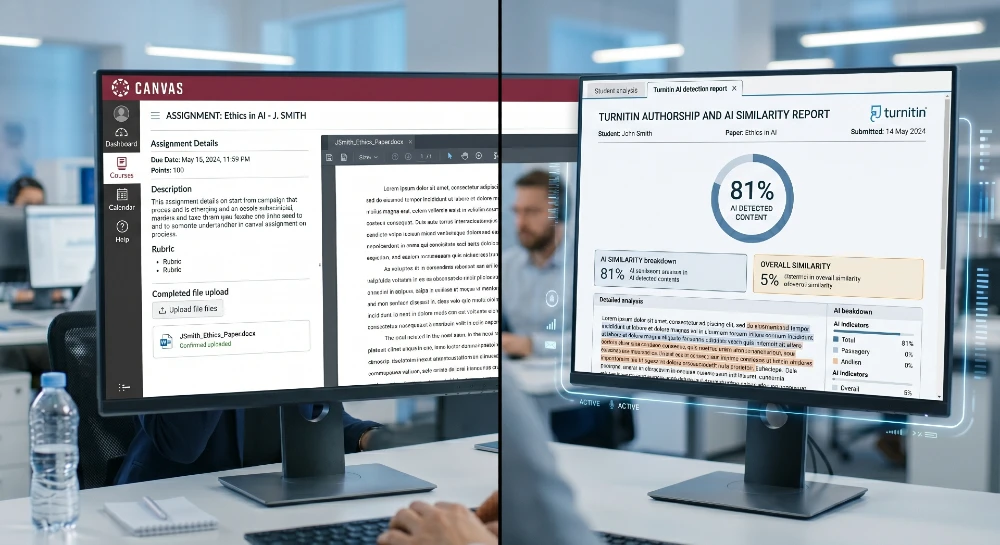
Your paper got flagged and you’re wondering if Canvas caught you. Or maybe you’re an instructor trying to figure out what’s actually running in the background. Either way, the answer isn’t what most people expect.
Canvas itself doesn’t detect AI. Not a single line of its core code scans for ChatGPT, Claude, or any other AI writing tool. What you’re actually dealing with is a chain of third-party tools your institution may or may not have turned on and that distinction matters a lot.
- Canvas LMS has no native AI detector; all detection comes from third-party integrations like Turnitin, GPTZero, or Copyleaks enabled by your institution.
- Students submitting to schools that use Turnitin face the most rigorous scanning Turnitin powers roughly 80% of AI detection in Canvas environments globally.
- The single most important thing to know: detection is assignment-specific, not platform-wide, so your instructor had to manually enable a tool for that particular submission.
- The biggest mistake is assuming that because Canvas didn’t flag something on one assignment, it won’t flag it on another — each assignment has its own settings.
- If your school uses GPTZero or Copyleaks instead of Turnitin, the sensitivity thresholds are different, and GPTZero tends to produce more false positives on non-native English writing.
Canvas Has No Built-In AI Detector Here’s Why That Matters
Canvas, made by Instructure, does not have its own built-in AI detector. Instructure has not built AI detection into the core Canvas LMS platform. That’s the short answer most students never get clearly explained to them.
Here’s the longer version. Canvas is a learning management system. Its job is to handle course delivery, assignment submission, grading workflows, and communication. It was never designed to be a surveillance tool. The AI detection piece? That’s outsourced completely.
Canvas has no native integration with ChatGPT or Claude. Some institutions use the Khanmigo or Cogniti LTI tools to give students AI tutors inside Canvas, but those are separate products. AI usage outside Canvas is invisible to the LMS until a detector is run on the submitted file.
So when you ask what ai detector does canvas use, the technically accurate answer is: Canvas uses whichever detector your school paid for and plugged in. Or none at all. Plenty of schools are still running Canvas with zero AI detection enabled.
The system that makes these integrations possible is called LTI Learning Tools Interoperability. It’s basically a plugin framework. Institutions need to integrate third-party AI checkers such as Proofademic and Turnitin via the Learning Tools Interoperability (LTI) to obtain AI scores in Canvas. An instructor with the right admin access can point Canvas toward any LTI-compatible detection tool, and from that point forward, every submission to that assignment gets automatically scanned.
What trips people up: the detection is invisible on the student side. You won’t see a “this assignment uses AI detection” banner. You upload the file, hit submit, and it silently passes through a scanner you can’t see. Teachers see the report; you don’t unless they choose to share it.
The Three Tools Schools Actually Use Inside Canvas
All AI detection within Canvas comes from third-party tools like Turnitin, Copyleaks, or Proofademic, which your institution has to license and enable separately. Those aren’t the only options, but they cover the vast majority of real-world deployments.
Turnitin: The dominant one
Turnitin is estimated to power approximately 80% of AI detection usage within Canvas environments based on institutional adoption patterns, making it the dominant choice for schools using Canvas LMS.
When your professor enables Turnitin in a Canvas assignment, the AI Writing Indicator appears as a blue percentage alongside the traditional red similarity score. That blue number is how much of your submission Turnitin’s model flagged as AI-generated. A score of 20% or above triggers a visible result. Below that, the report shows an asterisk instead of a number because Turnitin itself acknowledges the result isn’t reliable at low percentages.
What actually runs under the hood? Turnitin’s AI detector is separate from its plagiarism checker. There’s no database of AI-generated text it compares against. Instead, it uses a transformer deep-learning model trained to identify the statistical fingerprint that large language models leave in text. It’s looking for patterns — the specific way AI distributes word probabilities, sentence rhythms, and structural regularity that human writing doesn’t naturally produce.
One thing most people don’t know: Turnitin requires a minimum of 300 words for AI detection to function. Below that threshold, results are essentially meaningless. Even at 300–500 words, Turnitin’s own documentation warns that both false positives and false negatives are more likely. Short assignments are basically invisible to the detector.
GPTZero: The second most common
GPTZero integrates with Canvas as an external tool and works differently from Turnitin. Built originally by Edward Tian at Princeton, it analyzes two key signals: “perplexity” (how predictable the word choices are) and “burstiness” (how much sentence length varies). Human writing has high burstiness — short punches mixed with long flowing sentences. AI tends to flatten that variation.
GPTZero is often used by schools that want a free or lower-cost alternative, or that don’t already have Turnitin licenses. The trade-off: it has a documented higher false positive rate on formal academic writing, especially from writers whose first language isn’t English.
Copyleaks: The technical one
Copyleaks sits between the two. It claims higher accuracy on partially AI-edited text — one of the scenarios both Turnitin and GPTZero struggle with. Some institutions run both Turnitin and Copyleaks simultaneously on the same submission, which produces two separate reports. If both flag something, that’s treated as stronger evidence.
What Canvas Actually Does Track (That’s Not AI Detection)
Even without a detector, Canvas collects metadata you should know about.
Canvas Quizzes with proctoring can track tab switching, time on page, and some behavior metrics. This is proctoring — not AI writing detection. Two very different things.
Here’s what the behavioral layer actually looks like in practice: Canvas logs when you opened the assignment, how long you spent on the submission page, whether you copy-pasted large chunks of text (paste events get flagged), and whether you switched browser tabs during a quiz. None of this directly proves AI use. But instructors who look at a flagged submission combined with these behavioral signals get a more complete picture.
Metadata from document submissions is another underrated signal. When you upload a Word document or Google Doc, the file itself carries version history, creation timestamps, and edit duration data. A paper that was “created” at 11:45pm and submitted at midnight for a 3,000-word assignment looks different from one with a three-week edit history. Some instructors check this manually.
The combination — an 85% Turnitin AI score plus a document created and submitted in the same hour plus a paste event during submission — is much harder to explain away than any single signal alone.
The Accuracy Problem Nobody Talks About Honestly
This is the part schools rarely advertise on their academic integrity pages.
Turnitin publishes a 98% accuracy claim for AI detection with under 1% false-positive rate on documents with more than 20% AI-generated text. The practical caveat is that the 98% figure reflects internal testing on curated samples — it’s not a guarantee that any particular document will be classified correctly.
The real-world numbers look messier. Detection rates drop to 60-85% when AI-generated text has been manually edited or paraphrased, according to a 2025-2026 review published in the International Journal for Educational Integrity. And on the false positive side: a Stanford HAI study found that detectors flagged 61% of non-native English student essays as AI-written, compared to a much lower rate for native English samples.
At least 12 major universities including Yale, Johns Hopkins, Vanderbilt, and Waterloo have disabled the Turnitin AI detection feature entirely specifically because of these accuracy concerns. Vanderbilt was one of the first to pull back, citing unreliable results and disproportionate impact on ESL students.
Turnitin’s Chief Product Officer Annie Chechitelli has publicly acknowledged this trade-off, noting that the system deliberately accepts missing up to 15% of AI-written text to keep false positive rates below 1%. That’s a design decision, not a flaw — they chose to be conservative to avoid wrongly accusing real students.
The honest picture: detection is strongest on unedited, raw AI output. It weakens significantly on anything that’s been meaningfully revised. And it fails disproportionately on certain populations non-native English speakers, neurodivergent writers whose phrasing patterns are naturally more uniform, and students writing in highly structured academic formats that naturally resemble AI output.
This matters because knowing the accuracy limits helps you understand what actually puts you at risk and what doesn’t.
How to Know If Your Assignment Is Being Scanned
You can’t always tell definitively, but there are reliable signals to look for.
The clearest sign: if you see a Turnitin submission receipt or a similarity report after submitting, Turnitin is active. That same integration runs AI detection. Some instructors keep the AI score visible to students; others don’t. Either way, Turnitin ran.
For assignments using SpeedGrader without any mention of Turnitin, GPTZero, or Copyleaks — and where there’s no “similarity” percentage anywhere in the workflow there’s probably no AI detection active on that specific assignment.
What almost no one checks: the course syllabus. Seriously. Most instructors who use AI detection will mention it in the syllabus under the academic integrity section. It’s the one document that actually tells you the tools in play. Worth 10 minutes to actually read.
If you’re still not sure, asking your instructor directly is both the simplest and safest move. Most aren’t trying to trap you — they’d rather you ask upfront than get flagged later. If you’re worried about whether AI tools are actually trustworthy in academic settings, that context helps when you approach these conversations.
If You Get Flagged: What Actually Happens
Getting a high AI score doesn’t automatically mean academic misconduct. The process looks like this in most institutions:
The instructor gets the report. They review it alongside your submission, your editing history, and whatever behavioral metadata Canvas logged. Most professors at this stage want to understand the context before escalating.
If the score is high enough to concern them, you’ll typically get a conversation not an immediate disciplinary referral. That conversation is your chance to explain your process. Do you have Google Doc version history? Did you use AI as a brainstorming tool and then write the final version yourself? Can you talk through your arguments in a follow-up discussion? These things matter.
The schools that have gotten into serious trouble with AI detection are the ones treating high scores as automatically dispositive. A 2024 study published in the journal Computers and Education found Turnitin’s false positive rate for human text was 4.2% more than four times what Turnitin claims in its official documentation. Responsible institutions know this and build human review into the process.
What you should never do: argue that the detector is inaccurate without being able to show your own work. “The AI detector is wrong” is not a defense by itself. Showing a timestamped document history, a process journal, or the ability to explain and expand on your own arguments in real-time that’s a defense.
What’s Actually Changing in 2026
Turnitin’s 2026 model update specifically targets content modified by AI “humanizer” tools designed to evade detection. This represents a significant escalation in the detection arms race — tools that previously worked to mask AI-generated text are now increasingly identified.
The other change that matters: more schools are moving away from purely automated detection toward blended approaches. An instructor who knows their students, who has read three prior submissions, and who sees an assignment that reads completely differently from the previous ones that’s harder to get past than any algorithm.
The detection pipeline is also expanding. In April 2025, Turnitin added AI detection capabilities for Japanese submissions, expanding beyond its English-language foundation. Other languages are being added. The assumption that non-English submissions fly under the radar is getting less reliable.
One thing that’s not changing: AI tools themselves are evolving faster than detection methods. The arms race between generation and detection is ongoing, and neither side has a permanent advantage.
For Instructors: Setting This Up in Canvas
If you’re on the teaching side and want to understand what you’re actually deploying, here’s the practical breakdown.
Canvas AI detection requires a paid institutional license with Turnitin, GPTZero, Copyleaks, or another LTI-compatible tool. Your institution’s IT or e-learning team handles the integration. You don’t configure this yourself from an instructor account.
Once the integration is live, you enable it per assignment not globally for the whole course. Go to the assignment settings, look for the External Tool or Plagiarism Review option, and select the appropriate tool. Submissions from that point forward get automatically scanned.
A few things worth knowing before you pull the trigger on flagging a student:
The 20% threshold matters. When a document is below the 20% AI threshold, Turnitin displays only an asterisk rather than a score because they know the result isn’t reliable. Treat low-score reports with skepticism.
Context is everything. Highly structured, formal academic writing — the kind that follows predictable academic conventions — scores higher on AI detection tools even when written entirely by humans. That’s not a student trying to cheat; that’s a student who learned how to write formal essays.
The false positive risk for your ESL students is real and documented. If you’re seeing high AI scores from international students consistently, that’s a signal about the tool’s limitations, not necessarily about student behavior.
For a deeper look at how misinformation can spread through AI tools your students might be using, this breakdown of ChatGPT reliability issues is worth reading before building your AI policy.
If you’re a student: Check your current course syllabi right now for any mention of Turnitin, AI detection, or academic integrity tools. Open your most recent submitted documents and confirm they have version histories. For any upcoming major assignment, start early enough to have a demonstrable editing trail.
If you’re an instructor: Audit which of your assignments actually have AI detection enabled. If you’re using Turnitin, review the threshold settings and make sure you have a documented process for handling flagged submissions that includes human review — not automated escalation.
And the most practical advice regardless of which side of this you’re on: the question isn’t just “what ai detector does canvas use” it’s understanding that the system is layered, imperfect, and institution-specific. Knowing the limits of these tools puts you in a far better position than treating them as infallible. They’re not.
For related reading: How real-time AI detection is evolving in professional environments |What AI-generated content labeling looks like in 2026


