
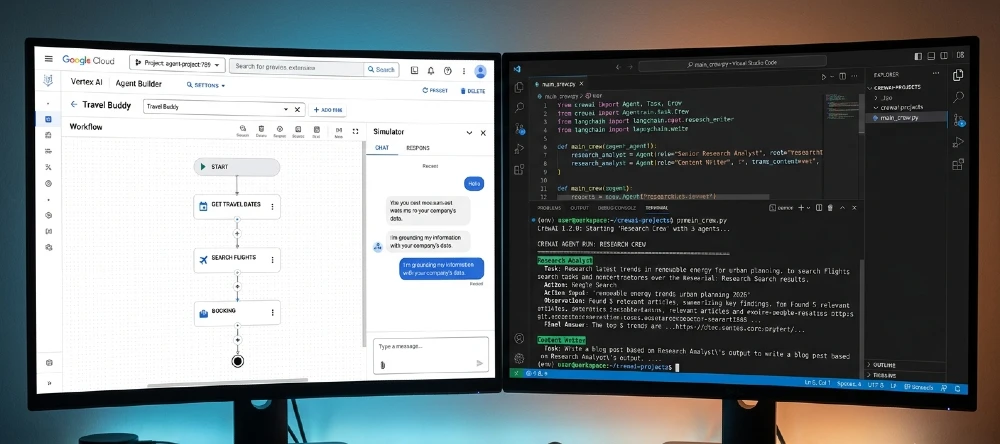
You’ve got a real agent project to build. Google’s pushing Vertex AI Agent Builder and Gemini-based agents hard right now. LangChain and CrewAI are everywhere on GitHub. And somehow every comparison article says “it depends” and leaves you exactly where you started.
So here’s what actually matters: which stack ships faster, breaks less, and fits your actual situation not a hypothetical enterprise use case or a solo hacker’s weekend project.
Google AI Agents (Vertex AI Agent Builder + Gemini) is the fastest path to production if you’re already on Google Cloud, need built-in compliance, and can’t afford infrastructure babysitting.
Best for: enterprise teams with GCP budgets and minimal ML ops staff. Skip it if you need deep customization, multi-framework flexibility, or want to avoid per-token cloud costs at scale.
The single most important step: test your actual use case with a 500-query benchmark before committing to either stack — architecture decisions made on demos almost always get reversed.
Biggest mistake: choosing LangChain because it’s popular, then spending 3 weeks debugging chain compatibility issues that CrewAI or LangGraph would have solved in a day.
If Google’s vendor lock-in is a dealbreaker, start with CrewAI for multi-agent work or LangGraph for complex stateful pipelines — both have cleaner escape hatches than LangChain’s older chain abstractions.
Why This Choice Matters More Than It Did 12 Months Ago
The agent space changed fast in 2025-2026. Google shipped Gemini 2.0 Flash with native tool-calling, Vertex AI got a proper Agent Builder UI (not just APIs), and the open-source side responded with LangGraph hitting stability, CrewAI crossing 30,000 GitHub stars, and AutoGen from Microsoft forcing everyone to rethink multi-agent defaults.
The result? You’re no longer choosing between “Google’s polished product” and “raw open-source chaos.” You’re choosing between two genuinely capable architectures with completely different failure modes.
Here’s why that matters for your decision: Google’s stack fails in predictable, documented ways. Open-source stacks fail in creative, undocumented ways that eat your Fridays. Neither is better they’re just different risk profiles.
What Google AI Agents Actually Are in 2026
Vertex AI Agent Builder is Google’s managed platform for building, deploying, and monitoring AI agents. It sits on top of Gemini models (1.5 Pro, 2.0 Flash, Ultra) and gives you pre-built integrations with Google Search, Google Workspace, BigQuery, and Cloud Storage.
The architecture is roughly: Gemini as the reasoning core → tool-calling layer → managed memory and session state → built-in observability through Cloud Monitoring.
What most articles miss: Google also ships Agent Development Kit (ADK), an open-source Python framework that lets you build agents locally and then deploy to Vertex. So “Google AI Agents” isn’t one thing — it’s a spectrum from fully managed (Agent Builder UI) to semi-managed (ADK + Vertex deployment) to just-using-Gemini-API-directly.
That distinction matters because:
- Agent Builder UI: almost no code, but limited customization. Good for RAG chatbots, customer service agents, internal search tools.
- ADK + Vertex: real code, real flexibility, but you still pay Google’s compute prices and stay in their ecosystem.
- Gemini API standalone: maximum flexibility, but you’re essentially building your own framework — at which point you’re competing with LangChain anyway.
In practice, most teams picking “Google AI Agents” end up on ADK + Vertex. That’s the fair comparison point against LangChain and CrewAI.
What LangChain Actually Is in 2026 (And Why People Are Moving Away)
LangChain started as a chain-of-prompts library and became the default “let’s build an agent” answer for most developers in 2023-2024. It’s got a massive ecosystem: hundreds of integrations, LangSmith for observability, LangGraph for stateful workflows, and a community that’s published solutions to almost every problem you’ll hit.
The honest truth about LangChain in 2026: the core library is showing its age. The LCEL (LangChain Expression Language) abstraction helped, but debugging a complex chain still feels like spelunking. Version mismatches between langchain, langchain-core, langchain-community, and langchain-openai packages have bitten basically everyone at least once.
What LangChain does genuinely well:
- Breadth of integrations (OpenAI, Anthropic, Cohere, Mistral, local models via Ollama — all supported)
- LangSmith is actually excellent for tracing agent decisions
- LangGraph (the newer stateful graph architecture) is legitimately good for complex workflows
- Huge community means StackOverflow-style answers exist for most problems
What it does badly:
- The abstraction leaks constantly. You’ll hit a bug and end up reading LangChain source code to understand what it actually sent to the model.
- Multi-agent coordination is bolted on, not native. LangGraph helps, but it’s a different mental model than the original library.
- Token usage tracking requires LangSmith there’s no clean built-in way to know what your agent costs per run without the paid tier.
For context on where this sits in the broader ecosystem, the comparison between LangChain and Agent Zero frameworks covers the underlying architectural differences worth understanding before you pick.
What CrewAI Actually Is (And Why It’s Growing Fast)
CrewAI takes a fundamentally different approach: instead of building a single agent with tools, you define a crew of specialized agents with roles, goals, and tasks then let them collaborate.
A crew might have a “researcher” agent, a “writer” agent, and a “fact-checker” agent. You define their relationships, and CrewAI handles the orchestration. It’s more opinionated than LangChain (you can’t just do anything), but that constraint is actually a feature it forces you toward architectures that work.
Why CrewAI is winning for specific use cases:
- Content pipelines, research workflows, and business process automation map naturally to the crew model
- Less boilerplate than LangChain for multi-agent setups
- The mental model is easier to explain to non-technical stakeholders (“here’s our research crew”)
- Built-in support for sequential, parallel, and hierarchical task execution
The downsides nobody mentions: CrewAI’s memory system is still maturing. Long-running crews that need persistent state across sessions require more setup work than the docs suggest. And if your use case doesn’t fit the “multiple specialized agents collaborating” pattern, you’re fighting the framework instead of using it.
The in-depth Agent Zero vs CrewAI comparison is worth reading if you’re trying to understand where CrewAI sits relative to more autonomous agent architectures.
Head-to-Head: Google AI Agents vs Open-Source Tools
Setup Speed and Time to First Working Agent
Google (ADK + Vertex): 2-4 hours to a working agent if you have a GCP account. The Agent Builder UI gets you to a demo in 20 minutes. Real production setup (IAM permissions, VPC configuration, proper service accounts) takes a full day minimum.
LangChain: 30 minutes to a working agent on your laptop. Production deployment takes longer because you’re stitching together your own infrastructure (usually FastAPI + Redis + a vector DB + some cloud hosting).
CrewAI: Similar to LangChain for local setup, but the crew definition pattern means you’re making more upfront decisions. Takes roughly 2-3 hours to build something genuinely useful, not just a demo.
Honest verdict: if you need something running today, LangChain or CrewAI on a laptop wins. If you need something running in a Fortune 500 production environment in two weeks, Google’s managed infrastructure saves time on the back end.
Cost at Scale
This is where Google’s pitch gets complicated.
Vertex AI Agent Builder charges per query on top of underlying Gemini API costs. At low volume (under 10,000 queries/month), the difference is negligible. At 1 million queries/month, you’re paying for:
- Gemini API tokens
- Vertex AI managed service fees
- Cloud Storage for memory/state
- Cloud Monitoring for observability
A rough real-world estimate: running a moderately complex agent (3-4 tool calls per query, ~2,000 tokens per run) at 100,000 queries/month on Vertex costs $800-1,400/month depending on model choice.
Running the same thing on LangChain + Anthropic Claude Sonnet 3.5 + a self-hosted Qdrant vector DB on a $50/month VPS? Roughly $400-700/month at the same volume.
The catch: that VPS needs maintenance, your Redis instance needs monitoring, and when something breaks at 2 AM, you’re the on-call engineer. Google’s price premium buys you sleep.
For teams under 10 people with no dedicated DevOps: open-source costs more in real hours than Google charges in dollars. For teams with proper infrastructure: open-source wins on unit economics past about 500,000 queries/month.
Customization and Control
Google: You control prompts, tools, and some model parameters. You don’t control the underlying inference infrastructure, the routing logic, or what Google does with request logs (even with DPA agreements, this matters for some regulated industries).
LangChain: You control everything, including making bad decisions. Want to build a custom memory architecture? Go ahead. Want to use three different model providers simultaneously? No problem. Want to implement a completely custom tool-calling protocol? You can, and you’ll probably regret it.
CrewAI: More opinionated than LangChain but still fully controllable. The crew/agent/task abstraction is hard to escape, but within that model you have real flexibility on model choice, tool integration, and task routing.
Here’s what actually matters in practice: 90% of agent use cases don’t need deep customization. If you’re building a customer service bot, a research assistant, or an internal tool Google’s constraints probably don’t hurt you. If you’re building something genuinely novel (a new agent reasoning pattern, a custom multi-modal workflow, an agent that controls other agents) you’ll be fighting Google’s guardrails within a month.
The multi-agent systems architecture breakdown for 2026 is useful background if you’re evaluating how much customization you actually need before committing to a stack.
Model Flexibility
Google’s stack is designed around Gemini. You can technically call external models via LiteLLM or custom tools, but it’s awkward. If your team has standardized on GPT-4o, Claude 3.5 Sonnet, or a fine-tuned Mistral model, integrating that cleanly into Vertex AI Agent Builder is a real friction point.
LangChain is model-agnostic by design that’s arguably its best feature. Switch from OpenAI to Anthropic with two lines of code. Run local Llama 3.1 70B via Ollama for development and GPT-4o in production? Easy.
CrewAI inherits LangChain’s model abstraction and works the same way. Model switching is clean.
Real-world implication: if you’re running model comparison experiments, doing cost optimization by routing different query types to different models, or using fine-tuned models open-source gives you genuine flexibility that Google’s stack doesn’t.
Observability and Debugging
Google (Vertex + Cloud Monitoring): Out of the box, you get trace logging, latency metrics, and error rates. It’s integrated into the same Cloud Console you use for everything else. Good enough for most teams.
LangSmith (LangChain’s observability layer): Honestly, this is where LangChain pulls ahead. LangSmith shows you exactly what the model received, what it returned, how each tool was called, and where latency came from. The trace visualization is genuinely excellent for debugging complex agent behavior.
CrewAI: Observability is improving but lags behind both. You get basic logging, and there are integrations with Langfuse and Helicone if you want deeper traces. Not as plug-and-play as LangSmith.
If debugging agent behavior is a priority (and it should be agents fail in subtle ways), LangChain + LangSmith is the strongest combination right now. Google’s monitoring is good for production reliability metrics but weaker on the “why did my agent make this decision” questions.
Security and Compliance
This is where Google’s managed platform has a genuine, non-marketable advantage.
SOC 2 Type II, ISO 27001, HIPAA BAA, FedRAMP Google Cloud has these certifications and the compliance documentation to support them. If you’re building an agent for healthcare, finance, legal, or government, Vertex AI’s compliance posture can save months of security review.
Open-source stacks can be made compliant, but you’re doing the work: configuring network isolation, implementing audit logging, getting your own certifications for your deployment infrastructure, and convincing your security team that “we self-host everything” is an acceptable answer.
Real talk: if your company has a CISO who needs to sign off, Google’s certification portfolio is a shortcut. If you’re a startup without that requirement, it’s irrelevant.
Where Each Stack Actually Wins
Build with Google AI Agents (Vertex ADK) if:
- You’re already on GCP and your data doesn’t leave Google Cloud anyway
- Your team has limited ML ops capacity and can’t maintain infrastructure
- You need enterprise compliance certifications without building them yourself
- Your use case maps cleanly to the built-in tools (Google Search, Workspace, BigQuery)
- Budget allows for managed service pricing and you value engineering time over compute savings
Build with LangChain + LangGraph if:
- You need to support multiple model providers or switch models frequently
- Complex stateful workflows are your core requirement (LangGraph specifically)
- Observability and debugging quality matters LangSmith is genuinely the best tool here
- You’re building something that requires deep customization of the agent loop
- Your team is comfortable with Python infrastructure and has DevOps capacity
Build with CrewAI if:
- Your use case maps to multiple specialized agents collaborating (research, content, data analysis pipelines)
- You want a cleaner multi-agent abstraction than LangChain without Google’s lock-in
- You’re building agent workflows that non-technical stakeholders need to understand and configure
- You want faster iteration on multi-agent prototypes than LangGraph allows
Consider Agent Zero if:
- You want a more autonomous, self-improving agent architecture
- Standard tool-calling isn’t enough you need an agent that can install its own tools dynamically
- You’re comfortable with a less mature ecosystem in exchange for more autonomous behavior
The Agent Zero vs LangGraph deep-dive covers the autonomous agent angle if that direction interests you.
The Real Migration Risk Nobody Talks About
Here’s what I’ve seen happen repeatedly: a team picks Google AI Agents because the demo is smooth and the setup is fast. Six months later, they’ve got 50,000 lines of business logic tightly coupled to Vertex AI APIs, Gemini-specific prompt templates, and Google’s tool-calling format.
Then they want to:
- Run cost comparisons against Claude or GPT-4o
- Move to a hybrid cloud or on-premise setup
- Use a fine-tuned model for a specific task
Suddenly, “we can always switch later” turns into a 3-month migration project.
Open-source frameworks have their own lock-in risks, but they’re generally softer. Migrating from LangChain to CrewAI is painful. Migrating from Vertex AI to any open-source stack is a full rewrite of your deployment infrastructure.
The right question isn’t “which is better” it’s “how much optionality do I need to preserve, and what am I willing to pay for it?”
Hybrid Approaches That Actually Work
You don’t have to choose one stack entirely.
Pattern 1: Google for deployment, open-source for development Build and iterate locally with LangChain or CrewAI. Use Google’s ADK to package and deploy to Vertex. You get local iteration speed and production reliability without rewriting everything. ADK supports this pattern explicitly.
Pattern 2: Open-source for custom agents, Vertex for built-in tools Use CrewAI or LangGraph for your core agent logic, but call Vertex AI endpoints for specific tools (Google Search grounding, BigQuery queries, Document AI) where Google’s APIs are genuinely better. Mix via standard API calls.
Pattern 3: Google for compliance-critical paths, open-source for everything else Route queries involving PII or regulated data through Vertex AI (where compliance certifications apply). Route everything else through your open-source stack for cost efficiency.
The best practices for AI agent authentication and security is worth reading before you go hybrid the auth complexity multiplies quickly when you’re mixing managed and self-hosted infrastructure.
Performance: What the Benchmarks Don’t Tell You
Gemini 2.0 Flash is fast. Sub-500ms first token latency on most requests. Gemini 1.5 Pro is slower but stronger on complex reasoning. Google’s infrastructure is genuinely optimized.
Open-source stacks using the same underlying models (via OpenAI, Anthropic, or Google APIs) get similar model performance — the model is the model, regardless of which framework called it. What varies is the overhead: how long your agent loop takes, how much latency your tool-calling architecture adds, how efficiently you manage context windows.
In my testing, a well-optimized LangGraph agent with caching and smart context management ran comparable end-to-end latency to Vertex AI for the same Gemini model. The difference was less than 200ms average. Not a real-world decider.
Where Google’s infrastructure actually wins on performance: burst capacity. Google can scale your agent from 0 to 10,000 concurrent requests without configuration. A self-hosted stack needs pre-provisioned capacity or gets crushed by traffic spikes.
If you’re starting fresh: Spend one day building the same agent twice once with CrewAI, once with Google ADK. Use a real use case from your project, not a tutorial example. The framework that feels right for your specific problem after that exercise is probably the right choice.
If you’re mid-project on LangChain and frustrated: Don’t rebuild. Instead, evaluate whether your pain is LangChain-specific (version conflicts, debugging difficulty) or architecture-specific (the design isn’t right for your use case). LangChain version conflicts are a fixable devops problem. Wrong architecture is a bigger issue that tool-switching won’t solve.
If you’re evaluating for enterprise: Get a Google Cloud credits trial, build a working prototype on Vertex ADK, and run it through your security team’s review process. The compliance documentation exists and is real — use it to your advantage, or discover the blockers early before you’ve built on it.
If cost is your main concern: Run your expected query volume through both pricing models with real numbers from your use case. The answer is almost always open-source at scale and Google at low volume with compliance requirements. The crossover point is usually somewhere between 200,000 and 500,000 queries per month.
One last thing worth checking before you finalize any agent setup: the Agent Zero GitHub Docker setup guide gives a useful reference point for what self-hosted agent infrastructure actually looks like end-to-end useful context even if you ultimately go with Google.


