
⚡ Quick Verdict: ChatGPT Free Limits 2026
Hitting “10 Messages/5hrs” Every Day? Exact Reset Math
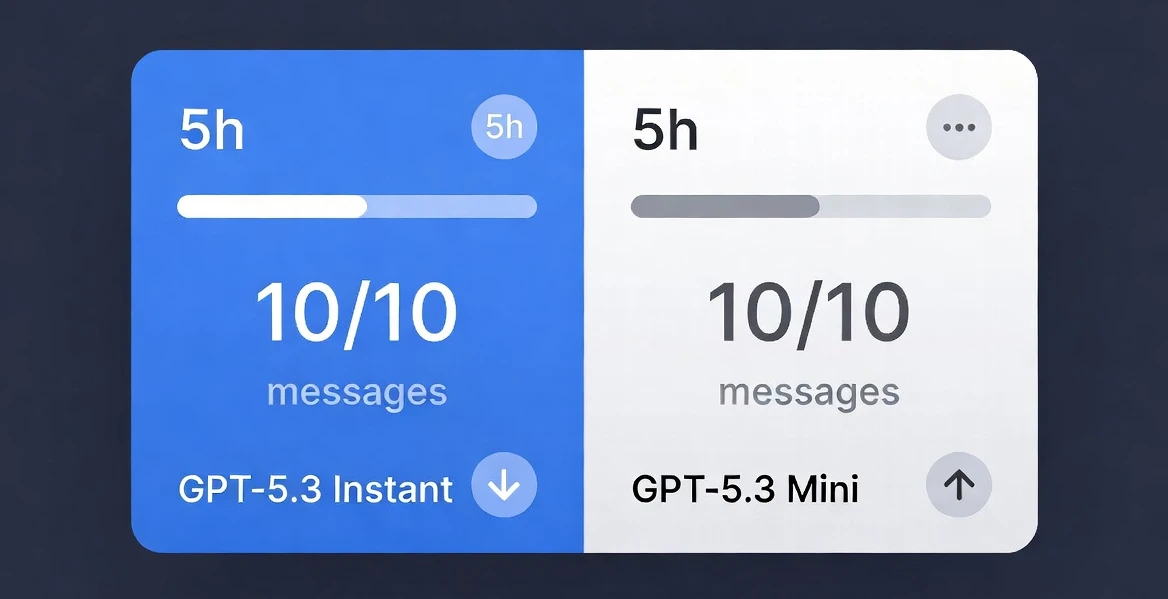
The most common mistake is treating ChatGPT free limits like a daily reset. They’re not. It’s a rolling 5-hour window from the moment you send your first GPT-5.3 message — not from midnight, not from when you first logged in.
So if you send message #1 at 9:00 AM, your window resets at exactly 2:00 PM. If you burn all 10 messages by 10:30 AM, you still wait until 2:00 PM — not until tomorrow. This one misunderstanding wastes hours for most free users.
Reset Calculator: Your Next GPT-5.3 Slot
Here’s the 5-hour rolling math across common PKT start times:
| First Message Sent (PKT) | Window Resets At | Best If You Start At |
|---|---|---|
| 6:00 AM | 11:00 AM | ✔ Good start |
| 9:00 AM | 2:00 PM | ✔ Standard workday |
| 12:00 PM (noon) | 5:00 PM | ⚠ Evening gap |
| 3:00 PM | 8:00 PM | ✔ Two windows/day |
| 8:00 PM | 1:00 AM | ⚠ Late reset |
| 3:00 AM (off-peak) | 8:00 AM | 🏆 Best: empty servers + full reset by morning |
If you’re strategic, you can fit two full 10-message windows into a single day — 20 GPT-5.3 messages total — by starting your first at 3 AM PKT and your second at 8–9 AM. That covers most real workloads without paying a rupee.
GPT-5.3 Mini vs Full: The Real Quality Gap
When your 10 GPT-5.3 messages run out, ChatGPT automatically falls back to GPT-5.3 mini. OpenAI doesn’t make this obvious, but the difference matters depending on what you’re doing:
| Task Type | GPT-5.3 Full | GPT-5.3 Mini | Worth Saving Messages? |
|---|---|---|---|
| Simple Q&A / summaries | Excellent | Excellent | No — use mini |
| Email drafting | Excellent | Very Good | No — mini works |
| Complex coding / debugging | Excellent | Decent | Yes — save full |
| Multi-step reasoning | Excellent | Noticeably weaker | Yes |
| Creative writing | Excellent | Good enough | Depends on quality bar |
| Data analysis / research | Excellent | Misses nuance | Yes — save full |
| Translation | Excellent | Very Good | No — mini is fine |
The actual strategy: Do all your light tasks — rewrites, translations, simple questions — on mini. Save your 10 GPT-5.3 messages for debugging, research, or any task where the first attempt failing would cost you time.
“Try Later” Peak Times Killing You? 7 Timing Hacks
Beyond the per-message cap, ChatGPT free throttles even faster during high-demand windows. You’ll hit “Try again later” instantly — not because you’re out of messages, but because OpenAI is rate-limiting free users during peak hours.
Global Peak Table: When Free Tier Gets Squeezed
| Time Zone | Peak Hours (Worst) | Best Window |
|---|---|---|
| 🇵🇰 PKT (UTC+5) | 11 AM – 3 AM (next day) | 3 AM – 9 AM PKT |
| 🇺🇸 US Eastern | 9 AM – 11 PM ET | 2 AM – 7 AM ET |
| 🇬🇧 UK (BST) | 8 AM – 10 PM BST | 1 AM – 6 AM BST |
| 🇩🇪 Central Europe | 9 AM – 11 PM CET | 2 AM – 6 AM CET |
| 🏆 Universal Safe Zone | 3 AM – 7 AM PKT = servers near-empty globally | |
Peak hours are driven by US and European daytime. Since ChatGPT’s biggest free user bases are North America and Europe, 3–7 AM PKT is your golden window — it’s the middle of the night in both regions. Response speed also improves noticeably.
7 Timing & Usage Hacks That Actually Work
The 3 AM Golden Window
Schedule heavy AI tasks for 3–7 AM PKT. “Try later” errors essentially disappear, and GPT-5.3 response speed doubles vs. peak hours.
Model Rotation Cycle
Rotate: GPT-5.3 (10 msgs) → mini (unlimited) → wait 5 hrs → repeat. Combine with Grok/Gemini on alternating tasks to never go dry.
Prompt Compression
Trim every prompt to its essential instruction. “Write a professional email declining a meeting” → “Decline meeting email, professional, 3 sentences.” Saves ~40% of tokens per message.
Batch Your Questions
Instead of 5 follow-up messages, write one mega-prompt with all 5 questions numbered. One message = five answers. Massively extends your 10-message window.
Mobile App vs. Web
The mobile app sometimes loads faster during peak and occasionally handles “Try later” differently than the web client. Worth switching if the browser is freezing up.
Free Alternatives Stack
Grok (xAI) has generous free limits, Gemini 2.0 Flash is effectively unlimited for most tasks, and Claude.ai offers solid free access. Rotate these on mini-worthy tasks.
Auto-Downgrade Prompt
When near your limit, add “If you’re running on a smaller model, tell me and I’ll simplify the task.” This flags quality drops before they waste a message.
📖 Related Reading
- Grok AI Free Limits, Plans & Alternatives 2026 — if ChatGPT throttles you, here’s what Grok actually offers
- Best AI for Coding 2026 — which model handles coding tasks best when you’ve used up your GPT-5.3 budget
80 Uploads/3hrs Gone? Data Analysis Blocked?
Free The upload cap — 80 files per 3 hours — hits data analysts and researchers the hardest. The reset here is a true 3-hour rolling window, similar to the message cap logic.
Upload Math: What 80/3hrs Actually Means Per Day
Realistic max given message caps and sleep: ~160–200 uploads/day for a power user.
For most users: 80 uploads covers a full day of normal document work in one sitting.
The real problem isn’t volume — it’s when you’re doing batch analysis (uploading 80+ CSVs, PDFs, or screenshots in one session). Hit the cap and you’re stuck waiting 3 hours or pivoting to a workaround.
Free OCR & Batch Upload Workarounds
Zip batches before uploading — ChatGPT can extract and read text from .zip files containing multiple documents. One upload = many files. This isn’t officially documented but works reliably.
Google Lens for screenshots — Instead of uploading an image, run it through Google Lens first, copy the text, and paste it directly into your prompt. Zero upload consumed.
Google Drive links — Share a Google Doc or Sheet link in your prompt. ChatGPT can’t browse links, but you can paste the exported text. Combine with Google Docs’ “Copy all” function.
Pre-process PDFs with Adobe Acrobat free tier — Convert PDF to text file (.txt) before uploading. Text files tend to be smaller and parse faster, meaning you get more analytical depth per upload.
Consolidate documents — Merge related PDFs into one file before uploading. One consolidated doc uses one upload slot and keeps context intact.
3,000 Thinking Tokens/Week Exhausted? Here’s the Real Calculation
New in 2026 ChatGPT free now includes access to Thinking mode — extended reasoning — but caps it at 3,000 tokens per week. This resets weekly, not daily, which changes the strategy entirely.
Thinking ROI: When Is It Actually Worth Using?
| Task | Use Thinking? | Why |
|---|---|---|
| Complex math / logic proofs | Yes | 2–3x more accurate reasoning chain |
| Hard coding problems (bugs, architecture) | Yes | Catches edge cases standard mode misses |
| Strategic planning / decision trees | Yes | Maps tradeoffs better |
| Essay writing | No | Standard GPT-5.3 handles this well |
| Summarizing documents | No | Wastes tokens, no quality gain |
| Simple Q&A | No | Overkill — mini is sufficient |
| Weekly allocation strategy | Save all 3,000 for 1–2 hard problems/week, not scattered casual use | |
16K Context Too Small for Long Docs? The Chunking Fix
Free 16K tokens sounds like a lot — it’s roughly 12,000 words. But real research documents, codebases, or legal contracts blow past that fast. ChatGPT Plus gives you 32K, Pro gives 128K. On free, you chunk.
The 4-Part Chunking Template That Actually Works
| Step | Action | Prompt to Use |
|---|---|---|
| 1 | Split your document into 3,000–4,000 word sections | Use any word processor’s word count |
| 2 | Feed Chunk 1 | “This is chunk 1 of 4 of a document about [topic]. Summarize the key points in bullet form. Do not draw conclusions yet.” |
| 3 | Feed Chunks 2–4 sequentially | “Here is chunk [X] of 4. Add to your running summary. Still no conclusions.” |
| 4 | Final synthesis | “You now have all 4 chunks. Draw conclusions, highlight conflicts, and answer: [your actual question].” |
This approach uses 5 messages total (4 chunks + 1 synthesis). Given your 10-message budget, that’s half your daily GPT-5.3 allowance for one document. Plan accordingly — batch the chunking during your first window, then use the second window for follow-up analysis.
Image Generation on Free Tier: What DALL-E Actually Allows
Image generation limits on the free tier are not officially documented in specific numbers by OpenAI — they throttle based on demand rather than a hard published cap. What’s confirmed: free users get noticeably fewer image generations than Plus, and during peak hours, image gen is the first feature to get rate-limited.
All 13 Ethical Free Hacks (No Account Violations)
These are all within OpenAI’s Terms of Service. Nothing here requires bypassing security, using VPNs to fake locations, or breaking cookies. Just smart usage patterns.
Multiple Email Accounts
OpenAI allows multiple accounts with different emails. Three Gmail aliases = 30 GPT-5.3 messages per 5-hour window. Perfectly within ToS — each account is its own independent user.
Model Roulette Every 5 Hours
Cycle: GPT-5.3 for complex tasks → mini for simple → Grok for research → Gemini Flash for long docs. Never idle; always using the best available free tier.
Prompt Compression
Cut every prompt to its core instruction. Unnecessary context in prompts doesn’t improve outputs — it just wastes tokens. Test: if removing a sentence changes nothing, remove it.
Fresh Session (Browser)
Clearing cookies and starting a fresh browser session can sometimes reset “Try later” errors that aren’t actually tied to your message cap — just session-level throttling.
Mobile App Switch
The iOS/Android ChatGPT app sometimes routes to less-congested servers than the web version during peak hours. If the web client is throttling, try the app immediately.
Share Chat for Continuity
Use ChatGPT’s “Share” feature to save a conversation URL. When switching accounts, paste the summary from the shared chat as context. Maintains thread continuity across account rotations.
Free Alternatives Stack
Grok 3 (xAI) — strong reasoning. Gemini 2.0 Flash — near-unlimited for most tasks. Claude.ai — excellent for writing and analysis. Use ChatGPT for what it does uniquely best.
OpenAI API Free Credits
New OpenAI accounts get $5 API credits. For developers: $5 at GPT-4o-mini rates goes a long way. Access via api.openai.com — different from ChatGPT limits entirely.
Manual Context Carry
When hitting context limits, ask ChatGPT: “Summarize our entire conversation in 200 words, preserving all key decisions.” Copy that summary, start a new chat, paste it as the first message. Zero context lost.
Peak Avoidance Schedule
3–7 AM PKT = golden window. Batch your hardest AI tasks here. Not just faster responses — actual higher quality because the model isn’t serving 10M concurrent requests.
Voice Mode on Web
ChatGPT’s voice mode on free tier uses the same message cap but can feel faster for back-and-forth. Use it for brainstorming sessions where you’d burn 3–4 text messages in a natural voice conversation.
Mega-Prompt Batching
Combine related requests into one structured prompt: “Do these 5 things: 1) Summarize this 2) Rewrite for LinkedIn 3) Generate 3 subject lines 4) List key stats 5) Draft a tweet.” Five outputs, one message.
Thinking Token Conservation
Turn off Thinking mode by default. Only toggle it on for genuinely hard reasoning tasks. Most users burn their 3,000 weekly tokens in 2 days on tasks that didn’t need extended reasoning.
Complete ChatGPT Limits Table 2026: Free vs Plus vs Pro
| Feature | Free $0 | Plus $20/mo | Pro $200/mo |
|---|---|---|---|
| GPT-5.3 Messages | 10 / 5 hrs | 160 / 3 hrs | Unlimited |
| Fallback Model | GPT-5.3 mini | GPT-5.3 mini | None |
| Context Window | 16K | 32K | 128K |
| File Uploads | 80 / 3 hrs | 500 / 3 hrs | Unlimited |
| Thinking Tokens | 3,000 / week | 10,000 / week | Unlimited |
| Image Generation | Limited (throttled) | Higher limit | Priority access |
| GPT Store / Custom GPTs | Counts vs message cap | Separate allocation | Priority |
| Voice Mode | Limited hours | Extended | Unlimited |
| Peak Hour Throttling | Heavy | Moderate | Minimal |
| Best For | Casual / occasional use | Daily professional use | Power users / teams |
Is ChatGPT Plus Worth $20/Month? The Honest Break-Even Calc
Most comparisons skip the math. Here’s the real calculation based on actual usage patterns:
- Up to 20 GPT-5.3 messages/day (two windows)
- Plus 2–3 alt tools for overflow
- 3,000 Thinking tokens/week
- 16K context with chunking
- Time cost: 15–20 min/day managing limits
- 160 GPT-5.3 messages per 3 hours
- 32K context — no chunking needed
- 10K Thinking tokens/week
- No alt-tool juggling
- Time saved: ~1–1.5 hrs/week
Go Plus if: You’re a developer, content creator, or analyst using ChatGPT as your primary tool for 3+ hours daily. At that point, the $20 is cheap compared to the productivity cost of hitting caps mid-task.
The honest truth: for most Pakistani users and students using ChatGPT casually or for a specific project, the free tier with smart hacks covers 80% of real-world needs. Plus becomes a no-brainer only once you’re losing more than an hour per week to limit management.
ChatGPT Free Tier Future in 2026: Will It Get Worse?
OpenAI has stated the free tier is a permanent part of their product. However, the trajectory since 2023 shows a pattern: free limits tighten as models improve. GPT-4 wasn’t available on free at launch; GPT-5.3 on free is impressive — and it came with tighter message caps than GPT-4o free had.
- Thinking token allocation could decrease as the feature matures
- Upload limits may tighten as storage costs rise
- Peak-hour throttling is likely to get stricter, not looser
- Custom GPT access on free may eventually require Plus
The safe bet: Use the free tier aggressively now. Build your workflow around the current limits rather than waiting for them to improve — they probably won’t.
ChatGPT Free Limits 2026: Frequently Asked Questions
It resets exactly 5 hours after your first GPT-5.3 message in the current window — not at midnight, not from your login time. If you sent message #1 at 2:00 PM, your window opens again at 7:00 PM. This is a rolling window, not a daily reset.
ChatGPT automatically falls back to GPT-5.3 mini. You can continue chatting — just with the smaller, faster model. For most everyday tasks (writing, simple Q&A, translations), mini is good enough. For complex reasoning, coding, or research, you’ll notice a quality drop.
For simple tasks — yes, absolutely. GPT-5.3 mini handles email drafting, summaries, translations, and basic coding questions very well. It’s slower to reason through complex multi-step problems and sometimes misses nuances in research or debugging tasks. Think of it as 80% of full GPT-5.3 quality for 80% of real tasks.
Free users can upload 80 files per 3-hour rolling window. This covers images, PDFs, documents, and data files. The 3-hour timer resets from your first upload in the window. For heavy document work, zipping multiple files into one archive before uploading conserves your upload slots significantly.
Free users get 3,000 Thinking tokens per week. This resets on a fixed weekly calendar — if you use them all on Monday, you wait until the following Monday. Thinking mode is worth using for complex math, hard debugging, or multi-step logic problems. Don’t burn tokens on tasks that standard GPT-5.3 handles perfectly well.
Three reliable approaches: (1) Use ChatGPT during off-peak hours — 3–7 AM PKT works best globally. (2) Switch to the mobile app if the web client is throttling. (3) Try a fresh browser session — some “Try later” errors are session-level, not account-level, and clear immediately.
Only if you’re using ChatGPT heavily — 50+ GPT-5.3-quality messages per day, or if you regularly work with documents longer than 12,000 words. For casual users, students, or anyone willing to spend 10–15 minutes per day on workarounds, the free tier with strategic hacks covers the same ground for $0.
Grok 3 (xAI) for reasoning and real-time web access. Gemini 2.0 Flash for near-unlimited everyday tasks and long documents. Claude.ai for writing, analysis, and nuanced reasoning. Rotate between all three and you effectively have an unlimited free AI stack. See our Grok free limits guide for exact details on what Grok offers.
📚 Sources & References
- OpenAI Help: ChatGPT Free Tier FAQ — official free tier limitations
- OpenAI Help: GPT-5.3 and GPT-5.4 in ChatGPT — model-specific limits and Thinking mode
- The AI Journal: Grok AI Free Limits 2026 — alternative AI tool comparison
- The AI Journal: Best AI for Coding 2026 — model quality comparison for technical tasks


