
Most people still think AI agents are just fancy chatbots. They’re not. The shift to AI autonomous agent computer interfaces is the part nobody’s explaining properly and that gap is costing people real hours every week.
What an AI Autonomous Agent Computer Interface Actually Is
Skip the textbook version. Here’s the practical one.
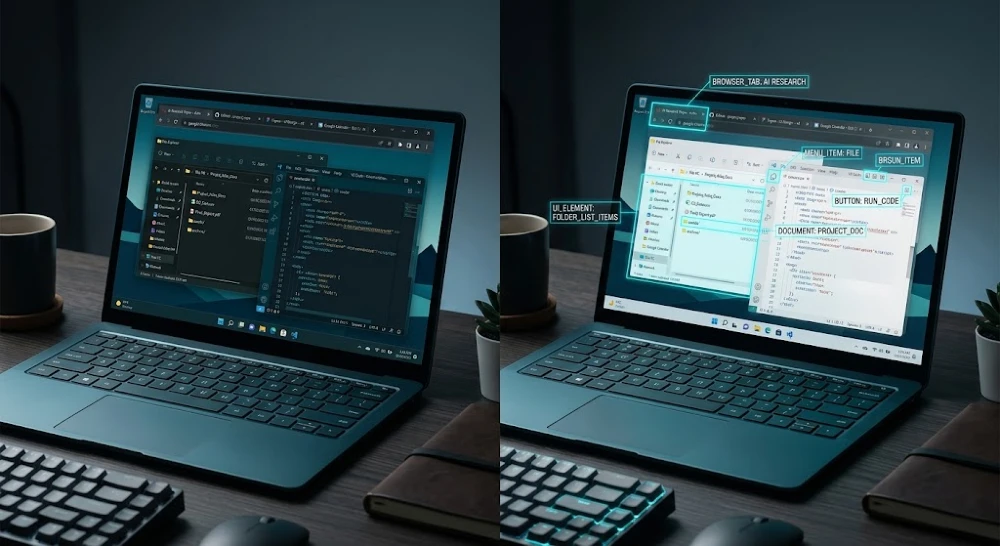
An AI autonomous agent computer interface is a setup where an AI doesn’t just respond to your questions it takes over a computer screen the same way you would. It moves the cursor. It clicks buttons. It opens applications, reads what’s on screen, and decides what to do next based on that visual input. No special API connections. No custom code. Just the AI looking at a screen and acting like a person using it.
Think of it this way: you give the agent a task. “Book me a flight to Dubai for next Thursday, economy, under $600.” The agent opens a browser, navigates to flight comparison sites, reads the prices visually, clicks through, fills in passenger details, and either completes the booking or comes back to tell you it couldn’t stay under budget. You weren’t involved in any of those steps.
That’s what makes this different from regular AI tools. It’s not generating text or answering questions. It’s operating software. That distinction matters because the failure modes, the use cases, and the setup requirements are completely different from what most people expect.
The underlying tech driving this is a combination of vision models (the AI “sees” the screen like a screenshot), action prediction models (deciding what to click or type next), and a feedback loop where the agent checks whether its last action worked before moving on. Companies like Anthropic with Claude, OpenAI with Operator, and Google with Project Mariner are all building versions of this. The open-source world has Agent Zero and similar frameworks for people who want to run this locally.
Why This Architecture Works Differently Than API-Based Agents
Real talk: I spent a few weeks testing both API-based agents and computer-use agents side by side. The difference is stark.
API-based agents need every tool they use to have a pre-built connection. Want the agent to create a Google Doc? There’s a Google API for that. Want it to update Salesforce? There’s an endpoint. But what about that old internal HR portal from 2014 that nobody ever built an API for? The API agent hits a wall.
Computer-use agents don’t care. They see the login page, they type the credentials, they navigate the interface the same way a junior employee would on their first day. That’s the actual value proposition not speed, not intelligence, but the ability to work with literally any software that has a visual interface.
The tradeoff? It’s slower. An API call takes milliseconds. A computer-use agent clicking through five screens to do the same thing might take 30-90 seconds. For high-volume, time-sensitive tasks, that’s a dealbreaker. For tasks you run once a week or that involve legacy systems, it’s a lifesaver.
This is why understanding your use case before picking an agent architecture actually matters. I’ve seen teams spin up elaborate computer-use setups for tasks that a simple Zapier workflow or a basic API call would’ve handled in a tenth of the time. The overhead wasn’t worth it.
How the Vision Layer Works (And Where It Fails)
The agent sees your screen the same way you’d see a photo someone texted you. It’s looking at pixels. It’s identifying elements — buttons, text fields, dropdowns, links using a vision model trained to recognize UI components across thousands of different software interfaces.
Here’s what surprises most people: it’s remarkably good at standard interfaces. Gmail, Google Docs, Notion, most SaaS dashboards — the agent navigates these pretty cleanly because the UI patterns are common enough that the model has seen them during training.
Where it falls apart:
Custom enterprise UIs. If your company built a proprietary portal with non-standard navigation or unusual button placements, expect the agent to struggle. It’s not trained on your internal software.
Dynamic content that changes position. If a button moves depending on screen size or user state, the agent can get confused mid-task. It’s looking for something it expected to be somewhere, and when it’s not there, some agents just… retry the same click forever.
Overlapping modals and popups. These are a nightmare. The agent sometimes doesn’t register that a popup appeared, clicks behind it, gets confused about why nothing happened, and either loops or fails.
CAPTCHAs and two-factor authentication. This is where most automated flows break down in real-world use. The honest answer is that no current AI autonomous agent computer interface handles these gracefully. You’ll need a human checkpoint or a workaround.
I learned this the hard way testing an agent on an e-commerce workflow that involved a checkout page with a third-party payment modal. The modal loaded dynamically after a click, and the agent kept trying to interact with the underlying page instead. Took me an hour to figure out why it kept failing the same step.
The Three Setups People Are Actually Using Right Now
There’s no single way to run an AI autonomous agent computer interface. What you use depends on what you’re trying to automate, your technical comfort level, and whether you need the agent to run continuously or just handle specific tasks.
Cloud-hosted computer use — This is the easiest path. Tools like Anthropic’s Claude (via their API with computer use enabled), OpenAI’s Operator, and similar services spin up a virtual machine in the cloud. The agent uses that VM’s screen. You send it a task, it does the work, you get the result. You never set anything up locally. The catch is cost — cloud VM time adds up fast if you’re running agents for hours at a time and you’re also sharing that VM environment with whatever security posture the provider gives you. Not ideal if the tasks involve sensitive credentials.
Local setup with open-source frameworks Agent Zero running via Docker is the setup I’d recommend for technically comfortable people who want full control. Your agent runs on your machine, sees your actual screen or a local virtual display, and you keep all credentials local. Setup time is real expect a few hours the first time — but once it’s running, the cost per task drops dramatically. Worth it if you’re running agents regularly.
Hybrid browser-only agents Some people don’t need full computer access. They just need the agent to operate a browser. Tools like Claude in Chrome (currently in beta) or browser-use frameworks let the agent control just the browser window without touching the rest of your system. Lower risk, easier to set up, but obviously limited to web-based tasks.
The framework comparison between Agent Zero and LangGraph is worth reading if you’re deciding between a local agentic setup and something more orchestration-focused.
What Tasks Are Worth Automating This Way
Not everything should be handed to an AI autonomous agent computer interface. I’ve tried to automate things that sounded like obvious wins and ended up with more cleanup work than if I’d just done the task manually.
Here’s the honest breakdown.
High-value targets:
- Repetitive data entry across systems that don’t have API connections
- Monitoring dashboards and capturing screenshots or numbers on a schedule
- Form submissions across multiple websites (insurance portals, government sites, supplier ordering systems)
- Cross-referencing information across multiple web sources and compiling it somewhere
- Navigating legacy enterprise software to pull reports
Tasks where it sounds good but usually isn’t:
- Anything requiring real-time judgment calls mid-task (the agent can’t ask you a question and wait while you’re in a meeting)
- Creative work that needs iteration and feedback loops
- Anything where a mistake causes irreversible damage (deleting files, sending emails, making purchases — some teams use “human-in-the-loop” checkpoints specifically for these)
- High-speed tasks where the agent’s 30-60 second navigation time creates a bottleneck
The part that trips people up: they design an automation for the happy path only. The flow works perfectly when every screen loads fast, every button is where expected, and no errors appear. Then in production, one edge case breaks the whole chain and nobody notices for two days.
Build in failure handling from the start. What should the agent do if it hits a CAPTCHA? If the page 404s? If the login fails? These aren’t edge cases in production. They’re regular occurrences.
Security and Access: The Part Most People Underestimate
Giving an AI agent access to your computer interface means giving it access to everything visible on that interface. That’s a broad statement, but think through what it means in practice.
If your agent is logged into your work email to automate email triage, it can read every email it sees. If it’s navigating a financial dashboard to pull numbers, it has visual access to every number on that dashboard. If it’s filling out forms using stored credentials, those credentials exist in the agent’s context during that session.
This is why the AI safety conversation isn’t abstract for people running computer-use agents — it’s directly relevant to what you’re deploying right now.
Practical steps that actually matter:
Principle of least privilege. Create dedicated accounts for your agents with only the permissions they need. Don’t run agents as your main admin account. If the agent is only supposed to pull reports, give it read-only access.
Session isolation. Use a separate browser profile or VM for agent tasks. Don’t let the agent share a session where you’re also logged into personal accounts.
Audit logging. Most cloud providers let you log every action the agent takes. Turn this on. When something goes wrong (and it will), you need a record of what the agent actually did, not what you think it did.
Avoid passing credentials in plaintext. Some setups have you include passwords directly in the task prompt. That’s a bad habit. Use environment variables or a secrets manager.
Benchmarks vs. Real-World Performance: The Gap Nobody Talks About
You’ve probably seen benchmark numbers for computer-use agents. Models scoring 70%, 80% on WebArena, OSWorld, or similar evals. Those numbers are real, but they don’t tell you what you actually want to know.
Agentic benchmarks across Claude, GPT, and Grok show some interesting patterns — but even the best-performing models in controlled eval conditions drop significantly in real-world, production environments. The reason is simple: eval tasks are designed to be solvable. Real tasks aren’t.
Real tasks have:
- Websites that load slowly or partially
- UI updates the model wasn’t trained on
- Tasks that require multi-day state management
- Ambiguous instructions that a human would ask a clarifying question about
What actually predicts whether an agent will work for your specific use case? Run it on your specific use case. Give it ten representative tasks. Watch where it fails. That 20 minutes of testing tells you more than any published benchmark.
After testing across about a dozen different workflow types, the ones that consistently worked had one thing in common: clearly defined success criteria. “Find the three cheapest flights” is better than “find good flights.” “Copy all rows where column B says ‘pending’ into a new sheet” is better than “organize the spreadsheet.” Precision in your task description directly correlates with agent success rate.
Where This Is Going in the Next 12 Months
The systems that exist today are impressive but fragile. They work most of the time in controlled conditions, fail in interesting ways when conditions change, and require significant human oversight to catch those failures.
What’s changing fast:
Longer action horizons. Current agents handle tasks best when they’re completable in under 10-15 steps. Research systems at companies like DeepMind, Anthropic, and Microsoft are extending this — agents that can handle 50-100 step tasks across multiple sessions without losing context.
Better error recovery. The next generation of computer-use agents won’t just notice they failed — they’ll have built-in strategies for what to try next. Right now, most agents retry the same failed action. Future systems will adapt.
Multimodal input beyond just screen. Agents that can also hear audio from the computer, read files, and use keyboard shortcuts more naturally rather than relying entirely on mouse clicks.
Persistent memory. Right now, most agents start fresh every session. Systems with persistent memory will be able to learn your specific environment — your company’s internal tools, your preferred workflows — over time.
The trajectory is clear. Google losing ground to AI-first interfaces isn’t separate from this story — it’s the same story. The way humans interact with software is being rebuilt, and AI autonomous agent computer interfaces are the mechanism doing the rebuilding.
How to Start Without Wasting Three Weeks
Here’s the minimum viable path to getting something useful running:
Start with a single, contained task. Not “automate my entire workflow.” Pick one thing: pulling weekly numbers from a dashboard, filling out a recurring form, monitoring a specific page for changes.
Use a hosted solution for your first run. Don’t set up local infrastructure until you’ve validated that computer-use agents can actually handle your specific task. Claude’s API with computer use enabled or OpenAI’s Operator are the fastest paths to a working prototype. If you’re hitting daily limits on Claude, there are practical ways around that.
Record what the agent does on the first 10 runs. Watch the recordings. You’ll see exactly where and why it fails — usually it’s one specific step that accounts for 80% of failures.
Then fix that step first before building more automation around it. Most people expand their automation before fixing its weak point. Don’t.
Also — don’t ignore the recording tools. If you’re using Otter AI or similar for capturing agent sessions and you want tighter control over what gets recorded, there are settings worth reviewing before you start logging sensitive workflows.
The teams getting real value out of AI autonomous agent computer interfaces right now aren’t the ones with the most sophisticated setups. They’re the ones who picked one real pain point, got an agent working on that, watched it carefully for two weeks, and then expanded from there. Slow, boring, and it actually works.
Pick the task. Start the prototype. Watch it fail. Fix the specific failure. That’s the whole playbook — and it’s more than most people ever actually do.


