
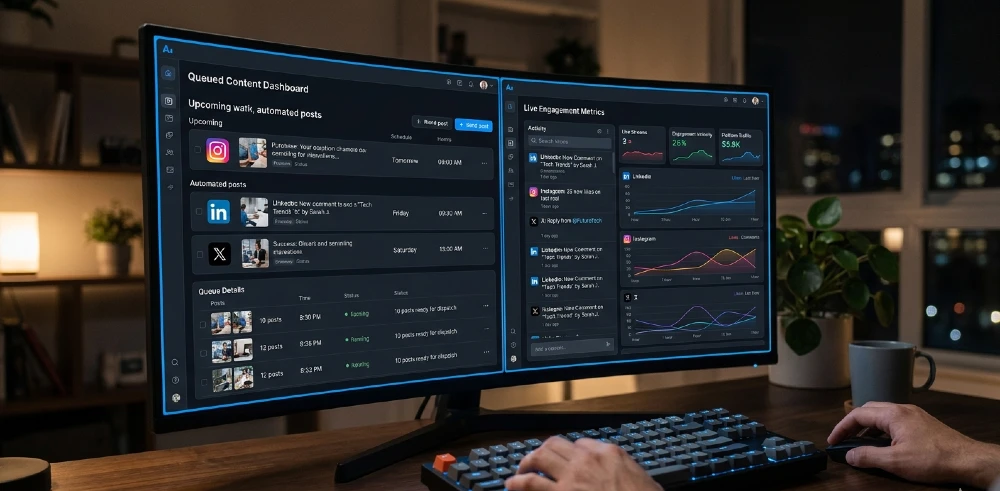
Most “AI social media tools” are just schedulers with a caption generator bolted on. That’s not an agent. A real social media manager AI agent decides what to post, when to post it, monitors responses, flags anything needing human attention, and reports back — without you touching it daily.
Here’s exactly how to build one that does all of that.
- The most reliable stack right now combines n8n or Make as the orchestration layer with Claude Sonnet or GPT-4o for content generation, and native platform APIs or Buffer/Ayrshare for publishing — this gives you full control without paying $500/month for an all-in-one SaaS tool that locks your data.
- Best for: solo founders, small marketing teams, and agencies managing 3+ brand accounts. Skip it if you post less than 3 times a week manual is faster at that volume.
- The single most important step is building a brand voice document your agent reads every time it generates content without it, you’ll get generic output that sounds like every other account.
- Biggest mistake: automating replies before you’ve tested the agent on 50+ real comment scenarios. One bad auto-reply to a complaint goes viral for the wrong reason.
- If you want a no-code starting point before building a full agent, Zapier’s AI agents with social integrations are a legitimate bridge but you’ll hit limits fast on anything custom.
What Makes Something an Actual AI Agent (Not Just Automation)
Standard automation runs a fixed sequence: trigger → action → done. An agent is different. It perceives inputs, makes decisions based on context, takes actions, and adjusts based on what happens next.
For social media, that distinction matters a lot. A Zapier workflow that posts your RSS feed to LinkedIn isn’t an agent. An agent would look at your last 30 posts, identify which content type drove the most engagement this week, generate three variations in your voice, pick the best posting time based on your audience’s activity window, schedule it, then after 24 hours check performance and log what worked.
That loop — perceive, decide, act, evaluate is what separates an agent from a fancy cron job.
The tools that make this possible now include Claude Opus and GPT-4o for reasoning and writing, n8n and Make for workflow orchestration, Ayrshare or Buffer for cross-platform publishing APIs, and Apify or Phantombuster for social data scraping where native APIs fall short. You don’t need all of them on day one. Start with one loop, prove it works, then expand.
For a deeper look at how agentic architectures actually work in production, this breakdown of agentic AI tools in 2026 covers the decision-making layer most guides skip.
Step 1: Define the Agent’s Scope Before You Build Anything
The part that trips people up is building the tool before defining the job. So before touching n8n or any API, answer these four questions:
Which platforms? Each one has different API limits, content formats, and audience behavior. Start with two max. Instagram + LinkedIn is the most common combo for B2B brands. X (Twitter) + TikTok for consumer brands. Trying to run five platforms from day one is how you end up with a broken mess.
What tasks does it own fully vs. what needs human approval? A sensible starting split: content drafting (agent), scheduling (agent), performance logging (agent), replying to positive comments (agent with templates), replying to complaints or anything ambiguous (human, with agent flagging and drafting the response for review).
How often does it post? Your agent needs a content calendar logic. Is it posting daily? Three times a week? Does frequency change by platform? Build this as explicit rules in your prompt layer, not as something the agent “figures out.”
What’s the brand voice? This deserves its own document at minimum 500 words covering tone, words you use, words you never use, example posts that represent the brand, and posts that don’t. Your agent reads this every single generation call. Without it, Claude or GPT will write competent but generic content that doesn’t sound like you.
Spend two hours on this scoping document before writing a single workflow node. It’ll save you 20 hours of debugging later.
Step 2: Choose Your Orchestration Layer
You need something that connects your AI model, your social platforms, your content sources, and your data store. Three realistic options:
n8n (self-hosted or cloud): Best overall choice if you have mild technical comfort. You own your data, the workflow logic is visual, and it handles complex branching well. The AI Agent node in n8n lets you connect directly to OpenAI, Anthropic, or any LLM with a tool-use interface. Takes about 3-4 hours to get your first working workflow deployed.
Make (formerly Integromat): Easier to start, harder to customize deeply. If you’ve never done any automation before, Make’s interface is more forgiving. The limitation shows up when you need conditional logic or multi-step agent loops — Make can do it, but the visual model gets cluttered fast.
Custom Python with LangChain or CrewAI: If you want agents that genuinely coordinate — say, one sub-agent doing research, another writing, another reviewing CrewAI is worth the setup time. I’ve built agents this way for clients who needed very specific brand controls. It’s a 2-3 day build vs. 3-4 hours with n8n, but the output quality and control are meaningfully better.
For most people reading this: start with n8n. You can always migrate logic to Python later once you know exactly what you need.
Step 3: Build the Content Generation Loop
This is the core of the agent. Every other piece feeds into or out of this.
The loop works like this:
- Agent checks a content source (your blog RSS, a Google Sheet of topics, a Notion database, or a web search for trending topics in your niche)
- Pulls the relevant input for today’s post
- Reads your brand voice document (stored as a text file or in a vector database if it’s long)
- Calls your LLM with a structured prompt
- Gets back a draft post + suggested hashtags + a suggested posting time
- If you’ve set it to auto-approve: posts directly. If not: drops into a Slack DM or email for your review
- After publishing: logs the post content, time, and platform to a Google Sheet or Airtable
The prompt structure matters more than most people think. Don’t just say “write a LinkedIn post about this topic.” Here’s a tighter structure that consistently produces usable output:
You are managing social media for [Brand Name].
Brand voice: [paste your voice document or key excerpts]
Platform: LinkedIn
Post goal: Drive traffic to this article — [URL]
Audience: [describe them in 2-3 sentences]
Tone: Conversational but credible. No corporate speak.
Format: 3-4 short paragraphs. End with one clear question to drive comments.
Avoid: Hashtag spam (max 3), exclamation marks, generic openers like “Excited to share”
Article title and summary: [paste]
Write the post.
That structure alone will cut your revision rate by 60-70%. The model knows what you want, what you don’t want, and has the context it needs.
One thing most people miss: give the model your last 5-10 best-performing posts as examples in the prompt. Not every call that gets expensive but run it weekly or when you’re retraining the agent’s output style. The examples act as implicit fine-tuning without needing to actually fine-tune anything.
Step 4: Set Up the Publishing Layer
You have two routes here. Native platform APIs directly, or a publishing middleware like Buffer, Ayrshare, or Hootsuite’s API.
Native APIs: Instagram Graph API, LinkedIn API, X API (now brutally rate-limited on the free tier), Pinterest API. Pros: no middleman, no extra cost per post. Cons: each one has different auth flows, rate limits, media upload requirements, and quirks. Instagram’s Graph API alone will take you half a day to set up properly if you haven’t done it before.
Ayrshare: This is what I’d recommend for most people building their first agent. Single API key, publishes to 15+ platforms, handles media uploads, link previews, and scheduling. The cost is $49-$99/month depending on your plan — worth it if you’re managing multiple accounts or don’t want to maintain multiple API integrations.
Buffer’s API: Solid for scheduling, less capable for programmatic analytics pulling. Fine if you already use Buffer and want to connect it to your agent.
Whatever you choose, build a simple test: have your agent draft a post, publish it as a scheduled draft (not live), and verify it shows up correctly formatted before you flip on auto-publishing. Do this for each platform. Formatting that looks fine in your workflow breaks on Instagram because of line break handling, or on LinkedIn because of character limits in the preview.
Step 5: Automate Engagement Monitoring
This is where most agent builds stop and where the biggest gains are left on the table.
Engagement monitoring means your agent regularly checks for new comments, mentions, and DMs, then either responds automatically (for simple cases) or flags and drafts responses for you to approve.
Here’s the honest breakdown of what’s safe to automate vs. what isn’t:
Safe to automate fully:
- Thanking people for shares or tags (using a rotation of 8-10 varied templates so it doesn’t sound robotic)
- Answering clearly defined FAQs (“What’s your pricing?” “Do you ship internationally?” — anything your agent can answer from a knowledge base)
- Liking positive comments within the first hour
Needs human review:
- Any complaint, frustration, or negative sentiment (your agent should flag these with a confidence score and draft a response for you to edit and send)
- Anything that could be interpreted as political, controversial, or sensitive
- Comments from high-follower accounts or verified profiles (engagement with these matters more)
- Anything the agent’s sentiment classifier is less than 85% confident about
Build your sentiment classification into the agent loop. Claude Sonnet handles this well with a simple prompt: give it the comment, ask it to classify as positive/neutral/negative/needs-escalation, return a confidence score, and draft a response accordingly. Log everything to your data store so you can review patterns weekly.
For context on how Claude and GPT-4o compare on this kind of agentic reasoning task, this benchmark comparison gives you real performance data rather than marketing claims.
Step 6: Build the Analytics and Reporting Loop
Your agent should pull performance data and give you a weekly briefing you actually read. Not a dashboard you ignore.
The reporting loop runs once a week (Sunday night or Monday morning works well):
- Pull last 7 days of post performance from each platform API or from Buffer/Ayrshare analytics endpoint
- Calculate: reach, engagement rate, top-performing post, worst-performing post, follower delta
- Pass data to your LLM with a prompt that says: “Analyze this week’s performance. What content type drove the most engagement? What should we do more of next week? What should we cut? Give me 3 specific recommendations.”
- Format the output as a clean summary
- Deliver via Slack message, email, or push to a Notion doc
The LLM layer here is doing pattern recognition you’d normally spend 45 minutes doing manually. After testing this across a few client accounts, the recommendations are about 70% actionable right away the other 30% needs context the agent doesn’t have, which you add in a 10-minute review.
One thing that genuinely surprised me: the agent catches posting time patterns faster than humans do. It noticed within 3 weeks that a client’s LinkedIn posts were consistently underperforming when published on Fridays after 2pm, and shifted the schedule automatically once I gave it permission to adjust posting windows based on trailing 14-day data. Manual analysis would have taken months to spot that.
Step 7: Add a Content Research Feed
If your agent only posts when you give it content, it’s not really autonomous. Give it a research feed.
Options:
- RSS aggregation: Pull 10-15 RSS feeds from industry publications and blogs. Agent scans for posts matching your topic keywords each morning, picks the two most relevant, summarizes them, and uses them as inspiration for original takes (not reposts)
- Google Trends API or Exploding Topics: Give the agent a weekly trending topics brief for your niche
- Reddit or Quora scraping via Apify: Pull the top questions being asked in your niche communities this week. These become your comment-bait posts — the ones that ask your audience what they think about an emerging problem
- Your own content library: If you have a blog or YouTube channel, your agent should regularly resurface evergreen content. A post from 18 months ago on a topic that’s trending now is gold
The research feed plugs into your content generation loop from Step 3. Instead of the agent waiting for you to feed it a topic, it’s sourcing topics, flagging the best ones, and either auto-generating posts or presenting you a topic queue to approve on Monday morning.
For building research-capable agents that actually pull and synthesize external data well, this guide on the best AI coding agents has useful detail on tool-use architecture that applies directly here.
The Real Costs (What Nobody Puts in Their Tutorial)
Let’s be straight about what this actually costs.
Time to build: 12-20 hours for a solid v1. That’s not counting refinement. If someone tells you they built a working social media agent in 2 hours, they built a scheduler with a ChatGPT call in the middle. Not the same thing.
LLM API costs: Running Claude Sonnet or GPT-4o for content generation across 3 platforms, 5 posts per week, plus engagement monitoring, runs about $15-40/month depending on volume. Less than one hour of a human social media manager.
Publishing middleware (Ayrshare): $49-99/month. Worth it to avoid maintaining 5 platform APIs.
n8n cloud: $20/month for the starter plan. Or self-host on a $6/month DigitalOcean droplet if you want to keep costs low.
Total monthly cost for a working agent: $75-150/month. Compared to $1,500-3,000/month for a part-time human social media manager, that’s not a close comparison but the agent doesn’t replace strategy, creative direction, or crisis management. It replaces execution.
The catch? The first month is setup and debugging. Don’t expect ROI until month two.
What Usually Goes Wrong (And How to Fix It)
Voice drift: After a few weeks, the agent starts producing content that sounds slightly off-brand. Usually happens because the LLM’s behavior shifts subtly with different context lengths. Fix: review output weekly for the first month. When you see drift, add a specific “avoid this phrasing” line to your voice document.
API rate limit surprises: X (Twitter) is the worst offender. The free tier is so restricted in 2026 that agentic use is basically impossible without a Basic or Pro API subscription ($100/month). If X is critical for you, budget for this.
Engagement loop going rogue: One client’s agent auto-replied to a comment that turned out to be sarcasm. The reply looked tone-deaf. This is why sentiment confidence thresholds exist. Set your auto-reply threshold conservatively 90%+ confidence, not 70%. Better to flag more for human review early on.
Content repetition: The agent pulls from the same sources and starts generating similar posts. Fix this by building explicit “topics used in last 30 days” memory into your agent. Before generating, it checks whether the topic was recently covered and skips if yes.
Scheduling conflicts during campaigns: If you run a product launch or time-sensitive campaign, your evergreen automation queue can conflict with campaign content. Build a manual override switch a simple field in your content sheet that says “PRIORITY: publish this instead of scheduled content on [date].”
For business automation architectures that handle these edge cases reliably, this overview of the best AI assistant tools for business automation is worth a read before you finalize your stack.
Platforms Worth Using as a Starting Point
If building from scratch sounds like too much right now but you want more than a basic scheduler, there are a few platforms that give you genuine agent-like behavior without full custom builds:
Recently.ai: Repurposes long-form content into social posts automatically. Not a full agent, but useful for content teams that produce a lot of written material.
Taplio (LinkedIn-specific): Has scheduling, AI writing, and basic engagement tools in one. Good for LinkedIn-only strategies.
Ocoya: All-in-one content scheduling with AI writing built in. Closer to an agent than most has approval workflows and team features.
Metricool: Strong on analytics and scheduling. Weaker on AI generation but excellent for the reporting layer if you want to build a hybrid (custom agent for generation + Metricool for publishing and analytics).
The honest assessment: none of these gives you the control or customization of a custom-built agent. They’re good for validation — use one for 60 days to confirm the concept works for your brand, then migrate to a custom build once you know what you actually need.
Should You Use Pre-Built Agentic Frameworks?
Yes, with caveats. Tools like AutoGPT, CrewAI, and AgentGPT have matured significantly. CrewAI in particular works well for multi-agent social media setups you can define a “Content Researcher” agent, a “Writer” agent, and a “Quality Reviewer” agent that pass work to each other before anything gets scheduled.
The downside is complexity. A CrewAI setup with three agents, proper memory, tool integrations, and error handling takes 3-5 days to build properly. For a solo founder, that’s a lot. For a marketing agency managing 15 client accounts, the ROI calculation is completely different.
If you’re curious about how these frameworks perform on real agentic benchmarks, this enterprise automation comparison shows which models actually hold up when agents need to make multi-step decisions with limited context.
The people getting the most out of CrewAI-style setups right now are agencies. They build one solid agent template, then clone and customize it per client. The setup cost amortizes across 10-20 clients. If you’re managing a single brand, the simpler n8n approach will get you 80% of the way there at 20% of the effort.
Your 7-Day Action Plan
Day 1: Write your brand voice document. Do it properly 500+ words, real examples of posts you love and hate, vocabulary list. This is the foundation everything else runs on.
Day 2-3: Set up n8n (or Make). Build a single workflow: pull one topic from a Google Sheet → call Claude or GPT to write a post → send the output to a Slack channel for review. Get this loop working before adding any complexity.
Day 4: Connect your first publishing platform via Ayrshare or the native API. Test with scheduled drafts, not live posts. Verify formatting on mobile before trusting it.
Day 5: Build your content source feed. Even just 5 RSS feeds from relevant publications. Have the agent surface two options per day and pick one automatically based on keyword relevance.
Day 6: Add the analytics pull. Even if it’s just fetching last week’s top post and bottom post from Buffer or native analytics, get the data flowing into a Google Sheet. The reporting loop can wait until v2 just start collecting data now.
Day 7: Run the whole chain manually once. Draft → review → publish → log. See where it breaks. Fix the top two issues. Then flip on the first automated run with your approval workflow still active.
Don’t go fully autonomous on week one. Run with human approval for 3-4 weeks, review every output, retrain your prompts based on what comes back. Full automation earns trust you don’t give it on day one.
The difference between agents that actually work and ones that get abandoned in week three is almost always this: the people who succeed built slowly, validated each piece, and treated week one as data collection. The ones who fail tried to automate everything immediately and got burned by one bad output that killed their confidence in the whole system.
Build the loop. Test the loop. Trust the loop. Then let it run.


