Most people think “AI agent” means a chatbot that’s slightly smarter. It’s not. A chatbot answers. An AI agent acts it decides what tool to use, runs it, checks the output, adjusts, and keeps going until the job is done. No hand-holding. No “please confirm before proceeding.”
That’s the gap between what people expect and what’s actually happening inside these systems.
So let’s get into the real mechanics — why agents can operate without you, where the process actually breaks, and what separates an agent that runs clean from one that spins in circles.
The Core Loop Nobody Explains Properly
Here’s how AI agents perform tasks without human intervention and I mean the actual engine, not the marketing version.
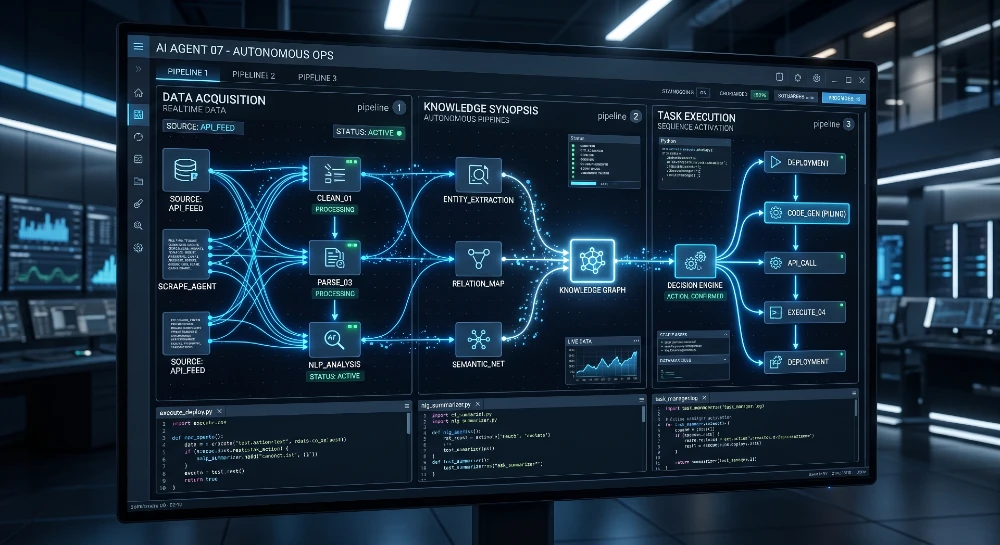
Every autonomous agent runs on a four-part loop: Perceive → Plan → Act → Reflect. That’s it. Everything else — the tools, the memory, the APIs — is just infrastructure plugged into that loop.
Perceive is the agent reading its environment. That could be an email that just arrived, a calendar event, a file in a folder, or a user query it received 10 minutes ago. The agent doesn’t wait for you to say “hey, look at this.” It’s already watching.
Plan is where it decides what to do about what it saw. This is where the LLM (usually GPT-4o, Claude 3.5 Sonnet, or Gemini 1.5 Pro) comes in the model reasons through the task, breaks it into steps, and picks which tools to call. Not randomly. Based on the context it was given.
Act is it actually doing something calling a web search API, writing to a Google Sheet, sending a Slack message, or running a Python script. The action is real. It touches real systems.
Reflect is the part most tutorials skip. After acting, the agent checks whether what it did worked. Did the API return an error? Did the search result look relevant? Is the task closer to done or further? If something’s off, it loops back to Plan and tries again.
That reflection loop is why agents don’t need you hovering over them. They self-correct. Not perfectly — but well enough to handle most real tasks without input.
What Actually Gives an Agent Its “Autonomy”
The word “autonomous” gets thrown around a lot. Here’s what it actually means in practice.
An agent is autonomous when it has three things working together: goals, tools, and memory.
Goals tell it what done looks like. Without a clear goal, an agent doesn’t know when to stop. I’ve seen setups where someone gave an agent a vague instruction like “manage my inbox” and it ran for 40 minutes doing almost nothing useful because “manage” means nothing concrete. Specific goals “flag emails from clients, draft replies, archive newsletters” — give the agent a finish line.
Tools are how it interacts with the real world. Raw language models can’t do anything except generate text. Tools are what let agents actually act. The most common ones agents use: web search (Brave Search API, Serper), code execution (Python sandboxes), file read/write, browser control (Playwright, Puppeteer), calendar and email APIs (Gmail, Outlook), database queries, and third-party APIs like Slack, Notion, or Airtable. The more tools an agent has access to, the broader the tasks it can handle — but also the more ways it can go wrong (more on that in a minute).
Memory is what makes it feel like a real agent instead of a one-shot prompt. Short-term memory is the conversation context — what happened in this session. Long-term memory is stored externally, usually in a vector database like Pinecone, Weaviate, or ChromaDB. When an agent needs to remember that a specific client prefers PDF reports, or that you asked it not to schedule meetings before 10am, that lives in long-term memory. Without it, every run starts from scratch.
Put these three together goal, tools, memory and you get a system that can actually run without you in the loop.
The Planning Layer: How Agents Break Tasks Into Steps
This is where most people’s mental model falls apart, so I want to be specific.
When an agent receives a complex task say, “research the top 5 competitors in the fintech space and build a comparison table” it doesn’t just… do it. It builds a plan first.
Frameworks like ReAct (Reason + Act) and Chain-of-Thought prompting are what let agents do this. ReAct specifically alternates between reasoning steps (“I need to search for competitor X’s pricing page”) and action steps (actually calling the search tool). Each step informs the next.
More complex agents use task decomposition they break the big goal into sub-goals and handle each one sequentially or in parallel. AutoGen (from Microsoft) and CrewAI are built around this. You can have multiple specialized agents — a researcher, a writer, a fact-checker each handling one piece of a bigger workflow.
Here’s what surprised me the first time I ran a CrewAI setup: the agents negotiate with each other. The researcher passes findings to the writer, the writer drafts content, the critic flags weak sections, the writer revises. I didn’t touch it for 25 minutes and got a draft that was genuinely usable. Not perfect, but 80% of the way there which is the point.
The honest downside: planning adds latency. A simple task that a human would do in 30 seconds might take an agent 2-3 minutes because it’s reasoning through steps, calling APIs, checking outputs. If your use case is time-sensitive, that’s worth factoring in.
Tools and APIs: The Actual Mechanism of Action
You want to understand how AI agents perform tasks without human intervention at a mechanical level? It comes down to tool calls.
When an agent decides to “search the web,” it doesn’t open a browser. It calls a search API Serper, Tavily, or Brave Search — passes a query, gets results back as structured text, reads them, and continues. From the agent’s perspective, it just received information. From your server’s perspective, an API call went out and a response came back.
Same with everything else. Writing to a spreadsheet = Google Sheets API call. Sending an email = Gmail API. Booking a calendar slot = Google Calendar API. Scraping a webpage = Playwright headless browser call. Running a Python script = code execution sandbox.
The agent doesn’t “know” how to do any of these things in the traditional sense. It knows which tool to call and what parameters to pass. The tool does the work. The agent orchestrates.
This architecture is why tool selection matters so much. An agent can only do what its toolkit allows. And a badly configured tool — wrong permissions, missing API key, rate limit issues is the #1 reason agents fail silently. They get a tool error, sometimes fail to handle it gracefully, and either stop or start hallucinating alternatives.
I spent an embarrassing amount of time debugging a workflow once because the agent kept “completing” a task it hadn’t actually done — it got a 403 from an API, didn’t surface the error cleanly, and just… moved on. The fix was adding explicit error-handling instructions in the system prompt and building in an output validation step.
For anyone building real workflows, check out tools to create self-running AI agents it covers the actual stack worth using, not just the popular names.
Memory Systems: Why Agents Don’t Forget (When Set Up Right)
Short-term context is easy it’s just the conversation window. GPT-4o has 128k tokens of context. Claude 3.5 Sonnet has 200k. That’s a lot of working memory for a single session.
Long-term memory is harder and most agent tutorials don’t build it properly.
Here’s the setup that actually works: after each agent run, key information gets extracted and stored in a vector database. When a new run starts, the agent does a semantic search against that database to pull relevant past context before it starts planning. So if you’re running a social media management agent and it handled your LinkedIn posts last Tuesday, it can recall the tone, topics, and what performed well without you re-explaining everything.
The tools most commonly used for this: Pinecone for hosted vector storage, ChromaDB for local/open-source setups, Mem0 for plug-and-play agent memory specifically. LangChain and LlamaIndex both have memory modules that abstract over these.
What doesn’t work: trying to cram everything into the system prompt. Yes, it’s tempting to just paste in a 3000-word “context document” about how the agent should behave. It works for simple tasks. It breaks on complex ones because the model starts ignoring parts of the prompt when the context gets too long a well-documented phenomenon called “lost in the middle.”
Real solution: keep system prompts tight, store context in memory, retrieve dynamically.
The Decision Engine: How Agents Choose What To Do Next
This is the part I find genuinely interesting and the part that separates good agent architectures from janky ones.
At every step, the agent is making a micro-decision: what’s the next action? And that decision comes from three inputs.
First: the system prompt the base instructions that define the agent’s role, constraints, and behavior. This is where you tell it “you are a research assistant, you always cite your sources, you never make up facts.”
Second: the current state what’s happened so far in this run. What tools have been called, what outputs came back, how far along the task is.
Third: the memory retrieval what relevant past context got pulled in from the vector database.
The LLM processes all three and generates the next action. That might be another tool call, a clarifying question (if it’s configured to ask), or a final output.
The reason this works without human intervention is that the LLM has enough reasoning capability to handle ambiguity. If a tool returns unexpected data, it can adapt. If one approach fails, it can try another. It’s not rigid if-then logic it’s flexible reasoning.
That said, reasoning has limits. When a task requires genuine judgment — like deciding whether a business email should be replied to with a negotiation or an apology agents struggle. They’ll pick something, but it might not be what you’d pick. That’s where human-in-the-loop checkpoints (deliberate pauses for human review) still make sense, especially for high-stakes actions.
Where Agents Actually Break (The Honest Breakdown)
Look, I’ve seen enough broken agent setups to give you the real failure modes.
Infinite loops. An agent gets stuck trying to fix an error it can’t resolve, keeps looping through the same tool calls, and runs up your API bill while doing nothing useful. Prevention: set a max iteration limit. LangGraph, CrewAI, and AutoGen all let you cap steps. Use it.
Tool hallucination. The agent convinces itself it called a tool and got a result — when it actually didn’t. This is more common than people realize, especially with older models. Newer architectures with structured tool-calling (like OpenAI’s function calling format or Anthropic’s tool use) mitigate this significantly.
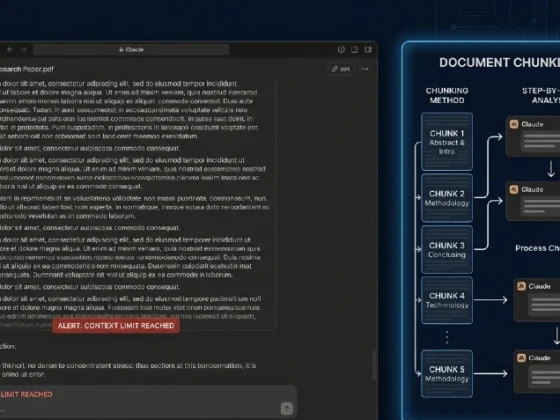
Context collapse. On long-running tasks, the context window fills up and the agent starts “forgetting” earlier instructions. Solution: summarize and compress context periodically, or use a windowed memory approach where old context gets archived and only relevant chunks get retrieved.
Permission creep. You give an agent access to your email to read messages. It decides it needs to send a message to “complete” the task. Then it needs to create a calendar event. Suddenly it’s doing things you didn’t authorize. Fix this with explicit scope limits in the system prompt and tool permission boundaries at the API level.
Silent failures. The worst kind. The agent runs, says it completed the task, but actually failed partway through. No error message. No flag. Just a clean finish screen and an unfinished job. Always build in output validation — have the agent explicitly report what it did, in checkable detail.
For a deeper look at what goes wrong systematically, common AI agent problems is worth reading before you build anything production-facing.
Single Agents vs. Multi-Agent Systems
Single agent = one LLM, one context, one set of tools, one task at a time. Good for focused, contained workflows. A single agent handling your email drafts, or doing research on one topic, or managing one platform.
Multi-agent = multiple specialized agents working in coordination. A researcher agent pulls data, a writer agent synthesizes it, an editor agent refines it, a publisher agent posts it. Each one is scoped to what it’s good at.
The tradeoff is real. Multi-agent systems are more powerful but significantly harder to debug. When something goes wrong across a five-agent pipeline, finding where it broke requires tracing through multiple logs, multiple context windows, multiple tool call histories. It’s not impossible, but it’s not simple.
My honest take: start with single agents. Get one workflow running cleanly and reliably. Then extend to multi-agent when you have a task that genuinely requires it — not because multi-agent sounds impressive, but because the task actually needs parallel specialization.
For context on how open-source approaches compare to managed platforms, this breakdown of Google AI agents vs open-source tools is a useful reality check on the actual capability gap.
Real-World Task Examples (With Honest Timelines)
Let me give you concrete examples of how AI agents perform tasks without human intervention in practice — not theoretical demos, but actual setups people are running.
Content research pipeline. Agent monitors Google Search Console for queries with impression volume but low CTR. Pulls the queries weekly, researches top-ranking content for each, generates a brief. Zero human input between the trigger and the brief landing in Notion. Setup time: about 4-5 hours the first time. Ongoing time: maybe 10 minutes a week to review outputs.
Customer support triage. Agent reads incoming support emails, classifies by issue type (billing, technical, general), drafts a reply from a knowledge base, and flags anything it can’t confidently resolve. The confident drafts go to a “ready to send” folder. The flagged ones go to a human queue. This cut first-response time from 6 hours to under 20 minutes in one implementation I’m aware of.
Social media scheduling. Agent pulls a content calendar from Airtable, generates post variations per platform, schedules through Buffer or Hypefury, and posts. The only human touchpoint is approving the weekly content calendar on Sunday. For a full breakdown of how this works, social media manager AI agents goes through the actual setup in detail.
Competitive monitoring. Agent runs daily, checks competitor pricing pages, product update pages, and press releases. Summarizes changes and sends a Slack digest. Costs about $3/month in API fees. I’ve tested setups like this — they catch things you’d miss if you were manually checking.
The common thread? Every one of these has a defined trigger (time-based or event-based), a clear goal, bounded tools, and an output that lands somewhere you can review. The agent doesn’t need to know it’s “autonomous.” It just runs the loop.
How to Set Up an Agent That Actually Runs Without You
Three things that make the difference between an agent you have to babysit and one that just works.
Write goals, not instructions. Most people write system prompts like a checklist of steps. That backfires because real tasks don’t always follow the steps you predicted. Write the goal instead — what done looks like, what quality means, what to do when something unexpected comes up. The agent will figure out the steps.
Build error handling into the prompt, not the code. Tell the agent explicitly what to do when a tool fails, when it gets an unexpected response, when it’s unsure. “If you receive an error from any tool, document the error, try an alternative approach once, and if that also fails, output a summary of what you attempted and what failed.” That one instruction has saved me hours of debugging.
Validate outputs, not processes. Don’t try to monitor every step the agent takes. It’s exhausting and mostly useless. Instead, define what a good output looks like and validate that. If the output is right, the process worked. If it’s wrong, then go back and look at the process. Outcome-first debugging is 5x faster than step-by-step monitoring.
The Honest Ceiling of Current Agents
No agent framework out right now handles truly open-ended judgment well. Tasks with clear criteria research, summarize, write, send, file, schedule agents handle these cleanly. Tasks that require understanding human context, navigating ambiguous social dynamics, or making decisions with incomplete information agents will take a swing but you probably won’t like the result.
The practical implication: autonomous agents are best suited for repetitive, rule-based, information-heavy tasks where the “right” output is definable. They’re not suited (yet) for tasks where the right answer depends on reading the room, understanding someone’s emotional state, or weighing nuanced tradeoffs.
That’s not a criticism. It’s just where the tech is. The ceiling will rise. For now, design your workflows around what agents are actually good at, and you’ll get real, measurable returns without the frustration of trying to make them do things they’re not built for yet.
Start with one workflow this week. Not five. One. Pick the task you do most often that follows a consistent process, map out what a good output looks like, give an agent the tools it needs, and run it 10 times. Fix what breaks. Then scale.
That’s how autonomous actually becomes useful not in theory, but in practice, one working workflow at a time.