
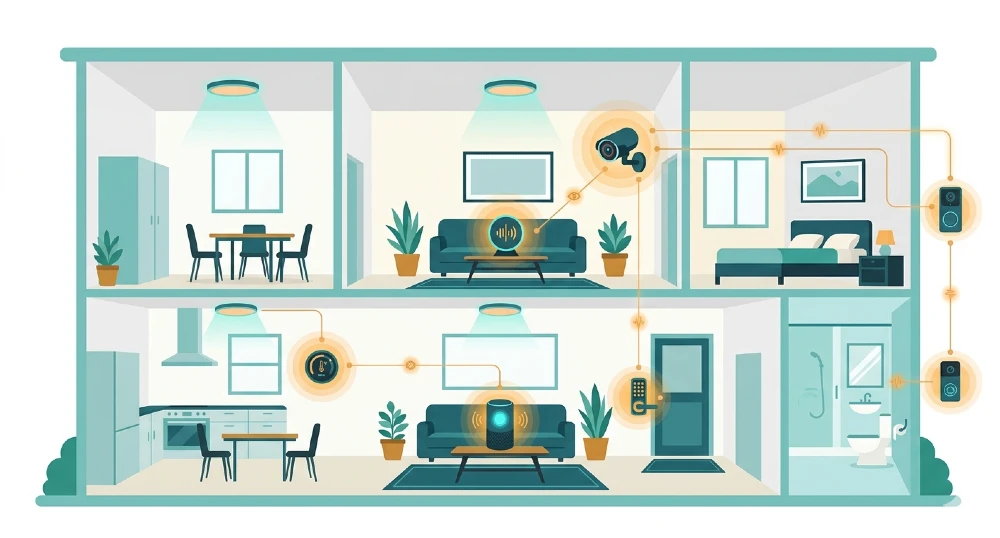
AI smart home devices use machine learning, natural language processing, and edge computing to learn your habits, automate tasks, and respond to your environment without you manually programming everything.
| Device Type | What AI Does in It | Key Technology |
|---|---|---|
| Smart thermostat (e.g. Nest) | Learns your schedule, auto-adjusts temperature | Machine learning on local chip |
| Smart speaker (e.g. Amazon Echo) | Understands voice commands, adapts to your voice | Natural language processing (NLP) |
| Security camera (e.g. Eufy, Arlo) | Tells humans from pets, flags real threats only | Computer vision on edge processor |
| Smart lock (e.g. Yale, August) | Recognizes entry patterns, detects anomalies | Behavioral ML + local inference |
| Smart lighting (e.g. Philips Hue) | Adjusts based on time, occupancy, or mood | Sensor fusion + automation rules |
| Robot vacuum (e.g. Roomba) | Maps your home, learns obstacle patterns | SLAM (simultaneous localization and mapping) |
| Air quality monitor (e.g. Alen airID) | Identifies specific pollutants in real time | Sensor ML classification |
What Makes a Smart Home Device “AI-Powered”?
Not every device calling itself “smart” actually uses AI. This distinction matters when you’re deciding what to buy and what to expect.
A basic smart device is just a remotely controllable one. A smart plug you control from your phone — that’s just remote control. It’s useful, but there’s no intelligence. You still decide when things turn on or off. You’re doing the thinking.
An AI-powered smart home device is different. It observes, learns, and acts on its own. It picks up patterns from how you actually use it and adjusts automatically over time. You don’t have to tell it your schedule it figures that out. You don’t have to tell it that the shadow crossing the camera is a cat, not an intruder it already knows.
With AI home automation, your smart devices gradually tweak themselves to match exactly what you need — not what you think you need. That’s the actual shift. Non-AI smart devices require you to program the sequences. AI-enabled ones learn and adapt without you telling them to.
The technology behind this breaks down into four main areas:
Machine learning is what allows devices to recognize patterns. Does the heating always go down at 10pm? The thermostat catches that after a few days and starts doing it automatically. Machine learning spots your habits and starts doing them for you.
Natural language processing (NLP) is how smart speakers understand what you say. Not just keyword matching — actual contextual understanding. When you say “turn the bedroom lights down a bit,” the device parses “bedroom,” “lights,” “down,” and “a bit” and translates that into a dimmer action on the right room’s fixture.
Computer vision is how security cameras and smart displays see and understand the world. A camera analyzing whether the figure at your door is a delivery person or a threat — that’s computer vision running on a small chip inside the device.
Edge computing is the infrastructure shift that makes all of this possible without your home constantly relying on the internet. More on this below — it’s one of the most important things to understand about modern smart home AI.
The Problem with Early Smart Homes — And How AI Fixed It
To understand where we are now, it helps to remember where things were.
Early smart home systems — the ones being sold heavily around 2015–2018 — were largely remote control systems with a scheduling layer on top. You could set your lights to turn on at 7am, or set your thermostat to 68°F on weekdays. But the device couldn’t adjust if your routine changed. If you stayed late at work, the house didn’t know. Your heating kicked on anyway. If a squirrel crossed the camera’s motion zone at 3am, you got an alert.
The alerts were the worst part. Early smart cameras triggered on everything — tree branches, passing cars, shadows — because they had no way to tell the difference between motion that matters and motion that doesn’t. People turned notifications off and stopped checking, which defeated the purpose.
The deeper problem was that all the intelligence lived in the cloud. Every decision had to make a round trip — sensor detects something, sends data to a distant server, server runs the analysis, sends back a decision, device acts. That introduced latency. Cloud computing might contain risks including data privacy leaks as well as net lag — over 500ms in some cases. And if your internet went down, your “smart” home went dumb.
AI changed this in two ways. First, the AI itself got smarter — better models for understanding voice, better computer vision for identifying objects, better prediction algorithms for learning habits. Second, and more importantly, the processing moved onto the device.
Here you can check chain-of-thought and few-shot methods for reliable AI outputs. Check our latest enterprise leadership strategies for scaling these skills.
Edge Computing: Why It Matters More Than the AI Model Itself
This is something most smart home guides don’t explain properly, and it’s the key to understanding why modern smart home devices behave differently from the ones sold five years ago.
Edge computing means the device processes data locally — on a chip inside the device itself — rather than sending everything to a cloud server. Smart home devices today incorporate machine learning models directly on the hardware itself. Rather than sending raw data to cloud services for analysis, devices perform sophisticated AI computations locally, enabling instant responsiveness and protecting user privacy by keeping sensitive information off remote servers.
Take a smart security camera. An old-style camera recorded everything and streamed it to the cloud, where servers analyzed the footage. This was slow, expensive in bandwidth, and a privacy risk — your raw video was sitting on someone else’s server.
A modern edge-AI camera is different. Contemporary cameras from Arlo and Eufy perform visual analysis locally, detecting actual security threats and recording only relevant footage. The device performs facial recognition, motion classification, and behavior analysis entirely on local hardware using dedicated AI chips, protecting privacy while delivering sophisticated security intelligence.
The practical result: faster alerts, no cloud subscription required for basic functionality, and your home video never leaves your home.
The same shift is happening in thermostats. Rather than relying entirely on cloud connectivity for decision-making, smart thermostats process temperature data, occupancy signals, and weather information locally, enabling split-second responses without network latency issues. This local processing means your thermostat continues functioning perfectly even during internet outages.
For smart speakers, this is still a hybrid — the wake word detection (“Hey Alexa,” “OK Google”) happens on-device, but most complex queries still travel to the cloud for processing. This is starting to change as on-device language models improve.
The privacy angle here is real and significant. In a smart home, data from smart meters or lighting controls can reveal occupancy patterns — detecting that someone is usually in the kitchen at 8:30am preparing breakfast. Such insights are best derived close to the data source to minimize delays and reduce exposure of private information on third-party cloud platforms.
When choosing smart home devices, looking for “local processing” or “on-device AI” labels is worth the effort. Those aren’t just marketing terms — they mean your data stays in your home.
Here you can check C-suite frameworks for governance and workforce transformation. Check our latest DeepSeek cost analysis for budget optimization.
How Each Major Device Category Actually Uses AI
Smart Thermostats
The Nest Learning Thermostat, launched by Google, was one of the first consumer AI devices to demonstrate what machine learning in the home actually looks like in practice. After a week or so of manual adjustments, it started learning the household’s patterns — when people wake up, when they leave, when they return, what temperature they prefer at different times.
The underlying mechanism isn’t complicated to understand. The thermostat collects a continuous stream of data points: temperature settings, occupancy signals from a motion sensor, time of day, and seasonal context. A local machine learning model finds the patterns in that data and starts predicting what settings you’ll want before you want them.
Devices like the Nest Thermostat use AI to learn the household’s heating and cooling preferences to automatically adjust settings for optimal comfort and energy efficiency. Over time, these AI-based systems learn from your habits and adjust the temperature automatically before you even think about it.
The energy savings are tangible. Google has published data showing that Nest users saved an average of 10–12% on heating and 15% on cooling costs. The AI is doing the optimization work that most people would never do manually — adjusting pre-heat timing based on outdoor temperature, scheduling around work-from-home patterns, avoiding heating empty rooms.
One thing worth noting from experience with these devices: the learning period of the first two weeks matters more than people expect. If you set it manually to match your real preferences during those early days, the model learns much faster and more accurately. If you let it guess from day one without correction, it can develop patterns that are slightly off and take weeks to adjust.
Smart Speakers and Voice Assistants
Amazon Echo (using Alexa), Google Nest Hub (using Google Assistant), and Apple HomePod (using Siri) are the three main platforms. They function as the central control layer for the whole smart home — the hub everything else talks to.
Amazon Echo, Google Nest Audio, and Apple HomePod mini serve as more than music players — they’re AI-powered hubs that control lighting, thermostats, security systems, and dozens of other connected devices through natural language voice commands.
The AI inside a smart speaker works in layers. The first layer is always-on wake word detection — a tiny, efficient model running on the device’s chip that listens only for the trigger phrase. This model is deliberately simple and runs on very little power. It doesn’t record or process anything else.
Once the wake word fires, the more sophisticated layer takes over. Your actual command gets analyzed by NLP — the system parses intent, extracts entities (which room, which device, what action), resolves any ambiguity, and executes the command. In 2025 this processing still usually involves the cloud for complex commands, though simpler commands increasingly resolve on-device.
What sets voice assistants apart in 2025 is how they’ve evolved — they can now recognize your tone, routines, and preferences, offering seamless support tailored to your lifestyle.
The ecosystem choice matters here. Amazon’s Alexa has the broadest device compatibility — it works with more third-party smart home products than any other platform. Google Assistant has strong search integration and works well if you’re already deep in Google’s services. Apple HomeKit is the most privacy-focused option, with stricter certification requirements for third-party devices, but it’s limited in compatibility if you use non-Apple devices.
Here you can check how efficient architectures slash infrastructure spending dramatically. Check our latest BI versus AI comparison for investment prioritization.
Smart Security Cameras and Doorbells
This is where AI has made the most obvious and dramatic improvement in real-world usefulness. The jump from “motion detected” alerts to “a person is at your door” alerts isn’t minor — it’s the difference between a useful security tool and an annoying one you eventually ignore.
Modern smart cameras use computer vision models running on an embedded chip to classify what they see in real time. The model has been trained on thousands of hours of labeled video — this is a person, this is a car, this is a dog, this is a shadow, this is leaves blowing. When the camera’s sensor picks up motion, the model classifies the motion source before deciding whether to record or alert.
Edge AI enables smart home cameras to process video on the device rather than streaming video 24/7 to the cloud. This also means manufacturers can reduce their compliance burden under GDPR and CCPA by keeping personally identifiable information, such as facial data, on the device.
Some cameras go further, offering facial recognition for known household members — so the camera knows the difference between “family member arriving home” and “unrecognized person at the door.” Eufy’s home cameras handle this recognition entirely on-device, meaning those facial templates never leave your home network. That’s a meaningful privacy distinction compared to cameras that send facial data to cloud servers for matching.
The practical advice when evaluating cameras: check whether local storage is available (SD card or home NAS), and whether core functionality works without an active cloud subscription. Some brands lock basic motion alerts behind a monthly fee — that’s worth avoiding if possible.
Here you can check when dashboards suffice versus predictive modeling needs. Check our latest open source RAG guide for implementation pathways.
Smart Locks
Smart locks have moved well past simple app-controlled deadbolts. AI-enabled locks like those from Yale and August now do behavioral analysis — building a profile of typical entry patterns (who unlocks at what time of day, from which direction, using which method) and flagging anomalies.
With machine learning algorithms, advanced smart locks learn your habits, locking your door when you leave and preparing to open as you arrive. The AI integration can recognize abnormal entry attempts that fall outside recognized patterns, and inform you of security issues the moment they occur.
The auto-lock feature is worth understanding carefully. Most smart locks can be set to lock automatically after a set time. But AI-enabled ones can also use geofencing — your phone’s location — to lock when everyone has left and unlock when someone from the household approaches. This works using a combination of Bluetooth proximity detection and GPS, so the lock starts responding when you’re within a block of home rather than waiting until you’re fumbling with your phone at the door.
One legitimate concern: battery dependency. Smart locks run on batteries, and most last six months to a year. The AI features (constant Bluetooth scanning, activity logging) do draw more power than a simple motorized lock. Checking battery level regularly matters more with these devices than with simpler smart home gadgets.
Here you can check when dashboards suffice versus predictive modeling needs. Check our latest open source RAG guide for implementation pathways.
Robot Vacuums
The AI story in robot vacuums is one of the most visible examples of how these technologies evolve over a product generation. Early Roombas (pre-2015) moved in random patterns, bouncing off walls and furniture until they’d covered the floor by probability. They were slow and inefficient.
Modern robot vacuums use a technique called SLAM — Simultaneous Localization and Mapping. The vacuum uses LiDAR sensors (laser-based distance measurement), cameras, or a combination of both to build a real-time map of your home. It knows where it is in the map at all times, plans an efficient cleaning path, and updates the map as conditions change.
The AI layer on top of SLAM adds things like room identification, obstacle avoidance, and schedule optimization. The vacuum learns that the kitchen floor needs cleaning more frequently than the guest bedroom. It learns to avoid the charging cable that’s always on the floor near the desk. It identifies the rug as a surface that needs a slower, stronger pass.
Once robot vacuums become first-class accessories in the home platform, they stop being isolated robots and start participating in routines, room-based commands, and broader household state. That integration — the vacuum being triggered by “I’m heading to bed” or starting automatically after the cooking routine ends — is where the AI coordination layer adds real value.
Here you can check LlamaIndex and LangChain deployment for private knowledge bases. Check our latest prompt engineering techniques for retrieval accuracy.
The Matter Standard: Why It Changes Everything About Compatibility
One of the biggest frustrations with smart home devices for years was ecosystem lock-in. Devices built for Amazon Alexa might not work with Apple HomeKit. Devices optimized for Google Home might have limited Alexa integration. Buying the wrong brand meant starting over.
Matter, released officially in late 2022 and now in version 2.0, is a universal protocol designed to fix this. It’s an open-source standard backed by Apple, Google, Amazon, and the Connectivity Standards Alliance, covering over 550 technology companies developing compatible products.
Matter ensures compliance out of the box through its universal, open-source connectivity. Instead of building separate products for Alexa or HomeKit, manufacturers build one Matter version that works everywhere across devices.
What this means practically: a Matter-certified smart light bulb from any brand will work with your Amazon Echo, your Apple HomePod, and your Google Nest Hub, without special setup or workarounds. The device just shows up and works.
Prioritize devices supporting Matter protocol — the emerging standard that reduces vendor lock-in and ensures future compatibility as the smart home ecosystem continues evolving.
When buying new smart home devices in 2025 and beyond, checking for Matter certification is one of the most future-proof decisions you can make. It means whatever ecosystem you build around today won’t become obsolete if you switch platforms later.
Cloud vs. Edge: A Practical Guide for Buyers
This decision comes up constantly when people are evaluating smart home products, and the marketing language around it can be confusing.
Here’s a clear breakdown:
Cloud-processing devices send your data to a company’s server for analysis and then send back the result. The upside is that the AI model can be very powerful and gets updated regularly. The downside: latency, dependency on internet connectivity, privacy exposure, and often a subscription fee for continued access to features.
Edge-processing devices run the AI model locally on a chip inside the device. The upside: faster response, offline functionality, better privacy. The downside: the model is fixed unless the device gets a firmware update, and hardware costs more because it needs a capable chip.
Hybrid devices do both — simple, time-sensitive processing on-device, and complex or learning tasks in the cloud. Most modern smart speakers follow this model: wake word on-device, command processing in the cloud.
In a hybrid smart home processing architecture, essential functions like security motion detection, lighting automation, or door unlocking can still operate locally through their edge component even when internet access is lost. The cloud-dependent features — such as voice analytics or large-scale device coordination — may be limited until connectivity returns.
For most people building a smart home, hybrid devices strike the right balance. But for specific sensitive applications — particularly cameras and locks — edge-first processing is worth prioritizing. The privacy cost of streaming your front door footage to a company’s servers 24/7 is not theoretical.
How to Start Building an AI Smart Home: A Step-by-Step Approach
Step 1: Pick an Ecosystem First
Before buying anything, decide which voice assistant ecosystem you’re building around. The three options are Amazon Alexa, Google Home, and Apple HomeKit. All three are mature and well-supported. The practical differences:
- Amazon Alexa has the widest device compatibility — more third-party products work with it than any other platform.
- Google Home integrates tightly with Android phones, Google Calendar, and Google Search. It’s the natural choice for Android users.
- Apple HomeKit is the most privacy-conscious, with stricter app permission requirements. It’s the right choice if you’re primarily on iPhone and Mac.
You don’t have to pick just one forever — Matter compatibility is making cross-platform easier. But starting with one keeps setup simple.
Step 2: Start with a Smart Speaker
The voice assistant hub is the most universally useful first device. It controls everything else, works from day one without complex setup, and costs between $30 and $100 for a capable entry-level option.
If you only buy one thing, start with a voice assistant device. These are your home’s “brain” — controlling lights, locks, music, reminders, and more.
Once the hub is working, every other device you add connects to it and becomes voice-controllable without additional configuration.
Step 3: Add Devices by Room, Starting with the Most-Used Space
Rather than buying one of everything, go deep in one room first. The living room or bedroom works well. Add smart lights, a smart plug, and a temperature sensor. Set up a few basic automation routines — lights dim at 9pm, the plug connected to the TV turns off after the “good night” command.
After that room is running well and the routines feel natural, expand. Kitchen smart appliances next, then bedroom, then entrance (smart lock and doorbell camera).
Step 4: Set Up Automation Routines, Not Just Manual Controls
The value of AI smart home devices isn’t in controlling them with your voice — that’s just more convenient remote control. The real value is in automation: the devices doing things without you asking.
Set up “Good Morning” and “Good Night” routines in your ecosystem’s app. Good Morning might turn up the thermostat, start the coffee maker (via smart plug), turn the lights to a bright daylight setting, and read out your calendar. Good Night might lock the front door, set the thermostat to sleep temperature, turn off all lights, and activate the security camera.
These routines use the AI in each device and the coordination layer in the ecosystem hub to act as a coherent system rather than individual gadgets.
Step 5: Evaluate Privacy Settings on Every Device
Every smart home device that records audio, video, or behavioral data has privacy settings — and the defaults aren’t always the most privacy-respecting ones.
For cameras: turn off cloud backup if you’re using local storage. Review the data retention settings. For voice assistants: review and delete voice recordings periodically. Amazon, Google, and Apple all have web portals for this. For thermostats: check whether usage data is shared with third parties for “energy optimization” programs — opt out if you’re not comfortable with that.
Real Limitations Worth Knowing
The learning period is real and takes time. Most AI-enabled devices need two to four weeks of use before their patterns are reliable. During this period, they may make suggestions or take actions that don’t quite fit your routine. This is normal — the model needs data before its predictions are useful.
Ecosystem lock-in still exists for some features. Matter has reduced this but hasn’t eliminated it. Advanced features — multi-room audio, whole-home energy dashboards, proprietary security modes — often only work fully within a single ecosystem. Keep this in mind when evaluating premium features.
Cloud subscriptions can change. Some smart home companies have changed subscription requirements after launch, locking features that previously worked for free behind a paywall. Nest and Ring have both done this. Choosing devices that support local processing and local storage reduces this risk, because core functionality doesn’t depend on a subscription.
Wi-Fi range matters more than most guides admit. A smart lock that loses Wi-Fi connection at 2am can be a serious inconvenience. Before buying, check whether your home’s Wi-Fi coverage reaches every corner where you plan to place devices. Mesh Wi-Fi systems (like Eero or Google Nest WiFi) solve this problem properly.
What’s Coming Next in AI Smart Home Technology
A few real developments that are already in early deployment and will become mainstream in the next two to three years:
Federated learning is a technique where AI models learn from data on your device without that raw data ever leaving your home. Multiple devices contribute model improvements to a shared model, but they share only the learned parameters — not your actual data. Federated learning — where IoT devices collaborate to improve AI models while keeping raw data private — promises more sophisticated device intelligence without centralized data collection.
Multimodal sensing is the ability for a single device to process voice, vision, and touch simultaneously. A modern smart home hub needs to process voice, vision, and touch simultaneously through sensor fusion, in which devices combine their inputs to make a decision. A smart thermostat with sensor fusion can use a camera to identify who entered the room and their preferred temperature.
Predictive maintenance is the ability for smart appliances to detect when something is about to fail — motor degradation in the washing machine, filter clogging in the HVAC, low battery in a smoke detector — and alert you before the problem becomes an emergency.
Matter 2.0 is expanding to cover more device types including cameras, energy management systems, and appliances. As it broadens, the ecosystem fragmentation problem continues to shrink.
AI technology in smart home devices has crossed from novelty into genuine usefulness. The combination of better machine learning models, edge computing chips, and universal standards like Matter means the gap between what these devices promise and what they actually deliver has narrowed substantially.
The most important thing to understand is that the value isn’t in the individual device — it’s in how they work together. A smart thermostat alone is useful. A smart thermostat that talks to occupancy sensors, connects to your calendar, and triggers the HVAC based on who’s home and what’s scheduled — that’s a genuinely intelligent system.
Start simple, build around one ecosystem, prioritize devices with local processing for anything privacy-sensitive, and look for the Matter logo when buying new. The rest follows naturally as you learn what automations actually fit your daily life.


