
| What You Want | Best Tool | Works For | Free? |
|---|---|---|---|
| Type text, hear Helen Parr speak | FakeYou.com | Personal use, content creation | Yes (with queue) |
| Higher quality, faster output | ElevenLabs | Creators needing clean audio | Free tier available |
| Fan projects and meme audio | 101soundboards.com | Quick playback clips | Yes |
| AI voice chat as Helen Parr | Talkie AI | Interactive roleplay | Free |
FakeYou.com has the most accessible Helen Parr TTS model for a computer. Type your script, hit Speak, download the WAV. That’s it. But there are real limits to how you can use it — especially for anything public or monetized.
Who Is Helen Parr and Why Does Her Voice Work So Well for AI?
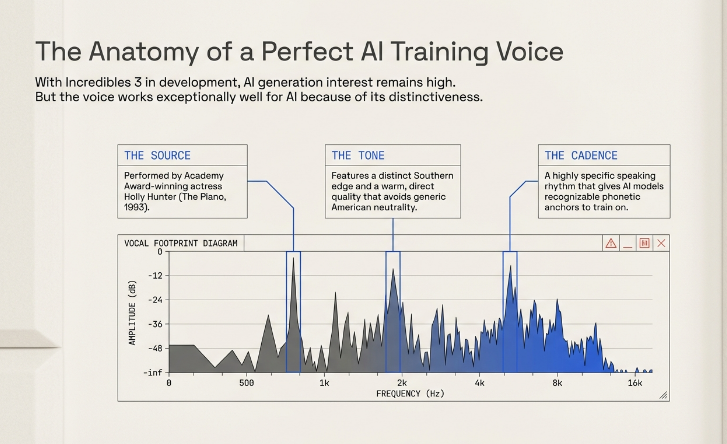
Helen Parr is the mother from Pixar’s The Incredibles (2004) and Incredibles 2 (2018). She goes by Elastigirl as a superhero. Her voice was performed by Holly Hunter — an Academy Award-winning actress known for her work in The Piano (1993).
What makes Helen Parr’s voice particularly interesting for AI generation is how distinct it is. Holly Hunter’s voice has a natural Southern edge, a warm but direct quality, and a very specific rhythm when she speaks. It doesn’t sound like a generic American voice. That distinctiveness is exactly what makes AI models trained on it more recognizable than, say, a neutral announcer voice.
The character has been part of two major Pixar films and several games including The Incredibles: Rise of the Underminer and Disney Infinity (2013). With Incredibles 3 reportedly in development, interest in the voice — and by extension the AI version — has stayed consistent.
The Problem: Most People Search for This and Get Confused
If you search “Helen Parr AI voice computer,” you’ll hit a wall of vague results. Some pages list tools with no actual steps. Others mix up Holly Hunter the actress with Helen Parr the character. A few take you to NSFW AI chatbot platforms you probably weren’t looking for.
The real confusion is this: there are three completely different things people want when they search this:
- A text-to-speech tool that reads out text in Helen Parr’s voice
- An AI chatbot you can have a conversation with as Helen Parr
- A voice changer that turns your mic input into Helen Parr’s voice in real time
These are not the same thing. Different tools do different things. Let’s go through each one clearly.
Tool 1: Text-to-Speech (Type Text → Hear Helen Parr Read It)
Best tool for this: FakeYou.com
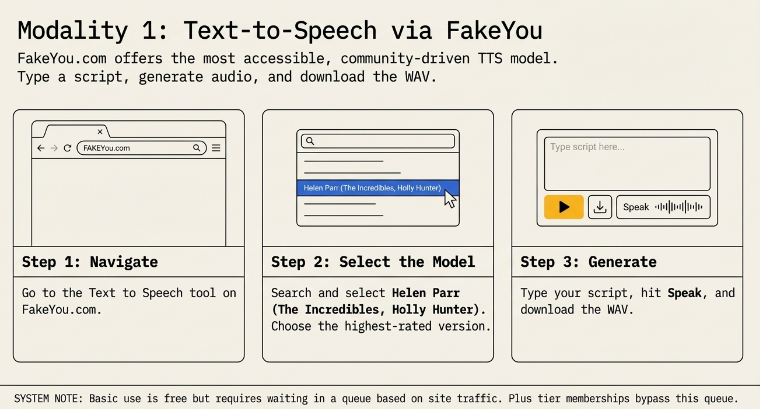
FakeYou is a web-based text-to-speech platform with a library of thousands of voice models including Helen Parr from The Incredibles. It’s community-driven — meaning people have trained and uploaded these voice models themselves. The Helen Parr model on FakeYou is based on Holly Hunter’s performance from the films.
How to Use FakeYou for Helen Parr (3 Steps)
Step 1: Go to fakeyou.com and click on “Text to Speech” in the navigation.
Step 2: In the search bar, type “Helen Parr” and select the model labeled Helen Parr (The Incredibles, Holly Hunter). There may be more than one version — the one with the most uses and highest rating tends to produce cleaner output.
Step 3: Type your script in the text box, press “Speak,” and wait for it to process. Once it’s done, you can preview and download the audio as a WAV file.
That’s genuinely the whole process. No account needed for basic use. The queue time depends on traffic — it can be instant, or it can take a few minutes during busy periods. Getting a paid FakeYou membership skips the queue, and plans start around £12/month for their Plus tier.
What to Watch Out For With FakeYou
The voice quality is decent for fan content and casual use, but it’s not perfect. Shorter sentences tend to come out cleaner. Long paragraphs with complex punctuation can produce unnatural pacing. Breaking your script into shorter lines before pasting it in gives noticeably better results — this is something you notice quickly when trying it on anything more than a sentence or two.
FakeYou also doesn’t give you control over tone, emotion, or speed in the free version. So if you want Helen to sound urgent versus calm, you can’t adjust that without workarounds. The voice is what it is, based on the model.
Tool 2: AI Voice Chat (Talk With Helen Parr)
Best tool for this: Talkie AI (talkie-ai.com)
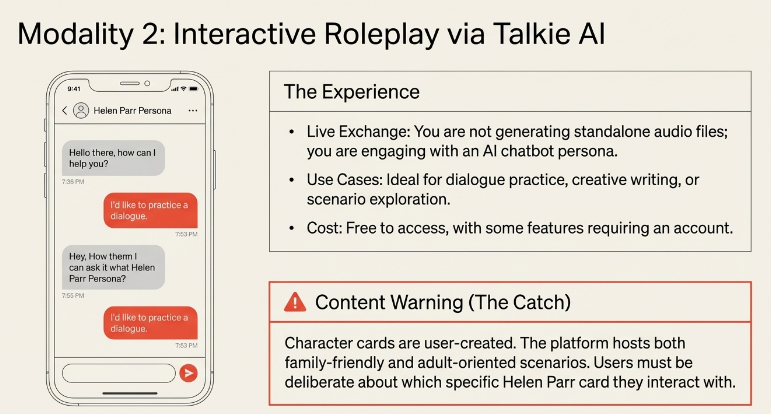
Talkie-AI has a Helen Parr character you can have a text or voice conversation with. It’s built for interactive roleplay and character-based conversation. The experience is closer to an AI chatbot persona than a TTS tool — you’re not generating audio files, you’re having a live exchange.
This is useful for people who want to practice dialogue, do creative writing with character interaction, or just explore what the character would say in different scenarios.
The platform is free to access, though some features may require an account.
One thing worth noting: some character cards on platforms like Talkie AI are user-created and can have very different tones and contexts depending on who made them. The platform has both family-friendly and adult-oriented character scenarios in their library — so it’s worth being deliberate about which card you’re using, especially if younger users are involved.
Tool 3: Real-Time Voice Changer (Sound Like Helen Parr on Your Mic)
This is the hardest one to do well, and honestly the most technically demanding.
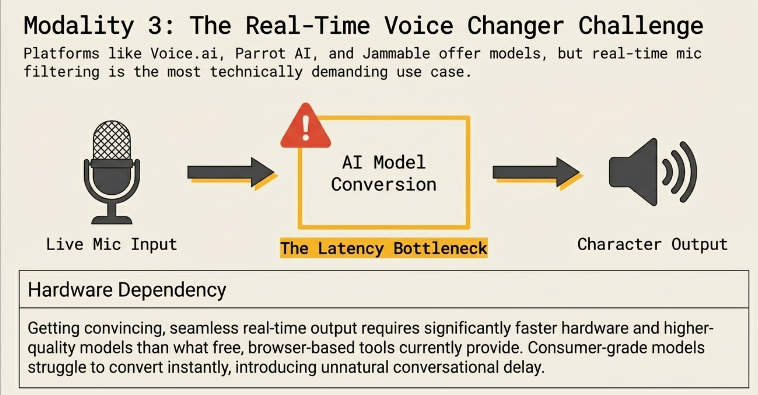
Real-time voice changing works by taking your microphone input and transforming it on the fly using an AI model. For a character-specific voice like Helen Parr, you’d typically need either a dedicated voice changer app that includes her voice model, or a setup where you pipe your audio through a conversion model manually.
Platforms like Parrot AI and Jammable have offered Helen Parr voice models, though these skew more toward song covers and recorded audio rather than live mic use. The latency involved in real-time voice conversion is still a challenge — most consumer-grade tools introduce enough delay that it feels unnatural during live conversations.
If real-time voice changing on a computer is specifically what you need, Voice.ai and similar desktop apps are worth exploring, but don’t expect it to be seamless out of the box. Getting a convincing, real-time Helen Parr voice through a microphone requires a higher-quality model and faster hardware than what most free tools offer right now.
The Audio Quality Gap: Free vs. Paid
Here’s something that doesn’t get explained enough. When people say “the AI voice doesn’t sound right,” the problem is usually not the character — it’s the model quality and the tool.
Free community-uploaded models on platforms like FakeYou are trained on relatively limited audio data (whatever clips of the film are available) and may not capture all the subtle phonetic qualities of Holly Hunter’s voice. The result is a voice that sounds like Helen Parr in broad strokes but stumbles on certain words or sounds slightly robotic on longer passages.
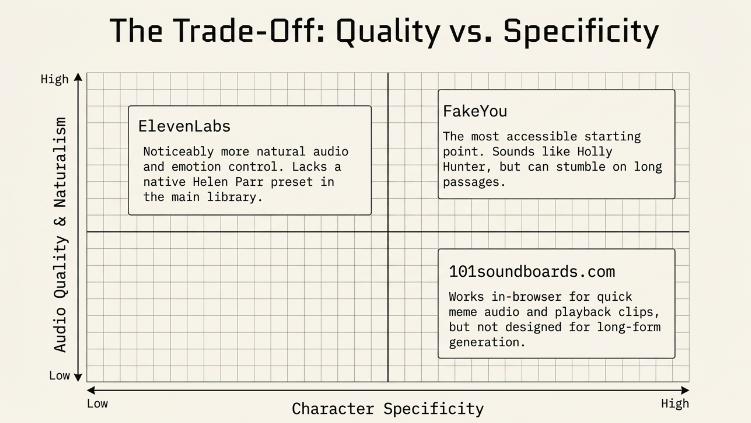
Paid platforms or models trained on broader datasets tend to perform better. ElevenLabs, for example, has a voice library and voice cloning capability that produces noticeably more natural-sounding output — but it doesn’t have a Helen Parr-specific model in its main library. You’d need to either use their voice cloning tool (which has its own legal considerations) or use one of their general voices as a stand-in.
The practical takeaway: if you want the best quality Helen Parr TTS for a project, FakeYou is the most accessible starting point. If quality is critical and the character-specific voice isn’t mandatory, ElevenLabs offers more control and cleaner audio.
What the Tools Actually Don’t Tell You: The Legal Side
This is where most articles on this topic go quiet, and it’s arguably the most important part.
The Copyright and Publicity Rights Situation
Holly Hunter’s voice performance in The Incredibles and Incredibles 2 is part of a copyrighted Pixar/Disney film. The voice model on FakeYou was trained on audio from those films — which means the data source is copyrighted material owned by Disney.
Using AI-generated voices that mimic real people’s voices — even when those voices are playing a character — touches on a few different legal areas:
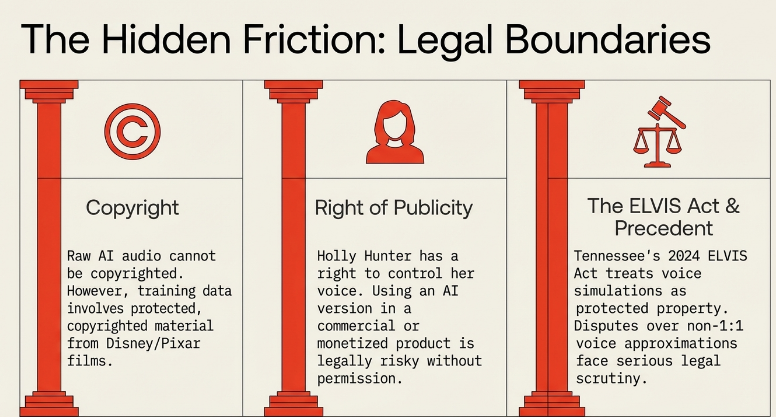
Copyright: According to the U.S. Copyright Office, raw AI-generated audio files do not themselves receive copyright protection because they lack a human author. However, the underlying performance data used to train the model may involve copyrighted material.
Right of Publicity: This is the bigger practical concern. Holly Hunter, as a real person, has a right of publicity — meaning her voice and likeness can’t be used commercially without her permission. Using an AI version of her voice (even filtered through a fictional character) in a paid product, monetized video, or commercial advertisement would be legally risky.
The ELVIS Act (Tennessee, 2024): Tennessee passed legislation in 2024 that explicitly treats a person’s voice — including AI-generated simulations of it — as protected property. This is one of the first state-level laws in the U.S. to directly address AI voice cloning. Similar legislation is being considered at the federal level.
In 2024, Scarlett Johansson raised concerns about OpenAI using an AI voice (“Sky”) that she said bore a strong resemblance to her own — even though it wasn’t an exact clone. OpenAI subsequently paused use of that voice. This case illustrates how seriously voice rights are being taken, even when there’s no direct 1:1 copy.
What This Means Practically
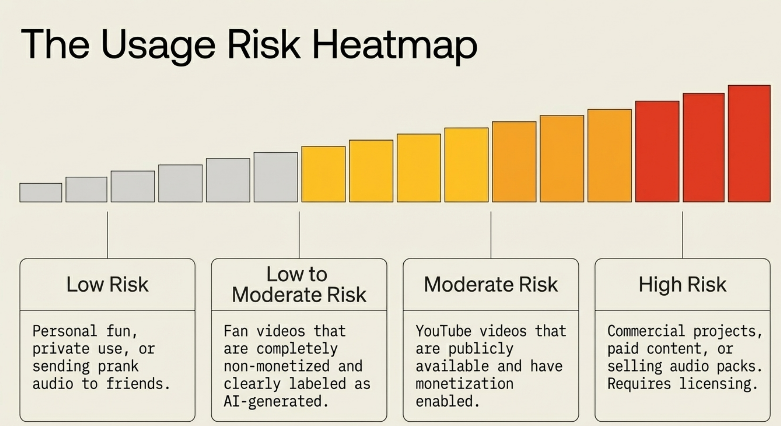
| Use Case | Risk Level |
|---|---|
| Personal fun, private use | Low |
| Fan videos (non-monetized, clearly labeled) | Low to moderate |
| YouTube videos with monetization | Moderate |
| Commercial projects or paid content | High — avoid without legal clearance |
| Selling audio or voice packs | High — likely requires licensing |
The safest position: use Helen Parr AI voice tools for personal, non-commercial, clearly labeled fan content. The moment you monetize it, sell something with it, or use it in a commercial context, you’re in territory that needs proper legal clearance — which, realistically, means a license from Disney/Pixar and potentially from Holly Hunter’s representation.
Why the Voice Quality Varies Across Different Tools
Not all “Helen Parr AI voice” tools are the same, even if they claim to be. Here’s what creates the variation:
Training data quantity: Models trained on more audio samples (more lines, more scenes) generally sound more consistent. The Incredibles films give a limited pool of dialogue. Models trained on this may struggle with uncommon words or unusual sentence structures that weren’t represented in the training clips.
Model architecture: Older TTS models use different synthesis methods than newer neural voice models. The difference is audible — newer approaches handle intonation more naturally.
Post-processing: Some platforms apply noise reduction or normalization to the output. Others give you the raw generation. The raw version can sound thinner or more robotic.
When comparing tools, test them with the same sentence. Something mid-length with normal conversational phrasing works well as a benchmark — like “I need you to stay here, it’s not safe” — and you’ll hear the difference between models quickly.
A Practical Guide to Getting Better Output
Whether you’re using FakeYou or another TTS tool for Helen Parr’s voice, small tweaks to how you write your script make a real difference.
Keep sentences short. Long, complex sentences with multiple clauses tend to produce uneven timing. Splitting them into two shorter sentences usually sounds more natural.
Avoid rare names and technical jargon. TTS models struggle with words they weren’t trained on. If your script has a made-up place name or a technical term, consider rewording it to something more phonetically common.
Use punctuation deliberately. A comma creates a brief pause. A period creates a longer one. For characters with a specific rhythm — and Helen Parr has a very specific cadence — punctuation placement affects how natural the output sounds.
Don’t try to make it emotional. Free TTS models don’t do emotional range well. Don’t write lines expecting the model to deliver them dramatically. Write lines that would sound good even if read neutrally.
Alternatives Worth Knowing
If the Helen Parr voice specifically isn’t essential, and you just need a voice with a similar quality — confident, warm, slightly authoritative — here are options worth considering:
ElevenLabs (elevenlabs.io): One of the most technically advanced TTS platforms available right now. Doesn’t have Helen Parr as a preset, but the voice quality and emotion control are significantly better than community-model platforms. Free tier is available with usage limits.
Parrot AI (tryparrotai.com): Has a specific Helen Parr voice generator listed on their site. Worth testing if FakeYou’s quality isn’t meeting your needs for a given project.
101soundboards.com: Has a Helen Parr TTS board that works directly in the browser. Good for quick clips and testing. Not designed for long-form content generation.
Common Questions, Answered Directly
Can I download the Helen Parr AI voice audio? Yes, FakeYou lets you download generated audio as a WAV file. 101soundboards also lets you save clips from their TTS board.
Does it sound exactly like Holly Hunter? No. It sounds like an approximation — recognizable to anyone who knows the character, but with the limitations of AI synthesis. Shorter scripts with simpler phrasing come out closer.
Is there a mobile app for this? Parrot AI has an app. Talkie AI works on mobile. FakeYou is browser-based and works on mobile browsers, though the experience is better on desktop.
Can I use it in my YouTube video? Technically possible for non-monetized fan content, but it carries copyright and right of publicity risk, particularly because the underlying voice performance is owned by Disney. Adding clear labels (“AI-generated voice”) and keeping the use non-commercial reduces — but doesn’t eliminate — that risk.
What if I just want to prank my friends? FakeYou is what you need. Type the message, generate the audio, send it. It’s exactly the use case it was originally built for.
The Broader Context: Why People Want Animated Character AI Voices
The search interest in AI voices for animated characters isn’t random. It reflects a few things happening at once.
First, there’s a generation of fans who grew up with these characters and have a strong emotional connection to the voices. Being able to generate new dialogue in those voices is creatively exciting — fan films, parody content, creative writing come to life.
Second, the technical barrier is lower than people expect. FakeYou launched in late 2021 and saw a surge in popularity through 2022 as people discovered how accessible character TTS had become. The community grew quickly and the voice library expanded significantly.
Third, there’s genuine educational and creative use — voice actors, writers, and game developers explore these tools to understand what AI voice synthesis can and can’t do. Testing a character voice model is a fast way to see the current limits of the technology.
What’s worth watching: as Incredibles 3 moves forward, interest in Helen Parr’s voice will likely increase again. And as AI voice technology improves, the quality gap between a free community model and a professional synthesis will narrow — which will make the legal and ethical questions more pressing, not less.
Final Checklist Before You Use Helen Parr AI Voice
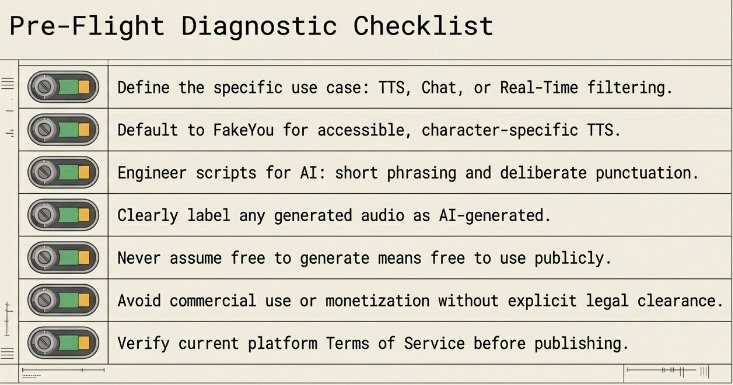
- [ ] Define your use case: TTS, chat, or real-time voice change?
- [ ] Use FakeYou for TTS — it’s the most accessible and has the character-specific model
- [ ] Keep scripts short and simply punctuated for better audio quality
- [ ] Label any AI-generated audio clearly in your content
- [ ] Avoid commercial use without legal clearance
- [ ] Don’t assume “free to generate” means “free to use publicly”
- [ ] Check the terms of service of whichever platform you use before publishing anything
Holly Hunter has voiced Helen Parr / Elastigirl in The Incredibles (2004), Incredibles 2 (2018), and associated games and attractions. The character is owned by Pixar/Disney. All referenced tools — FakeYou, ElevenLabs, Talkie AI, 101soundboards, Parrot AI — are independent third-party platforms. Tool features and pricing may change; check each platform directly for current details.


