
Agent Zero is one of the most capable open-source autonomous AI agent frameworks available in 2026 — and the agent zero github docker compose setup is the fastest, cleanest way to get it running. Whether you have never touched Docker before or just want a setup that actually works on the first try, this guide walks you through every step without skipping the parts where things typically break.
| 3.4K+ GitHub stars on Agent Zero | 15 min avg setup time with Docker Compose | 4 built-in agent tools at launch | Free open-source, no subscription required |
Agent Zero is not your typical AI chatbot. It is an open-source autonomous AI agent framework that can write code, execute that code, browse the web, manage files, coordinate multiple sub-agents, and self-correct when things go wrong — all from a single interface running on your own machine. Since its launch in 2024, it has gathered more than 3,400 GitHub stars from developers who were tired of AI tools that produce text but cannot actually do anything with it.
The reason the agent zero github docker compose setup has become the go-to installation method for beginners and experienced developers alike comes down to three things: isolation, reproducibility, and simplicity. When Agent Zero runs inside a Docker container, it has its own sandboxed environment where it can execute code without touching your host system. The agent zero github docker compose configuration manages all of that automatically — one command and the entire stack spins up correctly every time.
| 15min | Average setup time from cloning the Agent Zero GitHub repository to having the Web UI running — using Docker Compose on a machine with Docker already installed. Without Docker Compose, the same setup takes 45-90 minutes manually. |
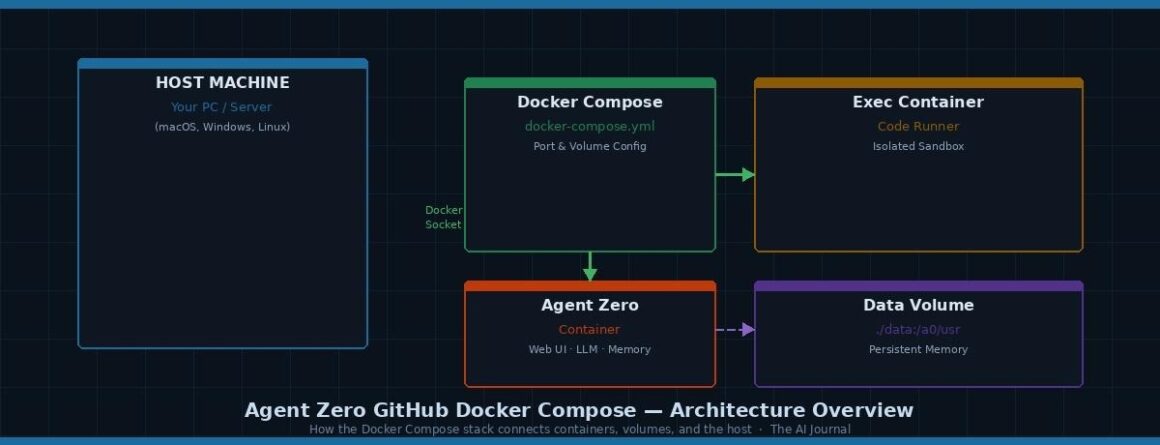
Agent Zero Docker Compose Architecture: Host machine, containers, volumes, and Docker socket — The AI Journal
What makes Agent Zero particularly powerful is its dynamic tool generation system. Most AI agent frameworks come with a fixed set of pre-built tools. Agent Zero starts with just four core capabilities — web search, memory, communication, and code execution — and then creates additional tools dynamically based on whatever task you give it. That entire process happens inside the container you set up with docker compose.
This guide is specifically built for 2026 — using the latest agent zero github docker compose configurations from the official repository and community-tested setups. If you have tried older tutorials and hit errors, the architecture changed significantly after version 0.9.8. The steps below reflect the current v1.1+ structure.
Before you clone the agent zero github repository and start writing Docker Compose commands, make sure your machine meets these requirements. Missing any one of these is the most common reason beginners hit walls in the first five minutes.
| Requirement | Minimum Spec | Why It Matters | Where to Get It |
| Docker Desktop | Version 4.37.1+ | Agent Zero image requires recent Docker features | docker.com/products/docker-desktop |
| Docker Compose | v2.38.1+ (Linux) | Compose file uses v3.9 syntax — older versions misparse it | Bundled with Docker Desktop |
| RAM | 8 GB min, 16 GB recommended | Agent Zero spawns child containers — each uses ~1-2 GB | Hardware requirement |
| Disk space | 10 GB free minimum | Docker image ~4 GB; execution containers and data add more | Hardware requirement |
| API key | OpenAI or Anthropic (required) | Agent Zero needs an LLM — it does not include one | platform.openai.com or console.anthropic.com |
| Git | Any recent version | Needed to clone the agent zero github repository | git-scm.com |
| macOS-specific note: On macOS, go to Docker Desktop → Settings → Advanced → enable “Allow the default Docker socket to be used.” Without this, agent zero docker compose will fail silently when trying to run code — this is the single most-missed setup step on macOS. |
The first step in any agent zero github docker compose setup is getting the source repository onto your machine. The official agent zero github repository lives at github.com/agent0ai/agent-zero and is where all stable releases, documentation, and the Docker Compose configuration files are maintained.
| Terminal Clone the official Agent Zero GitHub repository |
| # Clone the repository using HTTPS (recommended for beginners)git clone https://github.com/agent0ai/agent-zero.git # Navigate into the project foldercd agent-zero # Check the current version you have clonedgit log –oneline -1 # SSH alternative (requires configured GitHub SSH key)# git clone git@github.com:agent0ai/agent-zero.git |
| Pro tip: After cloning the agent zero github repository, explore the folder structure before doing anything else. The docs/ directory contains official installation documentation, and the docker-compose.yml in the root is what you will customise in the next step. Understanding where things live saves you significant debugging time later. |
Using the Official Install Script Instead
If you want the absolute fastest path, the official install script handles Docker image pulling and basic container setup automatically:
| Terminal One-line install script — alternative to manual agent zero github docker compose |
| # The official install script handles Docker setup automaticallycurl -LsSf https://install.agent-zero.ai | sh |
However, this guide uses the manual agent zero github docker compose approach because it gives you full visibility and control over the configuration — which matters enormously when you need to customise ports, add API keys, or troubleshoot issues.
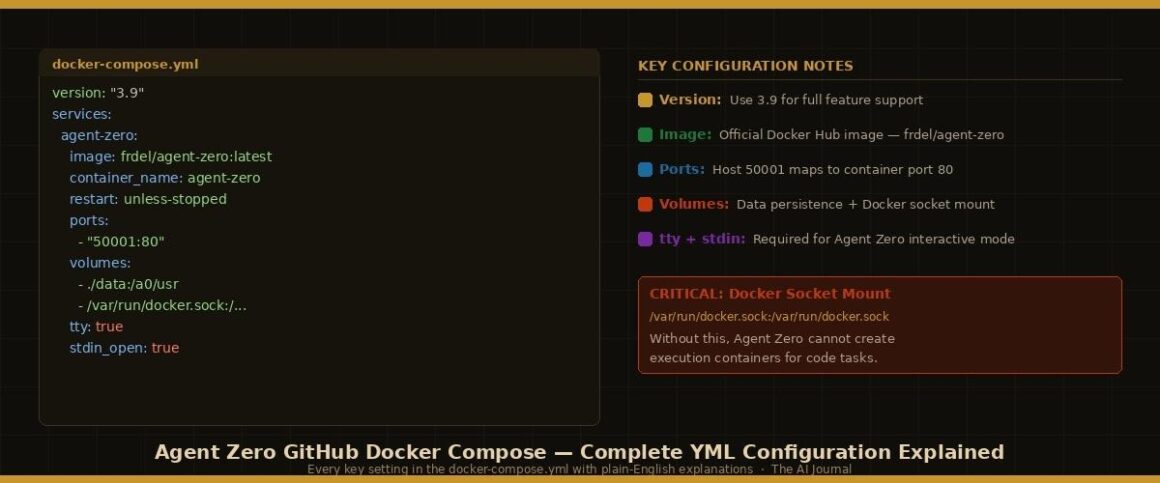
Agent Zero Docker Compose YML — every key setting explained with plain-English annotations · The AI Journal
Before running a single Docker command, spend five minutes understanding what the agent zero github docker compose configuration file is actually doing. This knowledge is what separates beginners who troubleshoot successfully from those who restart their machine and hope the problem disappears.
| docker-compose.yml Complete agent zero docker compose configuration — annotated for beginners |
| version: “3.9” services: agent-zero: # Use the official Agent Zero Docker image from Docker Hub image: frdel/agent-zero:latest # Name the container for easy reference in docker ps and docker logs container_name: agent-zero # Restart automatically if the container crashes or Docker restarts restart: unless-stopped # Map host port 50001 to container port 80 (the web UI) # Access Agent Zero at http://localhost:50001 ports: – “50001:80” # Load environment variables from your .env file env_file: – .env # CRITICAL: Mount the Docker socket for code execution # This lets Agent Zero create child containers safely volumes: – /var/run/docker.sock:/var/run/docker.sock # Persist memories, files, settings across restarts – ./data:/a0/usr # Keep stdin open — Agent Zero interactive processes need this tty: true stdin_open: true # Optional: limit resource usage on shared machines deploy: resources: limits: cpus: ‘4’ memory: 8G |
| Critical security note: Mounting the Docker socket gives the agent zero docker compose container significant privileges over your host system. Always run agent zero github docker compose on machines you trust and control. For production or shared server deployments, use the Docker-in-Docker (DinD) alternative covered in the advanced section below. |
Agent Zero uses a .env file to manage configuration securely — keeping API keys out of the docker compose file itself. Create this file in the same directory as your docker-compose.yml:
| .env Agent zero environment variables — copy and customise this for your setup |
| # ── LLM Provider Configuration ─────────────────────────────────# Option 1: OpenAI (most common choice for beginners)OPENAI_API_KEY=your_openai_api_key_hereOPENAI_BASE_URL=https://api.openai.com/v1OPENAI_MODEL=gpt-4o-mini # Option 2: Anthropic Claude (alternative)ANTHROPIC_API_KEY=your_anthropic_api_key_hereANTHROPIC_MODEL=claude-3-5-sonnet-20241022 # ── Agent Configuration ─────────────────────────────────────────AGENT_ZERO_DATA_DIR=/a0/usr # ── Timezone ────────────────────────────────────────────────────TZ=America/New_York # ── Max concurrent sub-agents (start low on local machines) ─────MAX_AGENTS=3 |
| Which model should beginners use? Start with gpt-4o-mini — it is fast, affordable (roughly $0.001-$0.003 per typical agent zero task), and handles most automation tasks well. Upgrade to gpt-4o or claude-3-5-sonnet when you need more complex reasoning. Never commit your .env file to the agent zero github repository — always check that .gitignore excludes it before pushing. |
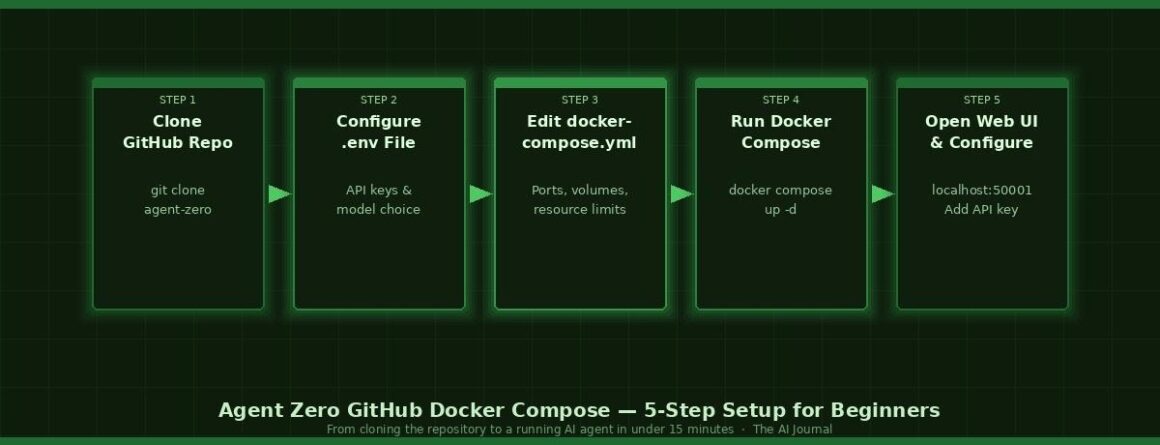
5-Step Agent Zero GitHub Docker Compose setup flow: from cloning to running in under 15 minutes · The AI Journal
With your docker-compose.yml configured and your .env file in place, you are one command away from a running Agent Zero instance. From inside the agent zero github directory:
| Terminal Start Agent Zero in detached mode (runs in the background) |
| # Pull the latest image and start Agent Zero in the backgrounddocker compose up -d # Verify the container is runningdocker ps # Watch the startup logs in real-timedocker compose logs -f agent-zero # Stop Agent Zero when you are donedocker compose down |
What Happens During Startup
| 1 | Image pull phase:Docker downloads the Agent Zero image from Docker Hub (~4 GB on first run). Do not interrupt this — partial downloads cause corruption that requires a fresh pull. |
| 2 | Container creation:Docker creates the agent-zero container with the volume mounts and port bindings from your docker compose file. This takes 2-5 seconds. |
| 3 | Framework initialization:Agent Zero boots its internal services — the web server, memory system, and tool framework. Watch the logs with docker compose logs -f to confirm startup completes without errors. |
| 4 | Ready state:When the logs show the web server is listening, open your browser and navigate to http://localhost:50001. You should see the Agent Zero Web UI. |
| Useful Docker commands: docker compose ps — check container status | docker compose restart agent-zero — restart without full teardown | docker compose pull && docker compose up -d — update to latest image | docker stats agent-zero — live resource usage monitoring |
Once the agent zero github docker compose startup completes, open http://localhost:50001 in your browser. The first thing you will see is a warning banner: “Missing LLM API Key for current settings.” This is expected. Click Settings, navigate to the API Keys section, enter your OpenAI or Anthropic key, and click Save.
Test the setup immediately with a simple task before trusting it with anything important:
| Agent Zero Web UI — First Test Prompt Type this into the chat to verify code execution is working |
| Create a Python script that prints “Hello from Agent Zero”and the current date/time, then execute it and show me the output. |
A successful response will show Agent Zero reasoning through the task, writing the Python code, executing it inside a child Docker container, and returning the output — all visible in the Web UI in real time. If Agent Zero shows the code but cannot execute it, the Docker socket mount in your agent zero docker compose file is the issue.
Running Multiple Agent Zero Instances
One real advantage of the agent zero github docker compose approach is how easily it scales to multiple simultaneous instances — each with different projects, API keys, or model configurations. Each instance needs unique ports and separate data volumes:
| docker-compose.yml Multi-instance agent zero docker compose configuration |
| version: “3.9” services: # Instance 1 — Development workspace agent-zero-dev: image: frdel/agent-zero:latest container_name: agent-zero-dev restart: unless-stopped ports: – “50001:80” env_file: – .env.dev volumes: – /var/run/docker.sock:/var/run/docker.sock – ./data-dev:/a0/usr tty: true stdin_open: true # Instance 2 — Research workspace (different port and data folder) agent-zero-research: image: frdel/agent-zero:latest container_name: agent-zero-research restart: unless-stopped ports: – “50002:80” env_file: – .env.research volumes: – /var/run/docker.sock:/var/run/docker.sock – ./data-research:/a0/usr tty: true stdin_open: true |
Docker-in-Docker Configuration for Production
For production deployments or shared servers, the agent zero docker compose setup supports Docker-in-Docker for stricter isolation. Instead of mounting the host Docker socket, Agent Zero runs its own internal Docker daemon:
| docker-compose.yml DinD configuration — better isolation for production agent zero deployments |
| version: “3.9” services: agent-zero: image: frdel/agent-zero:latest container_name: agent-zero privileged: true restart: unless-stopped ports: – “50001:80” environment: – DOCKER_HOST=tcp://docker:2376 – DOCKER_TLS_VERIFY=1 env_file: – .env depends_on: – docker volumes: – ./data:/a0/usr tty: true stdin_open: true docker: image: docker:dind privileged: true environment: – DOCKER_TLS_CERTDIR=/certs volumes: – docker-certs:/certs – docker-data:/var/lib/docker volumes: docker-certs: docker-data: |
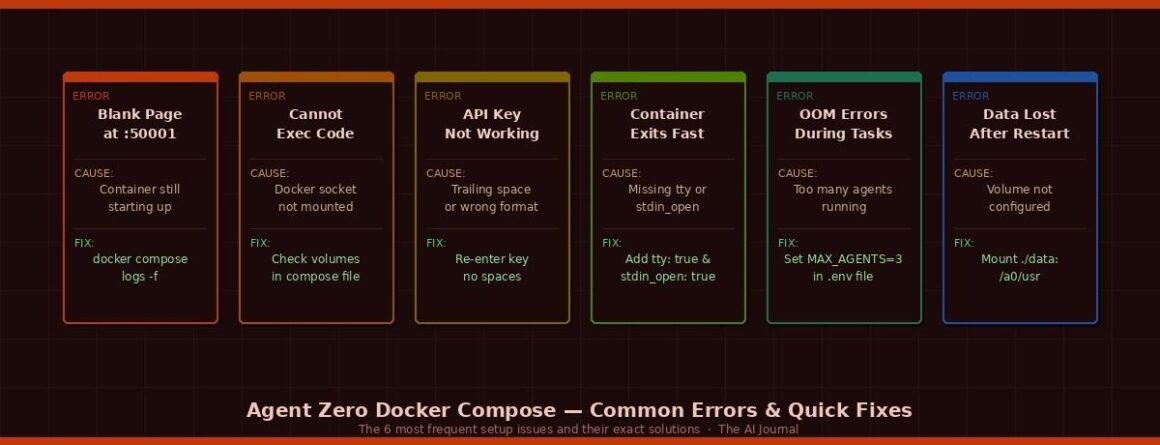
Agent Zero Docker Compose — 6 most common errors and their exact fixes · The AI Journal
Even with a correct agent zero github docker compose configuration, beginners hit the same set of problems repeatedly. Here is the definitive list with exact solutions:
| Error / Symptom | Root Cause | Exact Fix |
| Blank page at localhost:50001 | Container not fully started yet | Run docker compose logs -f and wait for web server ready message. Usually 15-30 seconds after docker compose up. |
| Connection refused at :50001 | Port conflict or container not running | Run docker ps to confirm container is up. If not, run docker compose up -d. Change host port in compose file if 50001 is occupied. |
| Agent cannot execute code | Docker socket not mounted correctly | Verify volumes section includes /var/run/docker.sock. On macOS, also enable “Allow default Docker socket” in Docker Desktop settings. |
| “Missing LLM API Key” persists | Key not saved or invalid format | Check for trailing spaces. OpenAI keys start with sk-. Anthropic keys start with sk-ant-. Re-enter and click Save, then refresh. |
| Container exits immediately | Missing tty: true or stdin_open | Ensure both tty: true and stdin_open: true are in your docker compose service definition. |
| OOM errors during tasks | Too many concurrent sub-agents | Set MAX_AGENTS=3 in your .env file. On 8 GB RAM, running more than 3 agents simultaneously causes out-of-memory kills. |
| Data lost after docker compose down | Volume not mounted for persistence | Add ./data:/a0/usr to volumes. Never map the entire /a0 directory — map only /a0/usr or you break upgrades. |
| Port 50001 already in use | Previous Agent Zero instance running | Run docker compose down first, then docker compose up -d. Or change the host port to 50002 in your compose file. |
One of the genuine advantages of the agent zero github docker compose setup is how cleanly it handles updates. Because Agent Zero runs as a Docker image, updating to the latest version is a two-command process that takes under two minutes and preserves all your data:
| Terminal Update Agent Zero to the latest version without losing your data |
| # Pull the latest Agent Zero image from Docker Hubdocker compose pull # Restart with the new image (data in ./data/ is preserved)docker compose up -d # Verify the updated version is runningdocker compose logs agent-zero | grep version |
Backing Up Your Agent Zero Data
If you have correctly configured the volume mount (./data:/a0/usr), your Agent Zero memories, files, and settings are stored in the ./data folder on your host machine. Backing this up is a single command:
| Terminal Backup and restore Agent Zero data |
| # Create a timestamped backup of your Agent Zero datacp -r ./data ./data-backup-$(date +%Y%m%d) # To restore from backupcp -r ./data-backup-20260429 ./data # Restart Agent Zero to pick up the restored datadocker compose restart agent-zero # Clean up unused execution containers (free disk space)# IMPORTANT: Only run this — not docker system prune –volumesdocker container prune -f |
| Performance tip: If Agent Zero slows down over time, the most common cause is accumulated execution container data. Run docker container prune -f to clean up unused containers. Agent Zero creates a new execution container for each code-running task — these accumulate quickly with heavy use. Never run docker system prune –volumes as this will wipe your agent data volume. |
What is the difference between the agent zero github docker compose setup and the official install script?
The install script is faster for getting started but gives you less control over configuration. The manual agent zero github docker compose approach gives you full visibility into the compose file — letting you customise ports, resource limits, environment variables, and volume mounts before the first run. For production or multi-instance setups, the manual approach is significantly better.
Do I need a GPU to run agent zero github docker compose?
No. Agent Zero itself does not require a GPU because the heavy LLM inference happens through your API provider on their servers — not on your machine. Your local machine only needs sufficient CPU and RAM to run the docker compose container, manage the web interface, and handle code execution tasks. 8 GB RAM is the practical minimum; 16 GB is recommended for multi-agent workflows.
Can I use agent zero docker compose without an API key using a local model?
Yes. Agent Zero supports local LLM providers through the OpenAI-compatible API format. Tools like Ollama expose a local endpoint that Agent Zero can connect to. Set OPENAI_BASE_URL=http://host.docker.internal:11434/v1 and OPENAI_API_KEY=ollama in your .env file. Llama 3.1 and Mistral 7B work reasonably well for simpler tasks on consumer hardware.
How do I change the port from 50001 in the agent zero docker compose file?
Edit the ports section in your agent zero docker compose file. Change the host-side port (before the colon): “8080:80” makes Agent Zero available at http://localhost:8080. The :80 after the colon is the container port — do not change this. Then run docker compose down && docker compose up -d to apply the change.
Is agent zero github docker compose safe to run on a cloud VPS?
Yes, with the right precautions. Use the Docker-in-Docker configuration rather than the socket mount for better isolation on shared servers. Configure authentication in Agent Zero settings to prevent unauthorised access. Use a reverse proxy (Nginx or Caddy) with SSL instead of exposing port 50001 directly. The agent zero github repository includes a dedicated VPS deployment guide.
How do I completely reset agent zero docker compose and start fresh?
Stop the container with docker compose down, delete the ./data folder (this removes all memories, files, and settings), then run docker compose up -d. Agent Zero will initialise fresh. If you also want the latest image, add docker compose pull before the final up command.
| Stay Ahead of the AI Agent Curve Weekly practical guides on AI tools, Docker setups, and agentic workflows | The AI Journal |


