
Yes, AI agents can make outbound calls, hold real conversations, handle objections, book appointments, and update your CRM automatically. This isn’t future technology. Small businesses, solo operators, and enterprise sales teams are running these systems right now. This guide tells you exactly how they work, which platforms to use, how much they cost, and how to build one yourself, even if you’ve never written code.
Best Platforms by Use Case
| Use Case | Best Platform | Cost Estimate | Setup Time |
| Fastest setup, no code | Retell AI | $0.07/min | 2–3 hours |
| High-volume outbound | Bland AI | ~$0.09/min | 4–6 hours |
| Full customization | VAPI | $0.05/min + fees | 1–3 days |
| Tightest budget | Synthflow | $29/month + usage | 3–4 hours |
| Zero budget start | VAPI or Retell free trial | $10 free credits | Same day |
1. Can AI Agents Legally Make Outbound Calls Without Breaking TCPA and GDPR Rules?
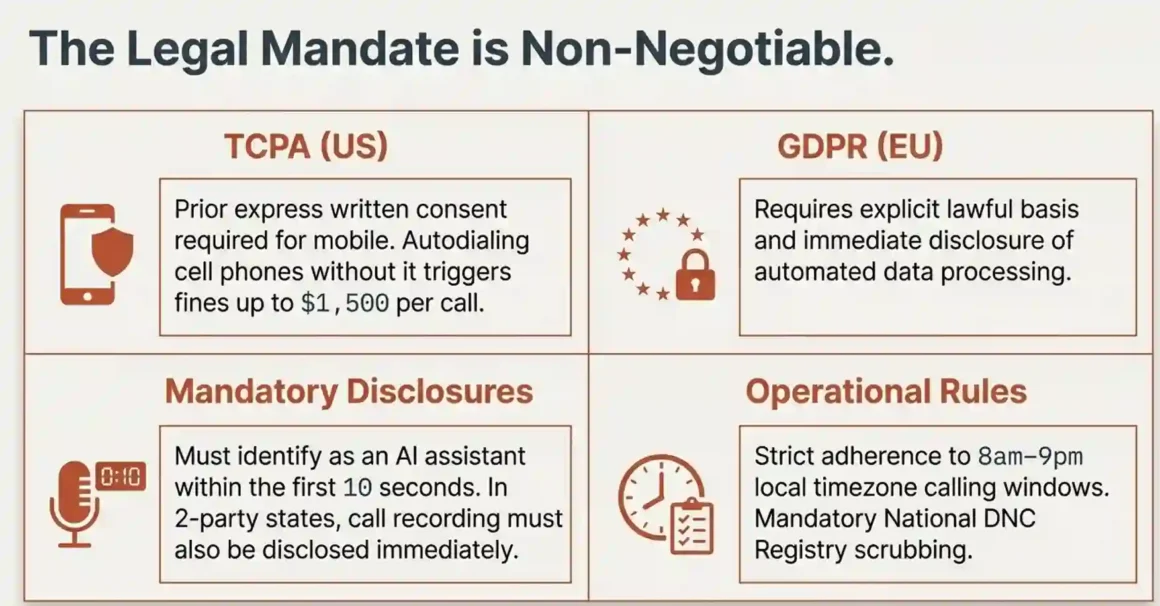
Short answer: Yes, but you need prior consent, proper caller ID, and opt-out mechanisms in place. Skip these and you’re looking at fines up to $1,500 per call under TCPA.
This is the first question to answer before you build anything. A lot of people jump straight to the technology and ignore the legal side. That’s a serious mistake.
What the law actually says:
TCPA (Telephone Consumer Protection Act) governs calls in the United States. Under TCPA, AI agents qualify as “artificial or prerecorded voice” systems. That means before you call someone’s mobile phone using an AI agent, you need their prior express written consent. Not implied consent. Not “they gave us their email so they probably want calls.” Written consent.
For landlines, the rules are slightly looser but only slightly. For business-to-business calls, TCPA requirements are less strict, which is why B2B sales teams find AI calling more straightforward to launch.
GDPR applies if you’re calling anyone in the European Union. Under GDPR, automated processing of personal data (which is exactly what an AI calling system does) requires a lawful basis — either consent or legitimate interest. You also need to tell people they’re interacting with automated processing.
FCC rules added in 2024:
The FCC clarified in early 2024 that AI-generated voices in calls count as “artificial voices” under TCPA. This closed a loophole some platforms were using and means the consent requirements apply clearly to AI voice agents.
Practical compliance checklist before you launch:
- Do Not Call list scrubbing: before uploading your contact list to any platform, check it against the National DNC Registry. Most platforms (Retell AI, Bland AI) have built-in DNC scrubbing. VAPI requires you to handle this yourself.
- Calling hours: 8am to 9pm in the contact’s local timezone. Call at 10pm and you’ve violated TCPA regardless of consent.
- Caller ID authentication: register your number with CNAM (Caller Name) so recipients see your business name, not “Unknown.” Set up STIR/SHAKEN authentication this is what carriers check to verify calls aren’t spoofed.
- Opt-out mechanism: every AI call must offer a clear way for the recipient to opt out. Most platforms let you add a phrase like “Press 9 to be removed from our call list” which automatically adds them to a suppression list.
- Disclosure: several US states (California, Connecticut, others) require the AI agent to disclose at the start of the call that it’s an AI. Best practice is to disclose in every call regardless of state.
Platform compliance features you should know:
Retell AI holds HIPAA, SOC 2 Type II, and GDPR certifications. This makes it the default choice for healthcare-adjacent businesses that need to call patients or prospects about health-related services.
Bland AI includes HIPAA compliance in its standard pricing. No add-on required.
VAPI charges a separate $1,000/month for HIPAA compliance. If you’re in healthcare, that changes your cost calculation significantly.
One thing most guides skip: call recording disclosure. Many US states are two-party consent states (California, Florida, and Washington, among others). If your AI agent records the call — which most do for quality review you must disclose this at the start. “This call may be recorded for quality purposes” isn’t optional in these states. It’s a legal requirement.
Explore AI voice agent for real estate. 24/7 property tours, instant lead qualification, booking automation. 3x conversion boost—perfect for high-volume real estate inquiries!
2. Which AI Calling Platforms Actually Work for Outbound Sales?
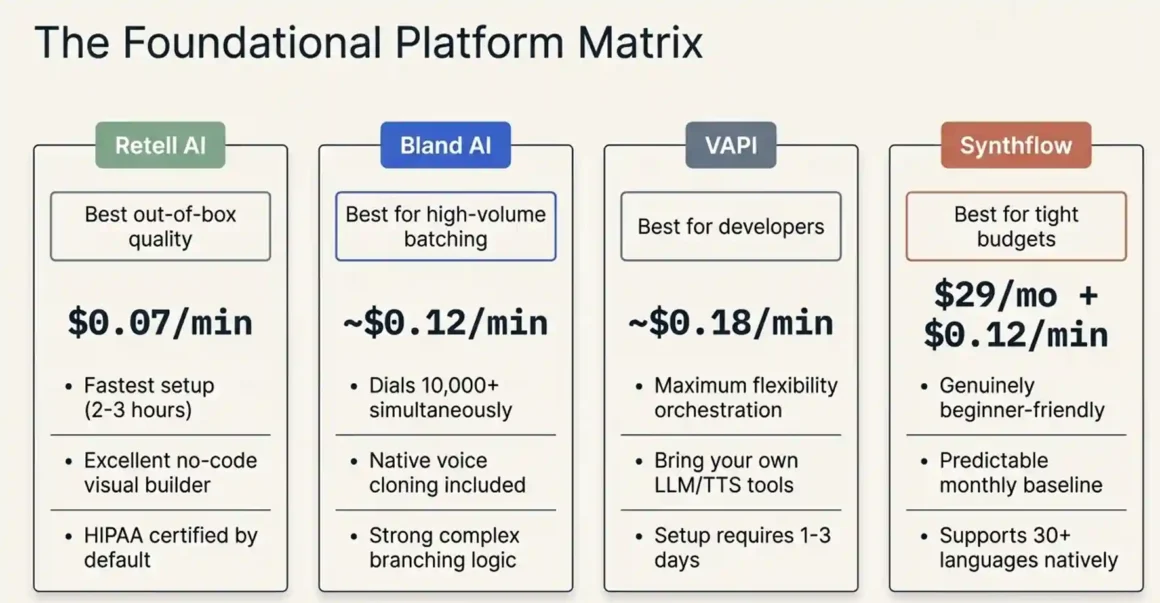
Short answer: Retell AI for quality and ease of setup. Bland AI for high-volume outbound campaigns. VAPI if you need deep customization and have developer resources.
These are the three platforms most teams land on after testing. Here’s the honest comparison.
Retell AI
Cost: $0.07 per minute. Latency: approximately 600ms fast enough that most callers don’t notice a pause. Voice quality is the strongest of the three out of the box.
What it does well: the visual conversation builder lets you map out call flows without writing code. You can build a branching conversation if the prospect says they’re interested, go to branch A; if they object on price, go to branch B using a drag-and-drop interface. Setup time for a basic outbound campaign is 2–3 hours.
The free tier gives you $10 in credits, which is roughly 140 minutes of calls. Enough to fully test before spending anything.
What it doesn’t do as well: VAPI offers more customization for complex workflows. Bland AI handles very high volume (batch calling thousands of contacts simultaneously) more efficiently.
Bland AI
Cost: approximately $0.09 per minute base, but extra charges apply for GPT-4 model usage, transcription, and voice cloning. Your real cost at scale is closer to $0.12–$0.15 per minute depending on configuration.
What it does well: batch calling. You can upload a list of 10,000 contacts and Bland AI will call all of them simultaneously (within your quota limits), rather than queuing them sequentially. For outbound prospecting at volume, this is a significant operational advantage.
Bland Pathways is their visual builder for conversation flows similar to Retell’s but with stronger branching logic for complex sales scripts.
What it doesn’t do as well: voice quality isn’t as polished as Retell AI out of the box. You’ll want to spend time selecting and testing voices before launch.
VAPI
Cost: $0.05 per minute base, but this is misleading. You pay separately for speech-to-text (STT), the language model (LLM), text-to-speech (TTS), and telephony. When you add everything up, real-world VAPI costs run $0.13 to $0.31 per minute, depending on which providers you use for each component.
What it does well: maximum flexibility. VAPI is essentially an orchestration layer; you choose your own LLM (GPT-4, Claude 3, Llama), your own TTS (ElevenLabs, Azure, Deepgram), and your own telephony (Twilio, Vonage, Telnyx). If you want to build something highly customized, VAPI is the right foundation.
What it doesn’t do as well: it requires more technical skill. Setting up VAPI properly takes 1–3 days of developer time. The no-code visual builder exists but is less mature than Retell’s.
Other platforms worth knowing:
Synthflow: $29/month base plus approximately $0.12 per minute. Good for small businesses that want a predictable monthly fee. Supports 30+ languages. The no-code interface is genuinely beginner-friendly.
Goodcall: $59/month. Positioned more at small business inbound handling but works for basic outbound. Limited customization.
PolyAI: enterprise-tier only. Not publicly priced. Used by large contact centers. Achieves approximately 80% query resolution rate the highest documented figure in the industry.
11x AI: focuses specifically on SDR automation. The interface is built for sales teams who aren’t technical. Good for appointment setting campaigns.
Discover best AI phone call agent background noise. Crystal-clear conversations despite noise, real-time transcription. Enterprise voice AI ready!
3. How Much Does It Really Cost to Make 10,000 AI Outbound Calls Per Month?
Short answer: 10,000 calls per month costs roughly $700–$1,600 depending on platform and average call duration. That’s 60–90% less than running a human call center for the same volume.
The math that actually matters is cost per conversation, not cost per minute. A call that connects and runs for 3 minutes costs very differently than a call that hits voicemail in 10 seconds.
Realistic cost estimate (assuming average 2-minute connected call duration):
10,000 calls at 40% connection rate = 4,000 connected calls at 2 minutes each = 8,000 connected minutes. Plus voicemail drops and AMD detection time on the 6,000 unanswered calls = roughly 2,000 additional minutes. Total: approximately 10,000 minutes per month.
- Retell AI: 10,000 minutes × $0.07 = $700/month
- Bland AI: 10,000 minutes × $0.12 (blended real cost) = $1,200/month
- VAPI: 10,000 minutes × $0.18 (mid-range configuration) = $1,800/month
- Synthflow: $29 base + 10,000 minutes × $0.12 = $1,229/month
Compare that to human callers:
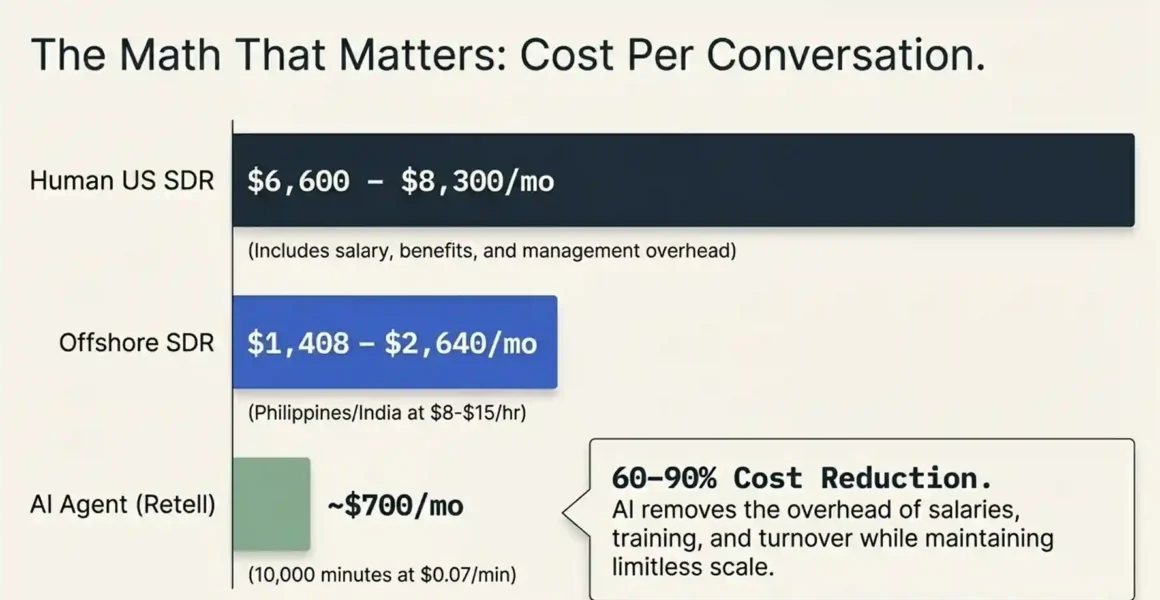
A US-based SDR costs $50,000–$70,000 per year in salary alone, plus benefits, management overhead, training, and turnover costs. A realistic all-in cost for one SDR is $80,000–$100,000 annually. That SDR can make 40–80 outbound calls per day on a good day.
An offshore call center in the Philippines or India runs $8–$15 per hour per agent. At 8 hours/day, 22 working days/month, that’s $1,408–$2,640/month per agent.
At 10,000 calls per month with Retell AI at $700, you’re comparing $700 to $1,400–$2,640 for an offshore agent doing similar volume. That’s the 60–80% cost reduction that gets cited in the industry.
Hidden costs you need to budget for:
Phone number rental: $1–$2 per month per number (Twilio rates). If you’re rotating numbers to protect caller reputation, multiply this.
CRM integration: if you use Zapier to push call outcomes to HubSpot or Salesforce, Zapier charges based on task volume. At 10,000 calls, you’re triggering 10,000+ Zapier tasks. The Zapier Professional plan at $49/month caps at 2,000 tasks. For 10,000, you need the Team plan at $299/month or direct API integration.
Voice cloning: ElevenLabs charges $22–$99/month for voice cloning access depending on tier. If you want your AI agent to sound like a specific person, budget for this.
Cost optimization strategies that actually work:
Use batch calling on Bland AI for large lists. Batch processing can unlock 10–20% discounts at volume.
Schedule calls for off-peak hours (late morning, early afternoon on weekdays). Connection rates are higher, and on some platforms, lower-demand periods have better latency performance.
For simple use cases appointment reminders, payment notifications, survey calls use smaller, cheaper LLMs. You don’t need GPT-4 to remind someone about their dentist appointment tomorrow. GPT-3.5 or a smaller local model cuts your LLM cost by 70%.
4. Can You Build an AI Outbound Calling Agent Without Writing Any Code?
Short answer: Yes. Retell AI, Bland AI, and Synthflow all have no-code builders that let you launch a working outbound calling agent in a few hours. For anything beyond basic call flows, you’ll eventually hit limits but you can get a lot done without code.
This is where most people worry unnecessarily. The no-code tools have genuinely improved. You don’t need to be a developer to get a working AI calling agent running.
Step-by-step setup using Retell AI (no code required):
Step 1: Create your account and get your phone number. Sign up at retellai.com. You get $10 in free credits. Go to “Phone Numbers” and either purchase a new number through Retell (they use Twilio on the backend, starting at $2/month) or connect your existing Twilio number. The connection is done through an API key Retell’s interface walks you through this with copy-paste instructions.
What NOT to do: don’t start calling from a brand new number at high volume on day one. A fresh phone number with no calling history gets flagged as spam quickly. Start with 10–20 calls per day and ramp up over 2 weeks.
Step 2: Build your conversation flow. Click “Create Agent” and choose “Outbound” type. Retell opens a visual editor. You write your agent’s opening line something like “Hi [contact_name], this is Sarah calling from [company_name], do you have 30 seconds?” and then build branches based on responses.
For each branch, you write what the agent says and define what triggers that branch. “If the person says yes or they have time” → move to pitch. “If they say they’re busy” → offer a callback. “If they say not interested” → politely close and log outcome.
The key to a good script: write it the way your best human caller actually talks. Not formal business language. Conversational, short sentences, and natural transitions. Record your best human sales call, transcribe it, and use that as your starting point.
Step 3: Upload your contact list. Prepare a CSV file with columns: phone_number, first_name, last_name, and any custom fields you want the agent to reference (company name, last purchase date, etc.). Import it into Retell under “Contacts.”
Clean your list before uploading. Remove numbers from the National DNC Registry. Validate phone number formats. Fix any names with special characters. A dirty list creates compliance risk and wastes calling credits.
Step 4: Configure calling schedule. Set calling hours (start with 9am–5pm in the contact’s timezone), maximum attempts per contact (2–3 is standard), and minimum time between attempts (at least 24 hours).
Step 5: Test before launching. Make 10 test calls to your own numbers mobile and landline. Listen to the recordings. Note where the conversation feels unnatural, where pauses are too long, and where the agent’s responses miss the intent of what was said. Adjust your prompt and test again. Don’t skip this step.
Where no-code hits its limits:
If you need the agent to look up data in real-time during a call, like checking a customer’s order status in your database, or querying available appointment slots from your calendar, that requires API calls during the conversation. You can handle this in Retell through their “function calling” feature, but you’ll need to either write a simple webhook or use a developer resource to set up the data connection.
If you need complex conditional logic more than 4–5 branches no-code builders become unwieldy. At that point, moving to code-level configuration with VAPI or Retell’s API gives you much cleaner workflow management.
The hybrid approach that works best:
Start with no-code to validate your script and workflow. Run 200–500 calls. Analyze the recordings, find where the agent fails, and improve the prompt. Once you’ve proven the concept works, bring in a developer to build the API integrations and custom logic on top of the validated foundation.
5. How Do AI Outbound Callers Handle Objections Without Sounding Robotic?
Short answer: Modern AI calling agents use large language models (GPT-4, Claude 3) combined with fast text-to-speech to understand context and respond naturally. Under 600ms latency with good voice quality makes most conversations feel human. Above 1,000ms, it feels like a bad overseas call.
This is the technical reality under the hood explained without jargon.
The three-layer technology stack:
When you speak into the phone during an AI outbound call, three things happen in sequence, and they must happen fast:
Layer 1 — Speech-to-Text (STT): your spoken words get converted to text. Deepgram is the fastest STT provider in this use case, typically processing speech in 100–200ms. Whisper (OpenAI’s model) is slightly slower but often more accurate for accented speech.
Layer 2 — Language Model (LLM): the text of what you said gets sent to a language model along with the conversation history and the agent’s instructions. GPT-4 reads everything — what you said, what was said earlier in the call, and the agent’s persona and goals — and generates the appropriate text response. This takes 200–400ms.
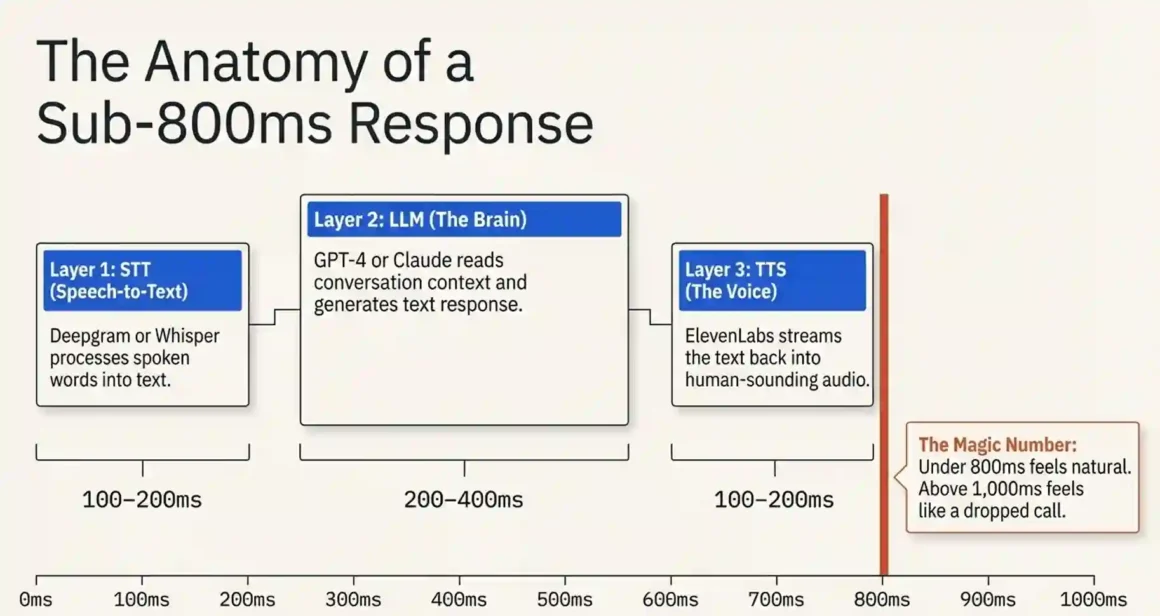
Layer 3 — Text-to-Speech (TTS): the text response gets converted back to audio and played on the call. ElevenLabs is the quality leader here. Their voices sound genuinely human with natural breathing patterns, slight pacing variations, and emotional tone. This takes 100–200ms.
Add those together and you get 400–800ms total latency roughly the same as a slight pause in conversation. Below 800ms, most people don’t consciously notice a delay. Above 1,000ms, it starts to feel like there’s a problem.
How context handling actually works:
The LLM reads the entire conversation history with each response. When a prospect says “I already tried something like this and it didn’t work,” the AI can refer back to what was said earlier in the call, acknowledge the specific concern, and respond to that specific objection rather than giving a generic “I understand your concern” deflection.
Where it struggles: calls longer than 6–8 turns start consuming more context tokens, which can slow response time and occasionally cause the model to lose track of earlier details. For complex enterprise sales conversations, this is a real limitation. For qualification calls, appointment setting, and surveys which most AI outbound campaigns target 4–6 turns is sufficient.
Barge-in support:
This is the ability for the caller to interrupt mid-sentence. Early AI voice systems couldn’t handle this — if you spoke while the AI was talking, it either ignored you or crashed the flow. Modern platforms (Retell AI, Bland AI, VAPI) all support barge-in. The agent stops speaking, processes your interruption, and responds to it.
Voice cloning for natural sound:
ElevenLabs’ voice cloning takes 1–5 minutes of audio from a real person and generates a cloned voice model. The result sounds like that person, including their natural pacing and tone. Bland AI has native voice cloning built in. Retell AI connects to ElevenLabs for cloning.
Research from multiple AI calling platforms suggests that voice-cloned agents show approximately 40% better engagement (longer conversations, higher qualification rates) versus generic TTS voices. The likely reason: people are more comfortable staying on a call that sounds genuinely human.
Explore artificial intelligence receptionist. 24/7 scheduling, multilingual support, visitor management. Frictionless front-desk automation live!
6. What Infrastructure Do You Need to Run Your Own AI Calling Agent?
Short answer: For most small and medium businesses, building on a SaaS platform (Retell, Bland, VAPI) is far cheaper and faster than self-hosting. Self-hosting only makes financial sense above 50,000 calls per month or if you have strict data residency requirements.
This section is for people who want to understand the full technical stack — or who are considering building their own system.
The open-source DIY stack:
If you want to build entirely from scratch, these are the components:
Telephony: Twilio handles phone number provisioning, SIP trunking, and call management via their Programmable Voice API. Cost: $1/month per number plus $0.013 per minute for calls. Twilio has excellent documentation and handles carrier relationships so you don’t have to.
Orchestration: VAPI can be self-hosted, or you use LangChain/LangGraph to build custom conversation management logic. This is where your conversation flow lives — the branching logic, context management, and tool calling.
Speech-to-Text: Whisper (open-source, self-hostable) or Deepgram API ($0.0043/minute). For self-hosting Whisper, you need a server with a GPU — a basic A10G instance on AWS costs around $1.50/hour.
Language Model: OpenAI API (GPT-4 at $0.03/1K input tokens, $0.06/1K output tokens), Anthropic API (Claude 3 Sonnet at $3/million input, $15/million output), or self-hosted Llama 3 70B on your own GPU infrastructure.
Text-to-Speech: ElevenLabs API ($0.30/1K characters for Starter plan) or Coqui TTS (open-source, self-hostable but lower quality).
What self-hosting actually costs:
A production-grade self-hosted AI calling system needs: a GPU server for LLM inference (AWS p3.2xlarge at ~$3/hour or dedicated hardware at $15,000–$30,000 upfront), a telephony gateway, low-latency network connections to carriers, and a Session Border Controller (SBC) for security and routing.
Realistic monthly cost for a self-hosted production system: $2,000–$5,000/month at minimum, not counting engineering time for maintenance.
At 10,000 calls/month, this is more expensive than Retell AI at $700. At 100,000 calls/month, self-hosting starts to become economically rational.
When self-hosting makes sense:
Your call volume exceeds 50,000 per month. You’re in an industry with strict data residency requirements (your call recordings cannot be processed by a US-based SaaS provider). You need a completely custom voice model that no SaaS platform supports. You already have telephony infrastructure (an existing contact center platform).
7. How Do You Connect AI Outbound Callers to Your CRM, Calendar, and Payment Systems?
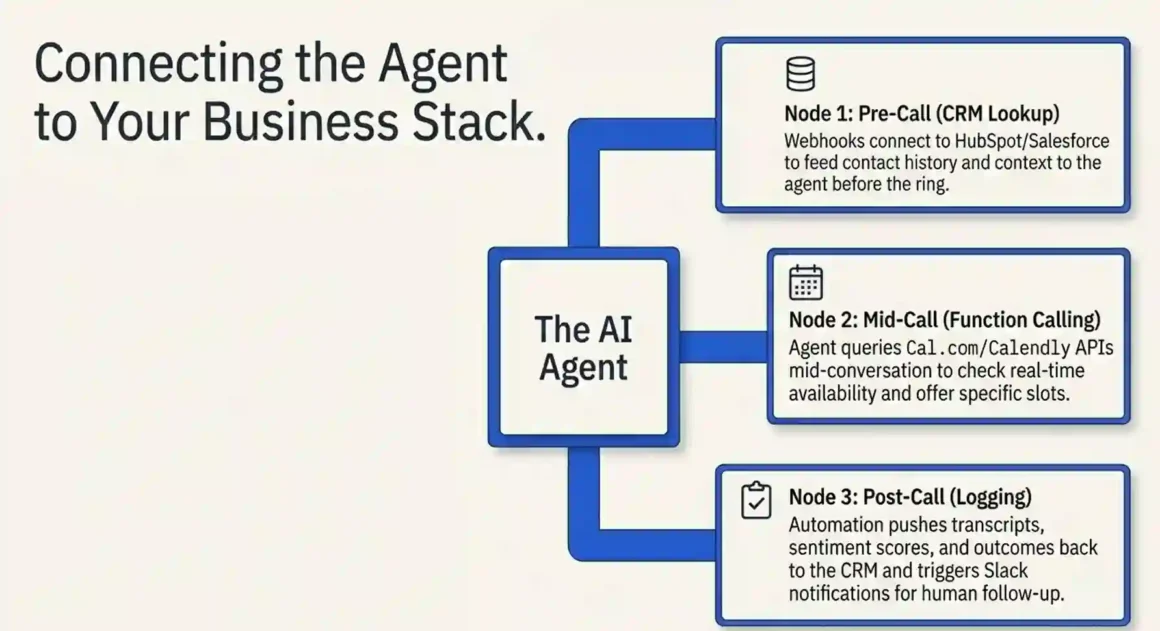
Short answer: Retell AI and Bland AI have native integrations with HubSpot and Salesforce. For everything else, Zapier or direct API webhooks handle the connection. Most CRM integrations can be set up in under an hour without developer skills.
This is what separates a useful AI calling agent from a powerful one. An agent that can look up a customer’s history before calling, check available calendar slots during the call, and automatically update the CRM with the outcome that’s where the real value is.
Native integrations (built into the platform, no code):
Retell AI includes 10+ native integrations including HubSpot, Salesforce, and Cal.com for calendar booking. You authenticate with your CRM account, map fields, and the agent automatically logs call outcomes.
Bland AI includes HubSpot, Salesforce, Slack, and others. The Slack integration is particularly useful — a notification fires in your sales Slack channel every time an agent qualifies a lead.
VAPI integrates with 40+ apps through Make (formerly Integromat) and GoHighLevel natively. If you use GoHighLevel as your CRM (common in marketing agencies and coaching businesses), VAPI + GoHighLevel is a very clean setup.
Webhook integrations (low code, very flexible):
Every major platform supports webhooks — HTTP POST requests sent to a URL of your choice when something happens during or after a call. You can receive a webhook when:
- A call starts (use this to look up the contact in your CRM and pass their history to the agent)
- A call ends (use this to log the outcome, transcript, and sentiment score)
- The agent books an appointment (use this to create the calendar event and send confirmation)
- The contact requests a callback (use this to create a task in your CRM)
If you’re comfortable with tools like Zapier or Make, you can build these workflows without coding. If you’re not, you can use Claude.ai (Anthropic’s AI assistant) to write the webhook handler code for you. Describe what you want in plain English “when I receive a webhook from Retell AI with call outcome ‘appointment booked’, create a new deal in HubSpot” and Claude will write the code. Copy it to a platform like Replit or Railway (both have free tiers), deploy it, and paste the URL into your platform’s webhook settings.
Master AI chatbots website conversion rates. 40% lift via personalized funnels, cart recovery. Visitors → revenue conversion perfected!
Real-time data lookup during calls (function calling):
This is more advanced but very powerful. Function calling lets the AI agent make API requests mid-conversation. For example:
The agent asks “What date works best for your demo call?” The prospect says “Next Tuesday.” The agent triggers a function call to your Cal.com or Calendly API, checks availability for next Tuesday, gets back “10am and 2pm are available,” and tells the prospect those options all within a second.
To implement function calling in Retell AI: go to Agent Settings → Functions → Add Function. Define the function name, description, and the API endpoint it calls. Retell’s LLM will automatically decide when to call this function based on the conversation context.
Step-by-step CRM integration for HubSpot (no code):
- In Retell AI, go to Integrations → HubSpot → Connect
- Authorize with your HubSpot account
- Map Retell fields to HubSpot properties: call outcome → “Last Activity Type,” transcript summary → “Last Activity Note,” appointment date → “Next Activity Date”
- Choose trigger: “On Call End”
- Test with a single call and verify the contact record in HubSpot updates correctly
8. Can AI Agents Make Calls in Multiple Languages for Global Campaigns?
Short answer: Yes. Retell AI and Bland AI both support 18+ languages. Synthflow supports 30+. The quality varies significantly by language English is best, Spanish and French are strong, and less common languages can sound stilted.
What multilingual support actually means in practice:
The LLM (GPT-4 or Claude 3) understands and generates text in most major languages natively. When a prospect responds in Spanish, the model understands it and responds in Spanish without you needing to configure language detection. This is automatic.
The voice quality in non-English languages depends on your TTS provider. ElevenLabs has strong Spanish, French, German, Italian, and Portuguese voices that sound natural. For languages like Hindi, Mandarin, or Arabic, quality varies more some voices sound good, others don’t. Always test with a native speaker before running campaigns in a new language.
Localization details that matter:
Timezone-aware scheduling: don’t just translate your script. A campaign calling Mexico City needs to respect Mexico City business hours (CST), not US Eastern time. Configure timezone settings per contact, not per campaign.
Cultural greeting protocols differ meaningfully. In Brazil, opening a sales call with a direct pitch is considered rude. A warmer personal opening is expected. In Germany, professionalism and directness are valued. Your script needs local adaptation, not just translation.
Compliance by country: GDPR applies across the EU with consistent consent requirements. Canada has CASL (Canadian Anti-Spam Legislation) which has different requirements from TCPA. Australia has the Do Not Call Register. Each market needs its own compliance configuration.
Practical language testing approach:
Before running any multilingual campaign, record 5 test calls in the target language. Send the recordings to a native speaker and ask them to rate naturalness on a 1–10 scale. Ask specifically about the voice quality, the grammar of the AI’s responses, and whether the phrasing sounds culturally appropriate. A score below 7 means the campaign will underperform. Improve the script or switch TTS voice before launching.
9. How Do You Measure Whether AI Calls Are Actually Converting?
Short answer: Track connection rate, conversation duration, qualification rate, and cost per booked appointment. AI typically achieves 60–80% of human conversion rates at 20–30% of the cost. For most outbound use cases, that math works strongly in favor of AI.
The metrics that tell you if the campaign is working:
Connection rate: percentage of calls that result in a live conversation (not voicemail, not immediate hang-up). A good outbound connection rate is 15–30%, depending on list quality and time of day. Below 10% means your list is bad, your number is being flagged as spam, or your calling hours are wrong.
Conversation duration: the average time spent on connected calls. For a qualification call, 90–180 seconds is healthy. If average duration is under 45 seconds, either the agent is losing people immediately or the offer isn’t relevant to the list.
Qualification rate: percentage of conversations that result in the desired outcome (appointment booked, qualified lead identified, survey completed). This is your core conversion metric.
Cost per qualified lead: total monthly platform cost ÷ number of qualified leads. If you spend $700 on Retell AI and generate 140 qualified appointments, your cost per appointment is $5. Compare that to your human SDR’s cost per appointment and you have your ROI calculation.
A/B testing AI versus human callers correctly:
Run parallel campaigns simultaneously same offer, same contact list quality, same time of day, same target market. Split contacts randomly 50/50. Run for 500 calls minimum on each side before comparing metrics. Less than 500 calls and your results won’t reach statistical significance.
Most honest comparisons find AI achieves 60–80% of human conversion rates for appointment setting and qualification. For complex sales (enterprise software, high-ticket services where trust and relationship matter early), humans still outperform AI by a meaningful margin.
Optimization techniques after launch:
Review call recordings weekly. Most platforms generate transcripts automatically. Search for the moments where conversations end the exact objection or response that caused a hang-up. Update your prompt to handle those scenarios better.
Test call timing. Tuesday through Thursday, 10am–11:30 am and 2pm–4pm in the contact’s local time, consistently outperforms other windows in most industries. Monday mornings and Friday afternoons reliably underperform.
Run voice A/B tests. Test two different voices on the same script. Conversion differences of 15–25% between voice options are common.
Explore how AI agents transform content marketing. 5x output, 300% engagement. Research/SEO automation unlocked!
10. What Kills AI Calling Campaigns (And How to Avoid It)?
Short answer: High latency, spam labeling by carriers, and context loss after 3–4 conversation turns are the three most common campaign killers. All three are preventable with the right setup.
Problem 1: Carrier spam labeling
This is the single biggest operational failure point. When AT&T, Verizon, or T-Mobile decide your number is making spam calls, they label your caller ID as “Spam Risk” or “Scam Likely.” Your connection rate drops from 20% to 2% overnight. Most campaigns that fail do so because of this, not because the AI is bad.
How it happens: calling too many numbers too fast from a new number, a high percentage of calls ending with immediate hang-ups, and complaints submitted by call recipients.
How to prevent it:
Ramp your volume gradually. Start with 10 calls/day from a new number. After one week, increase to 50/day. After two weeks, 200/day. After a month, 500+/day. This mimics normal human calling patterns and avoids triggering carrier algorithms.
Register your number with CNAM so recipients see your business name instead of a blank caller ID. Register with the Free Caller Registry (freecallerregistry.com) which is recognized by all three major US carriers.
Implement STIR/SHAKEN attestation. This is a digital signature system that tells carriers your call is legitimate. Twilio and most platforms handle this automatically at the A-level (highest trust) if you’re using verified numbers.
Monitor your number reputation at 800notes.com and CallerSmart. If complaints appear, retire the number and start fresh.
Problem 2: Latency above 1 second
When a caller asks a question and the AI doesn’t respond for 1.5 seconds, they assume the call dropped. Most hang up. This is fixable.
Choose platforms with sub-600ms latency (Retell AI is optimized for this). Select fast STT providers (Deepgram over Whisper for speed). Use smaller LLMs for simple response paths (GPT-3.5 for standard responses, GPT-4 only for complex objection handling). Use ElevenLabs’ streaming TTS mode, which starts playing audio as soon as the first sentence is generated rather than waiting for the full response.
Problem 3: Context loss in longer conversations
After 5–6 conversation turns, some agents start giving inconsistent or repetitive responses. This happens when the context window gets long and the model starts “forgetting” earlier details.
Fix this by keeping system prompts concise (under 500 words for most use cases), summarizing earlier context at natural conversation points, and designing call flows that achieve their goal within 4–5 turns. A qualification call shouldn’t require a 10-turn conversation.
Problem 4: Poor answering machine detection
AMD (Answering Machine Detection) accuracy on the major platforms runs 85–95%. The 5–15% failure rate means your agent sometimes starts its pitch to a voicemail recording, leaving a confused partial message. Set your AMD confidence threshold high (90%+) and accept that you’ll occasionally miss a live pickup in exchange for cleaner voicemail drops.
11. Can AI Outbound Callers Work for Cold Calling, or Only Warm Leads?
Short answer: AI cold calling works, but with important limitations. It’s most effective as the first contact that qualifies interest before a human follows up not as a full sales conversation replacement.
Where AI cold calling genuinely works:
High-volume B2B prospecting where the qualification criteria are clear and simple. “Are you the decision maker for IT purchasing? Do you currently have a cybersecurity solution in place? Would you be open to a 15-minute demo?” That’s a script an AI agent handles effectively. It can make 500 calls per day asking those three questions and passing interested leads to human reps.
Survey campaigns and research calls. AI agents are excellent for structured data collection — asking a fixed set of questions and recording responses. Response rates for AI survey calls can match or exceed SMS surveys when the script is well-crafted.
Reactivation campaigns. Calling past customers who haven’t purchased recently is a warm-cold scenario — the recipient knows your company but hasn’t engaged. AI agents perform well here because they can reference the contact’s history and the conversation has more natural context.
Where cold calling with AI struggles:
Complex objection handling requiring genuine empathy. When a prospect says “look, we just went through a painful ERP implementation, and I don’t have the bandwidth for another vendor conversation,” an experienced human sales rep reads the emotional context and navigates it thoughtfully. An AI agent will handle this more mechanically.
Relationship selling in small markets. If you’re selling to a community of 500 potential clients where word travels fast, an AI cold calling campaign that feels impersonal can damage your reputation with the whole market.
The hybrid model that works best:
AI makes initial contact → qualifies basic criteria → offers a callback with a human rep for interested prospects → human closes the conversation and schedules the demo. In this model, the AI is handling the volume and filtering work (500 calls/day), and the human is spending time only on qualified conversations (20–30 per day).
Legal note on cold calling cell phones:
Under TCPA, calling mobile phones with an autodialed AI system without prior express consent is illegal in the United States. B2B cold calling to business landlines or direct-dial desk phones has different (less strict) rules. Know your list mobile numbers versus business lines — and configure your platform to handle each accordingly.
Discover outreach AI prospecting agent. Autonomous research, personalized outreach, 3x pipeline velocity. Sales automation complete!
12. How Do You Make Your AI Agent Sound Like Your Best Human Sales Rep?
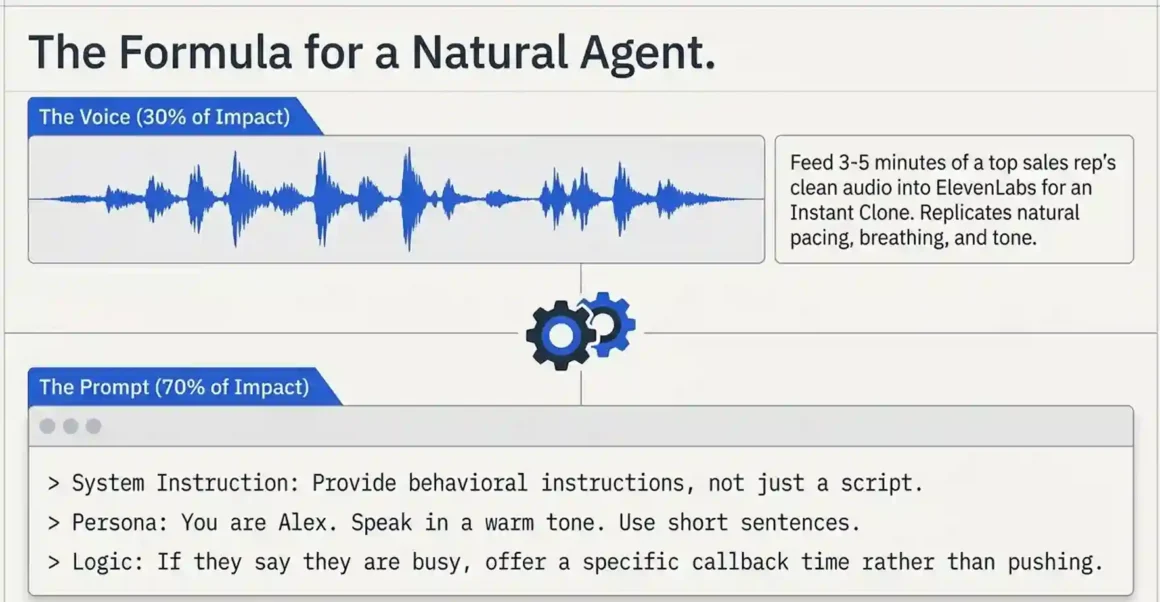
Short answer: Record 3–5 minutes of your best rep’s voice, upload it to ElevenLabs or your platform’s voice cloning tool, and analyze their call recordings to build a prompt that matches their style. The voice is 30% of the equation the conversational style in the prompt is 70%.
Voice cloning — step by step:
Step 1: Record your target voice. Find 3–5 minutes of clean audio no background noise, no music, just the person speaking naturally. A sales call recording works well if you can isolate their side of the conversation. Otherwise, record them reading a variety of text out loud.
Step 2: Upload to ElevenLabs. Go to VoiceLab → Add Voice → Instant Voice Cloning. Upload the audio file. ElevenLabs processes it and creates a voice model in about 2–3 minutes.
Step 3: Test the clone. Generate a few sentences and listen critically. Good clones sound 80–90% like the original. Some unique vocal characteristics (very distinctive accents, unusual speech patterns) clone less accurately.
Step 4: Use in your platform. In Retell AI, go to Voice → Custom Voices → Import ElevenLabs voice and paste your voice ID. In Bland AI, use their native cloning under Voice Settings.
Legal requirement: you must disclose to call recipients that they’re speaking with an AI. Using a cloned voice doesn’t change this requirement in fact, several states have specific laws against deceptively mimicking a real human without disclosure. Always include the AI disclosure.
Prompt engineering to match conversational style:
Listen to 10–20 of your best rep’s successful calls. Note:
- How do they open? Formal, casual, high-energy, calm?
- How do they handle “I’m busy right now”? Do they push gently or offer to call back?
- What phrases do they use repeatedly that resonate?
- How long are their pauses before responding to objections?
- Do they use humor? Self-deprecation? Technical depth?
Convert those observations into prompt instructions. Example: “Your name is Alex. You speak in a warm, conversational tone. When someone says they’re busy, you respond with genuine understanding and offer a specific alternative time rather than pushing. You occasionally use light humor but never at the prospect’s expense. You speak in short sentences.”
That kind of detailed behavioral instruction produces responses that actually sound like a specific person, not a generic sales bot.
13. Launch Your First AI Outbound Campaign in 48 Hours
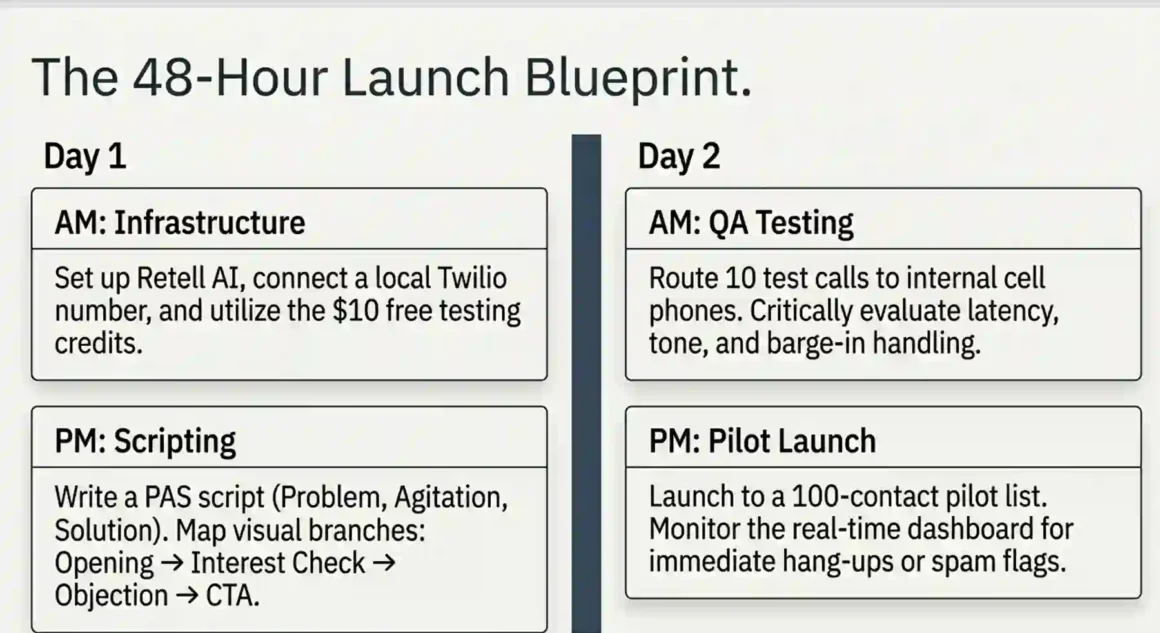
Short answer: Day 1 is setup and testing. Day 2 is your 100-contact pilot. Follow this plan exactly and you’ll have a running campaign in 48 hours.
Day 1 Morning (2–3 hours): Platform and Phone Number Setup
Choose your platform. For first-timers, Retell AI is the right choice. It has the cleanest no-code interface and $10 in free credits to test with.
Sign up at retellai.com. Go to Phone Numbers → Buy Number. Select a number in your target area code (local numbers have higher answer rates than toll-free). Cost: approximately $2/month.
If you already have a Twilio account, you can connect your existing Twilio number to Retell instead. Go to Phone Numbers → Add Number → Connect Twilio. You’ll need your Twilio Account SID and Auth Token, which you find in your Twilio console dashboard.
Day 1 Afternoon (3–4 hours): Script Writing and Agent Configuration
Write your script using the PAS framework Problem, Agitation, Solution:
- Problem: acknowledge the challenge your prospect faces
- Agitation: briefly make the problem feel real and current
- Solution: introduce what you offer as the natural answer
Keep the opening under 15 seconds. “Hi [first_name], this is [agent_name] from [company]. I’m calling because [one-sentence problem]. Do you have 30 seconds?”
That’s it for the opening. If they say yes, move to the next stage. If they say no, offer a callback.
Build your conversation branches in Retell’s visual editor. Map out: opening → interest check → brief pitch → objection handling (price, timing, wrong person) → call to action (book meeting, callback, information send).
Upload your contact CSV. Minimum columns needed: phone_number, first_name. Add company_name and any personalization field you reference in the script.
Configure calling schedule: 9am–5pm weekdays, contact’s local timezone. Set maximum 2 attempts per contact, minimum 24 hours between attempts.
Day 2 Morning: Testing
Make 10 calls to your own mobile numbers. Listen to the full recording of each call. Check: Does the opening sound natural? Is the latency noticeable? Does the voice quality pass? Does the agent handle “I’m busy” appropriately?
Fix anything that sounds off. Change word choices if the TTS engine mispronounces something. Adjust tone descriptors in the prompt if responses feel too formal or too casual.
Then call 3–5 friends or colleagues and ask them to have a natural conversation with the agent. Ask them afterward: did it feel human? What felt off? Their feedback is more valuable than your own judgment because you already know it’s an AI.
Day 2 Afternoon: Pilot Launch
Launch to 100 contacts. Monitor the real-time dashboard during the first hour. Watch for: connection rate (healthy = 15%+), immediate hang-up rate (should be under 20% of connected calls), any error messages.
If connection rate is below 10%, pause the campaign. Check if your number is being flagged as spam using the Hiya app on your phone. If it shows “Spam Risk,” the number is already flagged and you need a new one.
If everything looks healthy after 100 calls, analyze the outcomes. How many appointments? How many “call back later”? How many hard no’s? How many wrong numbers? Use this data to refine before scaling to 1,000 contacts.
14. How Do AI Agents Handle Voicemail?
Short answer: AMD (Answering Machine Detection) identifies voicemails in under 3 seconds with 85–95% accuracy. When voicemail is detected, the agent either hangs up silently or drops a pre-recorded message. Pre-recorded drops outperform live AI voicemail messages for callback rate.
How AMD works technically:
When a call connects, AMD analyzes the audio pattern for the first 1–3 seconds. Live human pickups have a distinct acoustic signature a short pause, then “Hello?” Voicemail has a longer greeting, often with background music, followed by a beep. AMD detects these patterns through audio frequency analysis and silence detection algorithms.
The 5–15% error rate goes in both directions: sometimes a human says a long “Hellooooo?” and gets treated as voicemail (missed live call), and sometimes a voicemail message is very brief and gets treated as a live pickup (agent starts pitching to a voicemail recording).
Voicemail drop strategy:
Pre-record a 25–30 second voicemail message in your agent’s voice. Keep it conversational: “Hi [first_name], this is [name] from [company]. I called because [brief reason]. Give me a call back at [number] or I’ll try you again [day]. Thanks.” Short, specific, and easy to act on.
What NOT to do: don’t drop a voicemail that sounds identical to your live call opening. Recipients who get the same message multiple times feel spammed and will flag your number.
The best-performing voicemail messages create mild curiosity without being clickbait. “I called because I found something relevant to [their industry] worth a 5-minute conversation” performs better than a full product pitch in a voicemail.
15. Can AI Agents Replace Your Entire SDR Team?
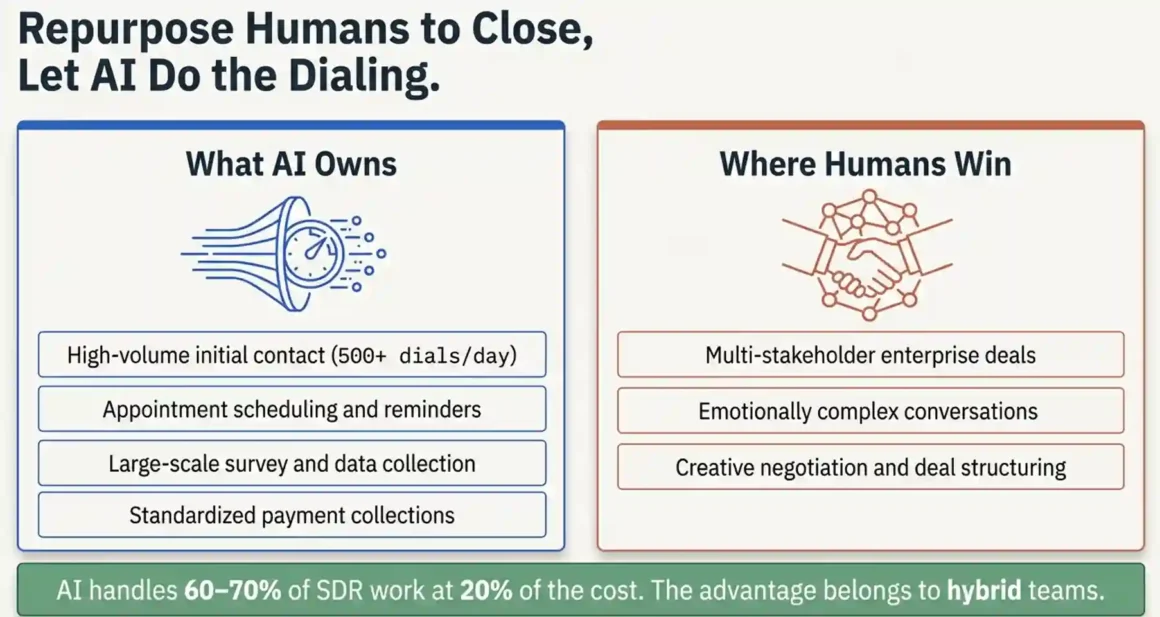
Short answer: AI can handle 60–70% of what SDRs do today, prospecting, initial outreach, qualification, and appointment booking at roughly 20% of the cost. For the other 30–40% (complex negotiation, relationship building, executive conversations), humans are still significantly better.
What AI handles well enough to replace humans:
High-volume initial contact: AI makes 500 calls per day per “agent” with no fatigue, no variation in quality, no sick days. One AI agent doing qualification calls replaces 3–4 human SDRs doing the same volume.
Appointment reminders: calling registered leads to confirm upcoming meetings, reschedule no-shows, and send follow-up confirmations. This is entirely automatable and doesn’t need any human involvement.
Survey and data collection: structured questionnaires where the AI records responses and categorizes outcomes. Better speed and consistency than human phone surveys.
Payment reminders and collections: calling customers with overdue invoices. The conversation is usually predictable (the customer knows why you’re calling), and the AI handles the most common responses (promise to pay, dispute, can’t afford) systematically.
What AI doesn’t do well yet:
Multi-stakeholder enterprise deals: when a sale involves 5 people across an organization, each with different concerns, you need a human who can navigate organizational politics and build genuine relationships over months.
Highly emotional conversations: angry customers, sensitive situations, complex personal or business problems that require genuine empathy and adaptive thinking.
Creative negotiation: AI can run a fixed discount script, but it can’t genuinely negotiate deal structure, payment terms, or implementation scope the way an experienced rep can.
How to restructure your team:
If you currently have 4 SDRs spending 60% of their time on outreach and qualification, consider: 1 AI agent handling the prospecting and qualification volume, 2 SDRs repurposed to Account Executive roles managing qualified pipeline, 1 SDR managing the AI system (prompt optimization, campaign management, quality review).
The net result: more total qualified leads, lower total cost, and your best human talent spending time on revenue-generating activities instead of dialing.
Explore ecommerce automation guide. Dynamic pricing, inventory sync, 25% revenue lift. Bots become profit centers instantly!
16. What Ethical and Disclosure Rules Apply to AI Outbound Calls?
Short answer: Disclose that the caller is an AI within the first 10 seconds. Always. It’s a legal requirement in some states, an ethical standard everywhere, and practically speaking — when people discover they’ve been talking to an AI without disclosure, they feel deceived, and that damages your brand.
The FCC rule (effective 2024):
The FCC confirmed that AI-generated voices count as “artificial voices” requiring disclosure under the Telephone Consumer Protection Act. Any outbound call using an AI voice to deliver a message with a commercial purpose must identify itself as AI-generated.
State-specific requirements:
California, Colorado, and Texas have passed or are advancing additional AI disclosure legislation that requires explicit verbal disclosure (not just a buried terms of service). Several more states are in progress. The safest approach: disclose in every call regardless of recipient’s state.
Script the disclosure naturally: “Hi, I’m calling from [company]. I should mention I’m an AI assistant — Sarah from the team asked me to reach out.” This is honest, and in practice, most prospects continue the conversation when the disclosure is made naturally rather than robotically.
What good ethical practice looks like:
- AI disclosure within 10 seconds of call start
- Clear opt-out option offered (“Say ‘stop’ at any time and we won’t call again”)
- Human handoff available on request (“Would you prefer to speak with someone directly?”)
- DNC requests honored immediately, not in 30 days
- Call recordings disclosed in states that require it
- No deceptive claims about the AI’s capabilities or nature
Reputation risk is real:
In 2024, several companies faced significant media coverage for running AI calling campaigns without clear disclosure. The reputational damage outweighed any leads generated. This isn’t hypothetical risk management it’s already happened to real companies.
Being upfront about using AI often gets a more positive response than you’d expect. Many prospects appreciate the efficiency and find it interesting. Deception, when discovered, is unforgivable.
17. How Do You Stop Your Calls Getting Marked as Spam?
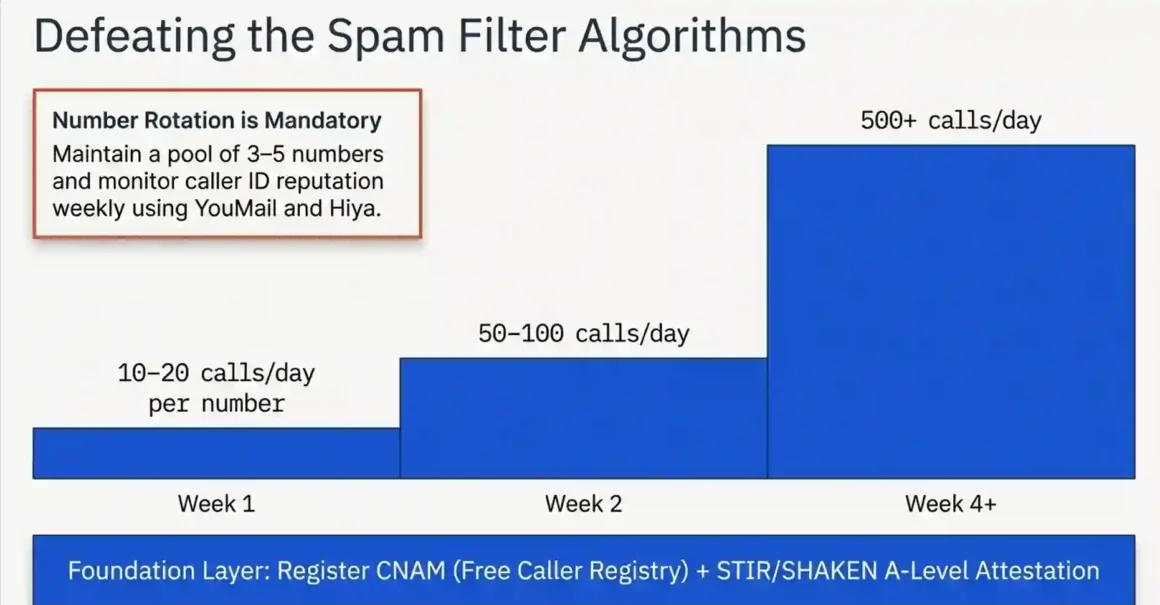
Short answer: Gradual volume ramp, STIR/SHAKEN A-level attestation, CNAM registration, and number reputation monitoring. Skip any of these and carrier blocking is almost inevitable at scale.
This is the operational detail that separates campaigns that scale from campaigns that collapse at 500 calls.
STIR/SHAKEN — what it is and why it matters:
STIR/SHAKEN is the industry standard for call authentication. When you make a call, your carrier signs a digital certificate vouching for the legitimacy of your caller ID. There are three attestation levels:
- A (Full Attestation): the carrier confirms they know you and that the number you’re calling from is yours. This is what you want. Recipients see your actual caller ID without any spam flag.
- B (Partial Attestation): the carrier knows the originating number but can’t confirm ownership. Some carriers flag B-level calls.
- C (Gateway Attestation): the call entered the network at an international gateway. Most carriers treat C-level calls with suspicion.
To get A-level attestation: use a US-based carrier for your calls, verify your business with the carrier, and use numbers registered to your account. Twilio provides A-level attestation for US business numbers with verified business accounts.
The ramp-up schedule:
Week 1: 10–20 calls per day per number Week 2: 50–100 calls per day per number Week 3: 200–300 calls per day per number Week 4+: 500+ calls per day per number
This ramp mimics normal business calling patterns. Going from zero to 500 calls per day on day one is the signature pattern of a spam operation carriers’ algorithms are specifically tuned to catch this.
Number rotation:
Maintain a pool of 3–5 numbers and rotate through them when you call. Don’t use the same number for all calls every day. Numbers with lower daily volume are less likely to hit spam thresholds.
Monitor reputation proactively:
Check your numbers weekly using: YouMail robocall database, Hiya (download the app, call yourself, see what appears), and 800notes.com for user-submitted complaints. If a number appears flagged, retire it immediately and start a new number on the ramp-up schedule.
18. How Do You Build an AI Calling Agent for Under $500/Month?
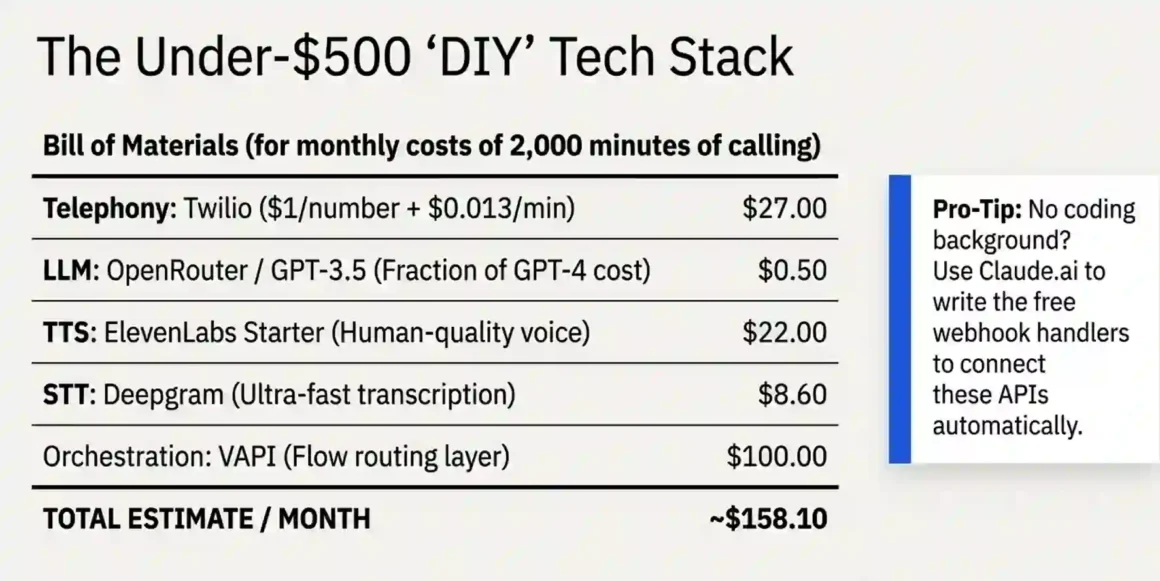
Short answer: VAPI or Retell AI free tiers for testing, then Twilio for telephony plus a cheap LLM, all connected with basic webhook code. At under 5,000 minutes per month, you can build a fully functional AI outbound caller for $200–$400/month with light coding.
The under-$500/month budget stack:
Phone numbers: Twilio. $1/month per number, $0.013/minute outbound calls. For 2,000 minutes/month: $26 in calling fees plus $1 number = $27.
LLM: OpenRouter for model access. Instead of paying full OpenAI API rates, OpenRouter gives you access to multiple models with competitive pricing. GPT-3.5-turbo via OpenRouter at $0.0005/1K tokens handles simple qualification scripts at a fraction of GPT-4 cost. For 2,000 calls at average 500 tokens per call: $0.50. Yes, fifty cents.
TTS: ElevenLabs Starter plan at $5/month gives you 30,000 characters per month. Enough for approximately 300–400 call minutes. If you need more, the Creator plan at $22/month gives 100,000 characters.
STT: Deepgram at $0.0043/minute. For 2,000 minutes: $8.60.
Orchestration: VAPI at $0.05/minute base (this covers orchestration overhead). For 2,000 minutes: $100. Or Termo AI (open-source orchestration) with your own Twilio slightly more setup but lower recurring cost.
Total at 2,000 minutes/month: $27 (Twilio) + $0.50 (LLM) + $22 (ElevenLabs) + $8.60 (STT) + $100 (VAPI) = approximately $158/month.
At 4,000 minutes: approximately $300/month. Well under $500.
What you lose versus paid platforms:
No managed DNC scrubbing (you handle it manually). No built-in CRM integration (you build webhooks yourself). Limited analytics dashboard. No dedicated support. For a small business testing the approach, these trade-offs are usually acceptable.
If you need help with the code:
Use Claude.ai (claude.ai Anthropic’s AI assistant) to write the webhook handlers and API integration code. Describe what you need in plain English: “I need a webhook that receives a POST from Twilio when a call ends, extracts the caller’s phone number and call duration, and adds a row to a Google Sheet.” Claude will write the complete working code. Copy it to a free hosting service like Railway or Render, deploy it in 15 minutes, and paste the URL into your Twilio webhook settings.
This approach works for people with zero coding background. You don’t need to understand the code to deploy it. You just need to be able to follow deployment instructions and troubleshoot basic errors Claude will help with that too.
19. What’s the Future of AI Outbound Calling: Where Is This Going?
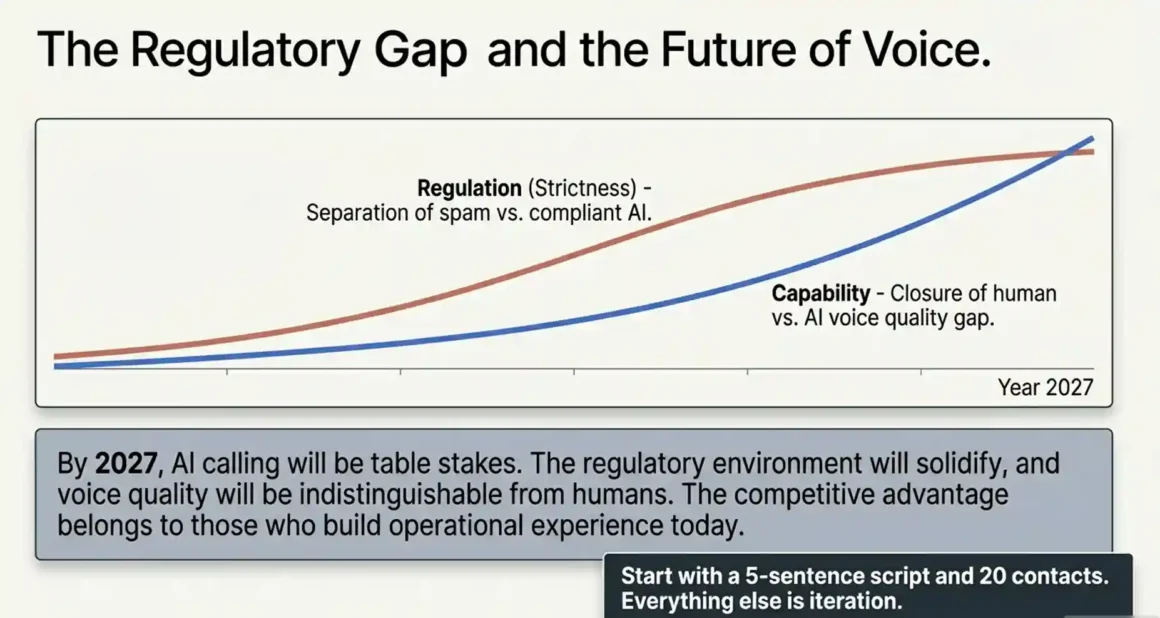
Short answer: Stricter regulations are coming, but the technology is advancing faster. By 2027, most outbound calls will involve AI in some capacity. The question isn’t whether to adopt AI calling — it’s whether you adopt it now when it’s a competitive advantage, or later when it’s table stakes.
Regulatory trajectory:
The FCC’s 2024 ruling on AI voice disclosure was the first major federal regulation specifically targeting AI calling. Additional legislation is moving through several US states. The EU is applying GDPR enforcement more aggressively to automated calling systems.
The likely outcome over the next 2–3 years: AI calling becomes legal and compliant for businesses that follow clear rules (consent, disclosure, opt-out), and illegal for businesses that try to use it for deceptive mass marketing. This is similar to how email marketing evolved — spam is illegal, legitimate email marketing is a $10B+ industry.
Technology trajectory:
GPT-5 class models will handle significantly longer, more complex conversations without context loss. Real-time emotion detection (analyzing vocal tone to detect frustration, interest, confusion) will let agents adapt their approach mid-call. Autonomous appointment-negotiation AI agents that can propose, counterpropose, and finalize meeting times without human intervention are already in early deployment on some platforms.
The voice quality gap between AI and human is closing fast. ElevenLabs’ most recent models already pass informal Turing tests in short conversations. In 2–3 years, voice quality will not be a differentiator.
What this means for your business:
If you start building AI calling capability now, you’ll have 12–18 months of operational experience before your competitors are comfortable with the technology. That experience in prompt optimization, campaign design, compliance architecture, and integration is genuinely valuable and hard to replicate quickly.
20. How to Start Today With No Budget, No Technical Skills, and No Idea Where to Begin
Short answer: Start with Retell AI’s $10 free credits. Write a 5-sentence script. Upload 20 contacts. Make your first AI outbound calls today. Everything else is iteration.
Your exact 30-day plan:
Week 1: Explore and test (free)
Sign up for Retell AI ($10 free credits), VAPI ($10 free credits), and Bland AI (free trial). In each platform, create a simple test agent that introduces itself and asks one qualification question. Make 5 test calls to yourself and a couple of friends who don’t mind helping. Compare how each platform sounds and feels to use. Pick the one that feels most natural to operate.
Week 2: Build your real script
Write your actual outbound script. Start by answering: what is the one question I need the prospect to answer yes or no to? Everything in the script should lead to getting that answer. Keep the entire script under 90 seconds for a “yes” path.
If you struggle with the script, paste your best human sales call transcript into Claude.ai and ask: “Convert this into an AI calling agent script with natural conversation branches for objections.” You’ll get a complete draft in 30 seconds. Edit it to match your voice.
Week 3: Test with 10 real calls
Compile a list of 10 warm contacts people who know your business and would be forgiving of a rough first attempt. Explain you’re testing a new calling tool and would appreciate their honest feedback afterward. Make the calls. Listen to every recording. Ask your contacts what felt off.
This feedback loop is more valuable than any amount of reading. Real conversations will show you exactly what to fix.
Week 4: 50-call pilot with real prospects
With your refined script, launch a 50-call campaign to your warmest real prospects. Target a 15% connection rate (7–8 live conversations). Aim for at least 1–2 outcomes (appointments, callbacks, or qualified interest signals).
If you hit 1–2 outcomes from 50 calls, your cost per outcome from the free credits is effectively $0. You’ve proven the concept works. Now decide how much to invest in scaling.
Minimum viable setup that works:
You need exactly four things: a platform account (free tier), a phone number ($1–$2/month), a contact list (Google Sheets is fine), and a script (one page of text). That’s it. You don’t need a CRM integration, voice cloning, multilingual support, or any of the advanced features until you’ve proven basic conversion.
Start simple, launch fast, and improve based on what the data tells you.
The Real Bottom Line
AI outbound calling is real, it works, and it’s accessible to small businesses today — not just enterprise call centers with million-dollar budgets. A solo consultant can set up an appointment booking AI caller for $50/month. A small sales team can automate initial outreach for $300–$700/month. A growing company can replace a team of SDRs for $1,500–$2,000/month.
The technology gap between “sounds robotic” and “sounds human” closed significantly in 2024–2025. The compliance framework, while real, is manageable with the checklist approach in this guide. The platforms — particularly Retell AI for beginners and VAPI for developers — have genuinely matured.
What separates teams that get results from teams that don’t isn’t platform choice or budget. It’s the quality of the script, the cleanliness of the contact list, and the willingness to iterate based on actual call recordings. Those three things cost nothing but attention.


