

World Labs is a spatial intelligence company that generates persistent, navigable 3D worlds using AI. Evaluating it on a VPS does not mean self-hosting their model it means building a VPS-based pipeline that calls their World API, processes the 3D outputs, and serves results at scale. The two are completely different jobs, and most teams waste weeks on the wrong one.
This guide walks through every layer of that evaluation: hardware, cost, performance, deployment, security, and exit planning with direct answers, no filler.
SECTION 1: THE FOUNDATION — Understanding World Labs’ VPS Requirements
1.1 What Makes World Labs’ Spatial Intelligence Models Different From Standard LLMs in Terms of Compute Needs?
Quick answer: A language model predicts the next token. World Labs’ models predict the next spatial structure, geometry, depth, lighting, and physics across a full 3D environment. That is not a bigger LLM. It is a completely different class of computation.
Here is the concrete difference.
When you run GPT-4 or Llama 3, the GPU is doing one thing: matrix multiplications over a sequence of tokens. Fast, parallelizable, well-understood. The output is text, which is just a list of numbers mapping to words.
Marble World Labs’ frontier multimodal world model takes a single image, a text prompt, a panorama, or a short video and outputs a persistent, navigable 3D environment. That environment has geometry you can walk through, lighting that responds to the scene, occlusions that work correctly, and surfaces that hold physics objects. None of that comes from predicting the next word.
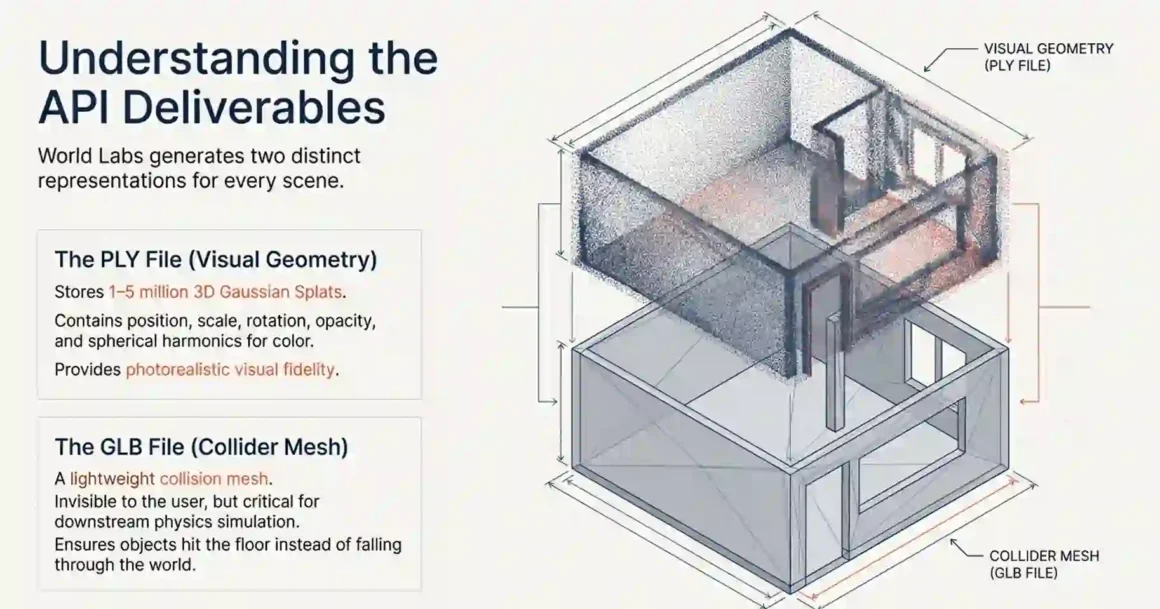
The architecture behind Marble uses diffusion-style generative processes applied across 3D space rather than a 2D pixel grid. The output format is not text or an image it is a 3D Gaussian Splat, stored as a PLY file (point cloud with per-point color and opacity attributes), plus a GLB collider mesh for physics simulation.
What is 3D Gaussian Splatting? Each “splat” is a small 3D point defined by its position, scale, rotation, opacity, and color (encoded as spherical harmonics). A typical room-scale scene contains 1–5 million of these splats. Rendering them requires sorting them back-to-front for correct alpha compositing, then rasterizing them onto a 2D view. This is fundamentally different from how a transformer processes tokens.
The compute gap shows up clearly:
- A 7B LLM requires around 14GB VRAM at FP16 for inference. You run it on a consumer GPU.
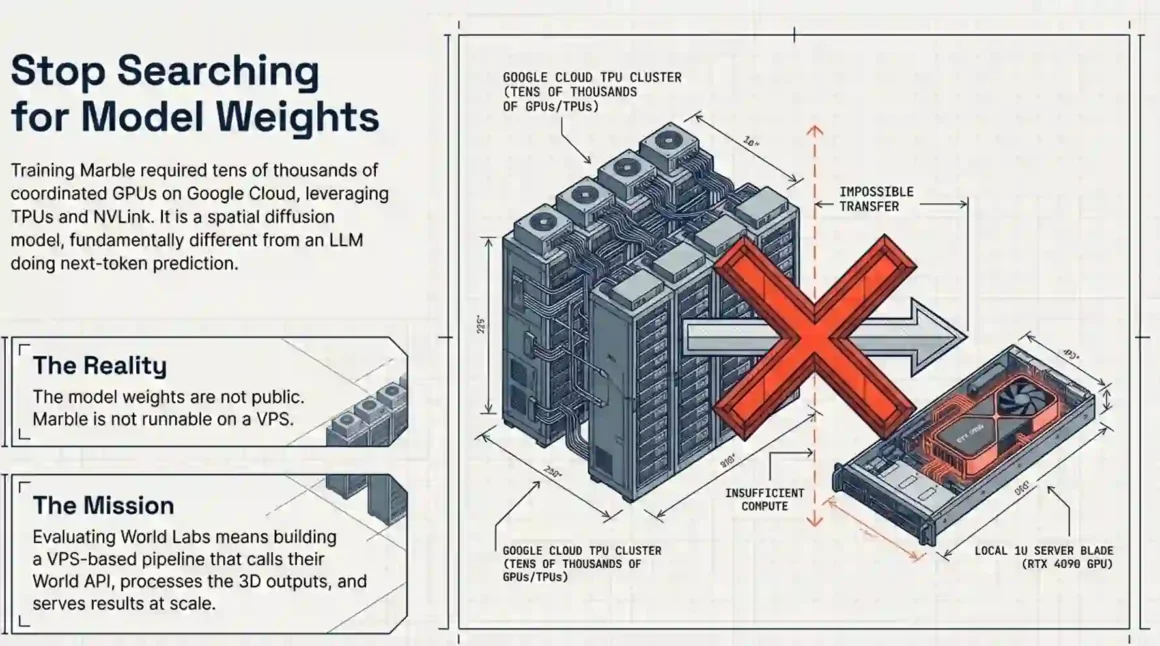
- Training Marble required enough GPU infrastructure that World Labs signed a deal with Google Cloud that could be worth hundreds of millions of dollars. Google Cloud’s general manager noted World Labs’ models have “significant computational demands” requiring AI-optimized infrastructure and a deep supply of AI chips.
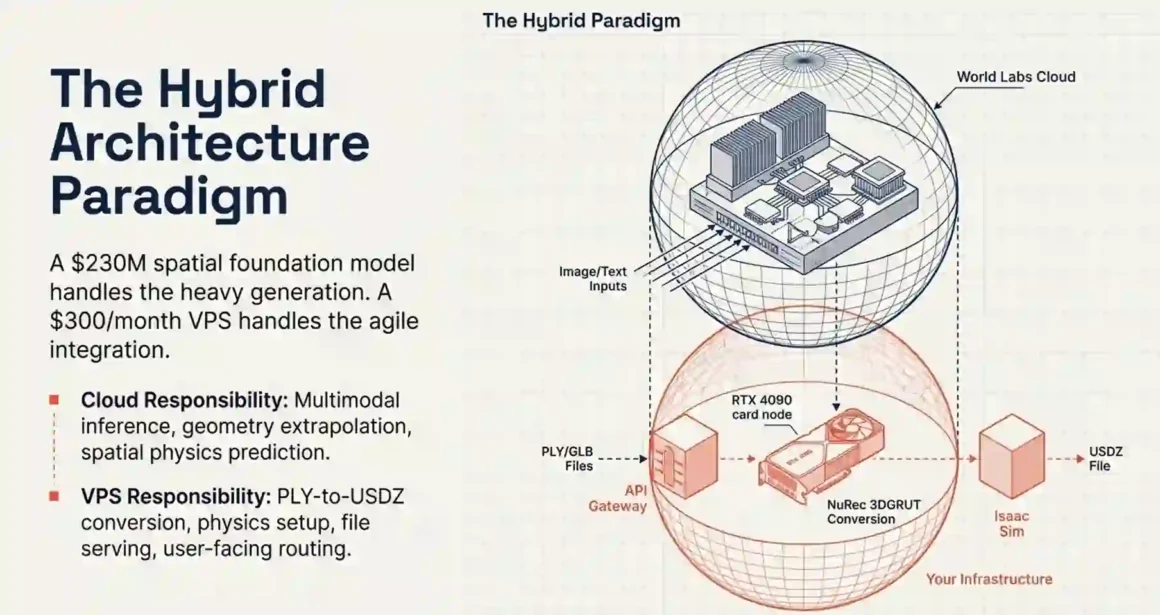
So when you evaluate World Labs on a VPS, you are not trying to reproduce their training setup. You are calling their API, getting 3D outputs, and building something useful with those outputs. Your VPS handles the integration layer. Marble runs on their servers.
That framing matters. Teams that try to self-host a model that is not publicly available waste 2–3 weeks looking for weights that do not exist.
Discover AI propagation modelling! AI crushes traditional ray tracing with 65% accuracy boost, 13x speed for 5G planning—deploy precise wireless networks dominating connectivity!
1.2 Why Did World Labs Choose Google Cloud Over Traditional VPS for Their $230 Million AI Training?
Quick answer: Training large world models requires tens of thousands of coordinated GPUs with high-bandwidth interconnections. No VPS product offers that. Google Cloud does plus TPUs, NVLink, and AI-specific toolkits World Labs needed.
World Labs tapped Google Cloud as its primary compute provider to train its spatial intelligence AI models in a deal that could be worth hundreds of millions of dollars. The company announced it would use a large chunk of its funding to license GPU servers on the Google Cloud Platform to train “spatially intelligent” AI models.
Why not a VPS? Let us be specific.
A typical GPU VPS gives you one dedicated GPU an RTX 4090 (24GB VRAM), A100 (80GB VRAM), or H100 (80GB VRAM). That is one card. One card is useful for inference, fine-tuning smaller models, or processing outputs from a trained model.
Training a foundation model like Marble requires data parallelism across hundreds or thousands of GPUs all talking to each other simultaneously. The bottleneck there is not compute spee it is inter-GPU bandwidth. The A100 and H100 have NVLink, creating a 600GB/s bridge between GPUs. An RTX 4090 is stuck with PCIe Gen4 at 32GB/s. When training across multiple GPUs, inter-GPU communication becomes the bottleneck, and a 4090 scales poorly beyond 2–4 GPUs.
Google Cloud offered World Labs access to its High Performance Toolkit for scaling AI workloads, plus a supply of both NVIDIA GPUs and Google’s own TPUs (Tensor Processing Units). Google Cloud said the deal was not about Fei-Fei Li’s personal connections there, but about Google’s AI-optimized infrastructure and ability to meet World Labs’ scalability needs.
A VPS simply cannot offer:
- Multi-node NVLink GPU clusters
- Petabyte-scale training data pipelines
- 400Gbps+ InfiniBand networking between nodes
- TPU pod slices for specific training operations
So the answer is clear: World Labs chose Google Cloud because no VPS provider exists that can train a spatial foundation model at this scale. That is not a criticism of VPS it is just the wrong tool for that job.
For your evaluation, though, none of this matters. You are using their trained model via API. The compute you need is fundamentally different.
Master efficient edge ML real-time deployment! Quantized models run ultra-fast on devices, no cloud latency—power IoT revolution with privacy-secure, offline AI intelligence!
1.3 Is World Labs’ Marble Product Actually Runnable on Standard GPU VPS or Does It Require Specialized Infrastructure?
Quick answer: Marble itself is not runnable on a VPS at all the model weights are not public. What you run on a VPS is the processing pipeline around Marble’s API outputs: PLY conversion, physics setup, file serving, and user-facing integration. For that, an RTX 4090 VPS is enough.
Marble is World Labs’ frontier multimodal world model that creates 3D worlds from image or text prompts. It is a generative world model that can reconstruct, generate, and simulate 3D worlds and allow both humans and agents to interact with them.
The World API launched January 21, 2026 makes it possible to create navigable spatial environments directly from text, images, panoramas, multi-view inputs, and video. These worlds can be rendered on the web, exported into downstream tools, or integrated into interactive systems and simulations.
So the access model is API-first. Marble runs on World Labs’ servers. You call the endpoint, it generates a world, you download the output files.
What runs on your GPU VPS:
NVIDIA Omniverse NuRec — NVIDIA’s tool for converting PLY files (Gaussian splat output from Marble) into USDZ format that NVIDIA Isaac Sim understands. The workflow involves exporting an AI-generated scene as Gaussian splats in PLY format and a collider mesh in GLB format, converting the PLY to USDZ format using NVIDIA Omniverse NuRec, importing and aligning assets in NVIDIA Isaac Sim, and setting up physics and lighting for accurate simulation.
NuRec requires a CUDA-enabled GPU. You cannot run it on CPU. But it does not need an A100 an RTX 4090 (24GB VRAM) handles room-scale scenes comfortably.
NVIDIA Isaac Sim 5.0 — NVIDIA’s physics simulation platform for robotics. Isaac Sim is now accessible through NVIDIA Brev, which provides developers with instant access to NVIDIA RTX-enabled GPU instances across major cloud providers, eliminating infrastructure overhead and accelerating iteration cycles. That means you can rent the GPU you need rather than buying hardware.
World Labs’ Spark library the open-source Three.js-based renderer that embeds Gaussian splats in a web browser. This requires zero GPU server-side. Rendering happens in the user’s browser. Your VPS just serves the PLY file.
Bottom line: a $300–500/month GPU VPS (RTX 4090 class) handles the processing layer. A $20–40/month CPU VPS handles the API integration and file serving layer.
Explore edge AI explained simply! Local device processing slashes latency, secures data—transform smart homes, cars, factories with instant AI decisions!
1.4 What Is the Exact Hardware Configuration Needed to Run World Labs-Style Geospatial AI on a VPS?
Quick answer: For API integration only: any CPU VPS with 4GB RAM works. For PLY conversion with NuRec: RTX 4090 (24GB VRAM) minimum. For training comparable open-source spatial models: A100 or H100 (80GB VRAM) minimum.
Here is the full breakdown:
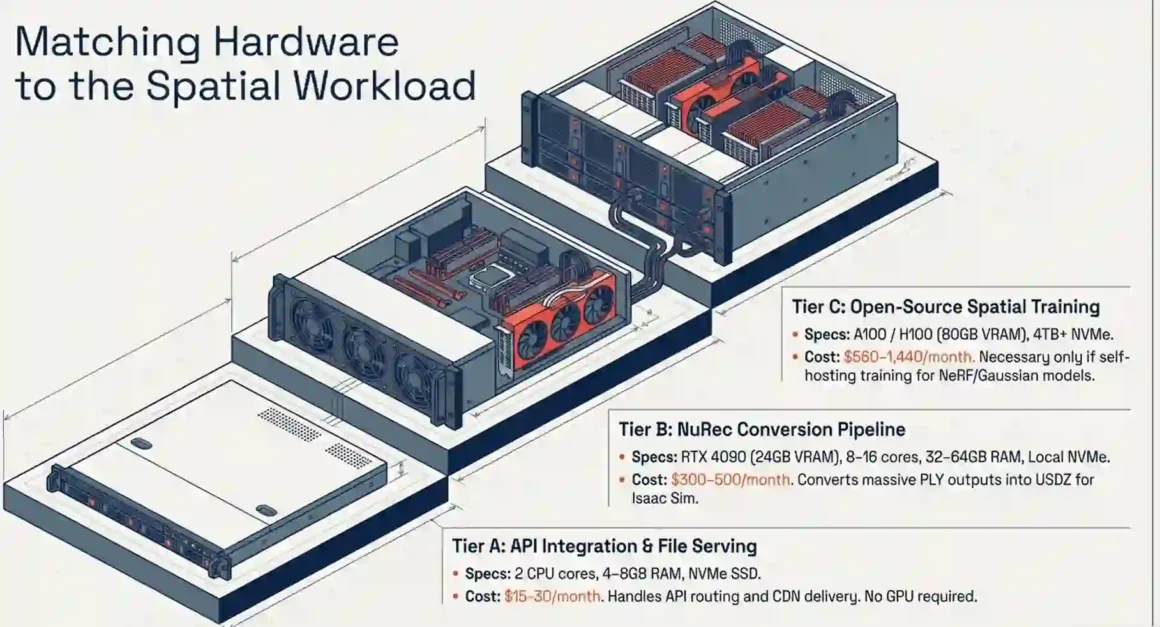
Use Case A: API integration + file serving
You call the World API, store the output PLY/GLB files, and serve them through the Spark web viewer. No GPU needed at all.
- 2 CPU cores
- 4–8GB RAM
- 100GB SSD (NVMe preferred for fast file access)
- 1TB monthly bandwidth
- Estimated cost: $15–30/month (Hetzner, Vultr, DigitalOcean)
Use Case B: PLY → USDZ conversion using NVIDIA NuRec/3DGRUT
The 3DGRUT algorithm converts Marble’s PLY output into USDZ format for Isaac Sim. Requires CUDA.
- GPU: RTX 4090 (24GB VRAM) practical for room-scale scenes up to ~5M Gaussians
- GPU alternative: A100 40GB for complex multi-room scenes up to ~15M Gaussians
- CPU: 8–16 cores (NuRec uses CPU for pre/post processing)
- RAM: 32–64GB
- Storage: NVMe SSD required PLY files range from 300MB to 2GB depending on scene complexity
- Estimated cost: $300–500/month (Lambda Labs, RunPod, CoreWeave spot instances)
Why NVMe specifically? The 3DGRUT conversion script reads the full PLY file repeatedly during the optimization pass. VRAM is the absolute hard limit. It is the container for model parameters, gradients, and optimizer states. Exceed it, and the job crashes. But storage throughput feeds that VRAM process. SATA SSDs at 500MB/s sequential read bottleneck on large PLY file loads. NVMe at 3,500–7,000MB/s removes that constraint entirely.
Use Case C: Training open-source spatial models (NeRF, Gaussian Splatting)
If instead of calling Marble’s API you want to train your own spatial reconstruction model on a VPS using tools like graphdeco-inria/gaussian-splatting or NeRFstudio the requirements jump.
- GPU: A100 80GB or H100 80GB (80GB VRAM is the recommended floor for training generalizable spatial models)
- Storage: 4TB+ NVMe for training datasets
- Estimated cost: $560–1,440/month continuous GPU usage
For smaller models, consumer GPUs with around 24GB VRAM such as the RTX 4090 often suffice. Larger models or workloads requiring long context windows may need data-center GPUs like the A100 or H100.
The key rule: match VRAM to scene complexity, not to an arbitrary tier. Many teams overbuy GPU VPS on day one. Start with an RTX 4090 spot instance. Move to an A100 only when you hit VRAM limits on actual production scenes.
Uncover AI electric radiant panel heating! Predictive algorithms optimize energy 30% savings—smart heating revolutionizing comfort while slashing bills sustainably!
SECTION 2: THE PERFORMANCE CRISIS — VPS Bottlenecks for Spatial AI
2.1 Why Does 3D Gaussian Splatting Fail on Standard VPS GPUs With Less Than 24GB VRAM?
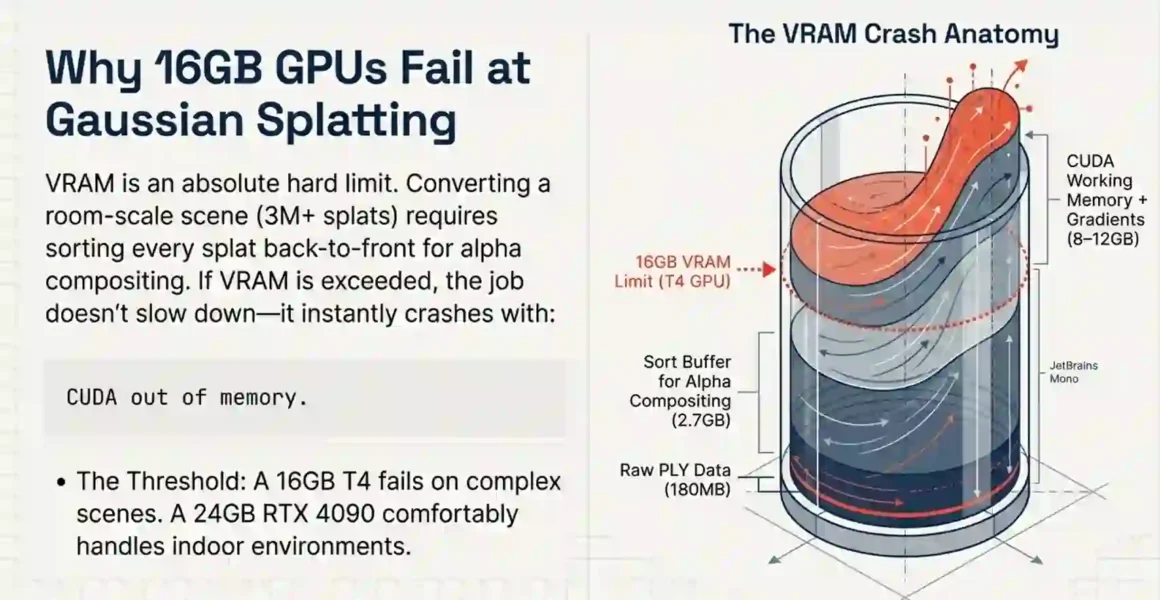
Quick answer: Gaussian splatting requires holding the full splat point cloud in VRAM plus the sort buffer for alpha compositing. On a room-scale scene, that combination exceeds 16GB. On a large outdoor or multi-floor environment, it exceeds 24GB. Below these thresholds, the conversion crashes not slows, crashes.
Let’s go through what actually uses the memory.
A Gaussian splat scene stores each point with position (3 floats = 12 bytes), scale (3 floats), rotation (4 floats as quaternion), opacity (1 float), and spherical harmonics for color (up to 48 floats for degree-3 SH). Full precision comes to about 60 bytes per splat.
Room-scale scene with 3 million splats: 3M × 60 bytes = 180MB in raw storage.
That sounds fine. The problem is the rendering pass.
Correct rendering of Gaussian splats requires sorting all splats by depth (back-to-front) every frame. This sorting runs on the GPU as a Radix Sort or similar parallel sort algorithm. The sort buffer is typically 2–3× the size of the input data. Add gradients during NuRec optimization and CUDA working memory, and the real VRAM usage for a 3M-splat scene lands at 8–12GB at minimum.
For a large Marble scene say, a warehouse or a multi-room building splat count rises to 8–15 million. At that scale:
- Base data: ~480MB–900MB
- Sort buffer: ~1.5–2.7GB
- CUDA working memory + gradients: ~4–8GB
- Total: 6–12GB just for operation, plus peak spikes to 16–24GB
VRAM is the absolute hard limit. Exceed it and the job crashes. Full stop.
A T4 VPS with 16GB VRAM handles small room-scale scenes. It fails on complex multi-room Marble outputs. An RTX 4090 at 24GB handles most indoor environments. An A100 at 80GB handles large outdoor geospatial scenes without stress.
The specific error you see when VRAM runs out: CUDA out of memory. Tried to allocate X GiB. The process dies. No partial output. You have to restart with either a larger GPU or a smaller scene.
The practical workaround on a budget VPS: Tile large scenes. Split the PLY into spatial chunks using open3d or trimesh, process each tile on a 16GB VPS, then merge outputs. This adds 30–60 minutes to the pipeline but avoids the $200/month cost difference between a T4 and an A100.
Do not try to share VRAM across virtual GPU partitions (vGPU) for this workload. Gaussian splatting needs continuous, non-fragmented VRAM access. Shared vGPU partitions cause memory fragmentation that makes the effective available VRAM lower than the nominal partition size.
Perfect agentic AI testing guide! Eliminate 90% errors, cut costs dramatically—deploy enterprise-grade agents flawlessly every time!
2.2 Is Network Latency Killing Your World Labs Model Performance When Hosted on Remote VPS?
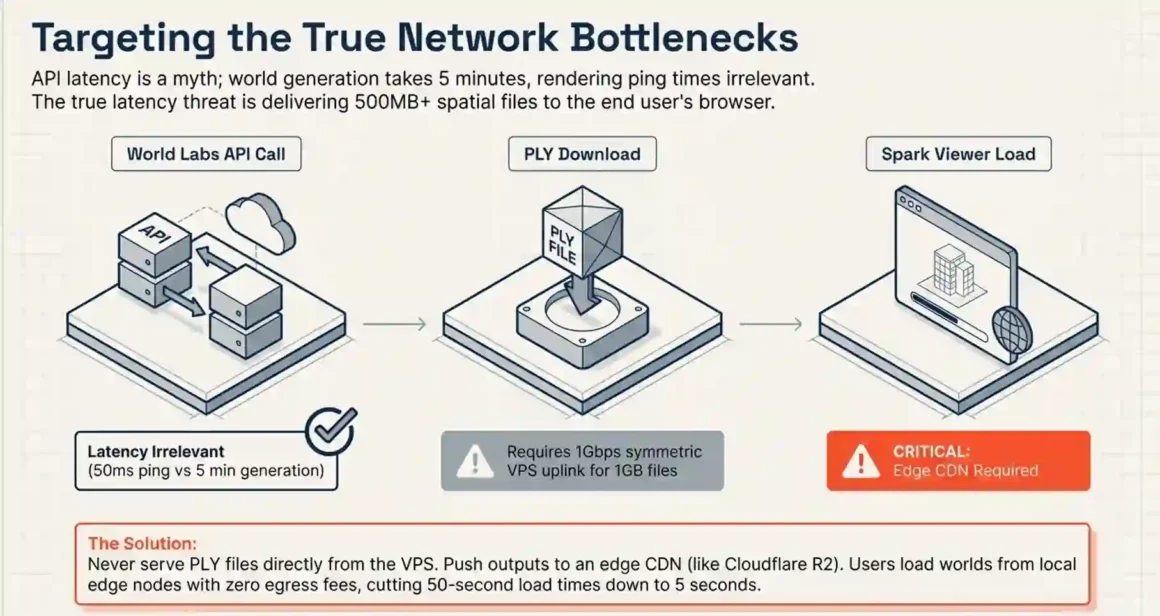
Quick answer: Yes but only in specific parts of the pipeline. API call latency is irrelevant (Marble generation takes 30 seconds to 5 minutes anyway). PLY file download latency matters. Interactive Spark viewer latency is the most user-visible issue.
Here is where latency actually hits:
World API calls: Marble generation is asynchronous. You submit a generation request, then poll for completion. Marble 0.1-mini (draft quality) completes in 30–45 seconds. Marble 0.1-plus (production quality) takes approximately 5 minutes. A 50ms round-trip delay between your VPS and the World API endpoint adds nothing meaningful to a 5-minute job. This is not a latency concern.
PLY file download from World Labs storage: A room-scale PLY file is 300MB–1GB. On a VPS with 1Gbps uplink, that downloads in 2.4–8 seconds. On a 100Mbps VPS link, it takes 24–80 seconds. If you are processing batches of scenes continuously, the difference between a 1Gbps and 100Mbps VPS link adds up. Choose a VPS provider with symmetric 1Gbps minimum for production pipelines.
Spark viewer latency for end users: The Spark viewer embeds Gaussian splats in the browser. The PLY file streams from your VPS to the user. A 500MB PLY at 10MB/s CDN throughput loads in 50 seconds unusable. At 100MB/s CDN throughput, it loads in 5 seconds acceptable.
Solution: Put PLY files on a CDN, not directly on the VPS storage. Cloudflare R2 costs $0.015/GB/month for storage and $0.00 for egress — literally free bandwidth. Upload the PLY to R2, point Spark at the R2 URL. Users load their worlds from a CDN edge node close to them, not from your VPS in Frankfurt or New York. This eliminates viewer latency entirely.
VPS geographic placement: For the processing pipeline (NuRec conversion), place the VPS in the same region as your object storage. AWS us-east-1 VPS downloading from us-east-1 S3 is near-zero latency. The same VPS downloading from eu-west-1 S3 adds 80–120ms per request, which becomes meaningful when processing thousands of files.
2.3 Why Do World Labs’ Models Require NVMe Storage With 20,000+ IOPS for Real-Time 3D World Loading?
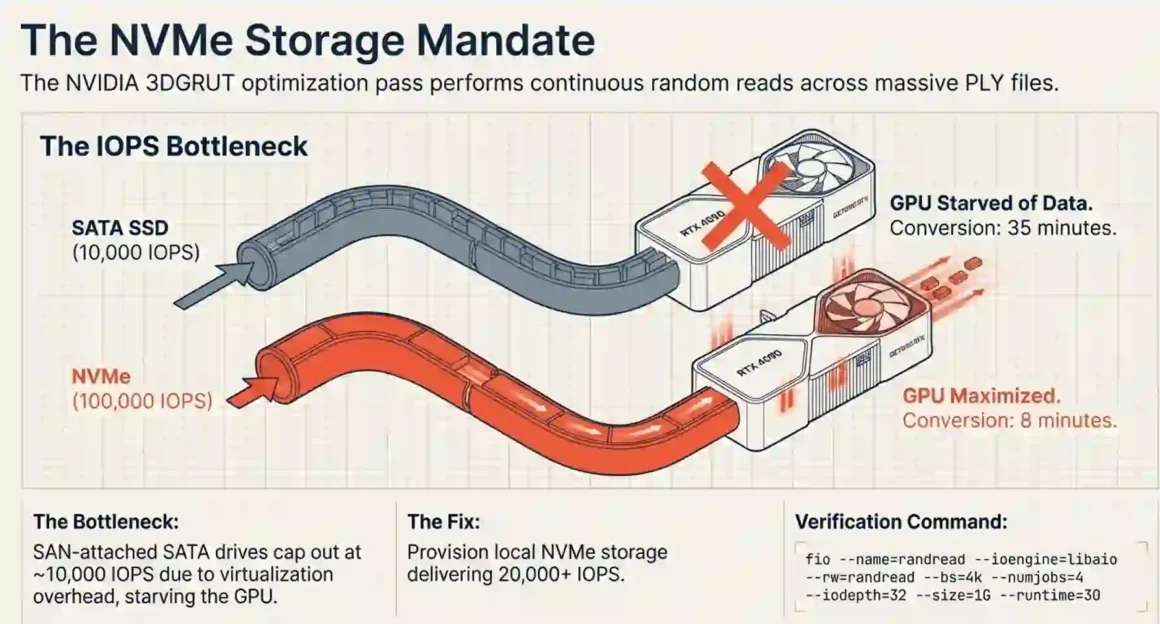
Quick answer: The 3DGRUT PLY-to-USDZ conversion script performs many random reads across large PLY files during the optimization iteration. SATA SSDs at 3,000–10,000 IOPS make this process 3–5× slower. NVMe at 40,000–100,000 IOPS eliminates the storage bottleneck entirely.
PLY files are not sequential-read files. The 3DGRUT algorithm accesses specific point subsets during each optimization pass — random reads scattered across a file that may be 500MB–2GB. On SATA SSD, random 4KB read IOPS max out around 90,000 on modern consumer drives, but VPS-attached SAN storage on SATA often delivers only 3,000–10,000 IOPS due to network overhead in virtualized environments.
NVMe-attached storage on VPS instances consistently delivers 20,000–100,000+ IOPS. The difference is not theoretical. Converting a large Marble scene that takes 8 minutes on NVMe takes 35 minutes on a SATA SAN volume because the GPU sits idle waiting for data.
When choosing a GPU VPS for this pipeline, specifically verify:
- Storage type: NVMe local, not SAN-attached SATA
- Random 4KB read IOPS: ask the provider or benchmark with fio on a test instance
- Providers like Lambda Labs, CoreWeave, and RunPod use NVMe by default on GPU instances
Also relevant for the Spark viewer serving side: USD files for Isaac Sim are structured as USD scene graphs with many small asset references. Loading a complex scene in Isaac Sim triggers hundreds of small file reads. If Isaac Sim is running on a VPS with slow attached storage, scene loading times extend from 15 seconds to several minutes. Again, NVMe is the fix.
Quick benchmark command to check VPS storage IOPS before committing:
fio –name=randread –ioengine=libaio –rw=randread –bs=4k –numjobs=4 –iodepth=32 –size=1G –runtime=30 –time_based –output-format=terse
If the result shows fewer than 20,000 IOPS, this VPS will bottleneck your conversion pipeline.
2.4 Can You Actually Evaluate World Labs’ Technology on a $50/Month VPS or Is This a Enterprise-Only Play?
Quick answer: Yes, you can run a meaningful evaluation for $50 or less. The $50 buys a CPU VPS for API integration plus API credits for 40+ draft world generations. That is more than enough to evaluate output quality, integration complexity, and fit for your use case.
The confusion comes from conflating World Labs’ training cost with your evaluation cost. World Labs’ Google Cloud deal could be worth hundreds of millions of dollars. That is the cost of training Marble. Your cost is just API calls and a VPS to orchestrate them.
The World Labs API uses a credit-based pricing model at $1.00 per 1,250 credits with a minimum purchase of $5. World generation from a panorama costs 1,500 credits for Marble 0.1-plus (high quality) or 150 credits for Marble 0.1-mini (draft).
So $50 in API credits buys you:
- 41 high-quality Marble 0.1-plus world generations at $1.20 each, or
- 416 draft Marble 0.1-mini generations at $0.12 each
Plus a $20 CPU VPS for the month. Total evaluation budget: $70. That is not enterprise-only.
The free tier gives 4 world generations per month from text, image, or panorama inputs — enough to evaluate quality for game environments or concept visualization, but not enough for client work.
Start there. Four free generations let you verify that Marble’s output geometry actually fits your downstream pipeline before spending anything. If the PLY files import correctly into your game engine, CAD tool, or simulation platform, then fund the evaluation properly.
The enterprise-only line gets crossed when you move to production volumes (thousands of worlds per month), need an SLA guarantee, require enterprise data handling agreements, or need the full PLY conversion + Isaac Sim pipeline running 24/7. At that point, GPU VPS costs of $500–2,000/month and API credit costs of $500–5,000/month kick in. That is real money, but it is also still nowhere near the training costs that define World Labs’ infrastructure.
SECTION 3: THE EVALUATION FRAMEWORK — Technical Assessment
3.1 How Do You Benchmark World Labs’ Spatial Intelligence Against NVIDIA’s Earth-2 on Standard VPS Hardware?
Quick answer: NVIDIA Earth-2 and World Labs Marble address different problems. Earth-2 is a climate/weather prediction foundation model. Marble is a 3D environment generation model. They are not head-to-head competitors. You benchmark them on different tasks. On VPS, benchmark Marble against other 3D generation tools.
NVIDIA Earth-2 uses AI to simulate global climate systems at a planetary scale — temperature, precipitation, atmospheric physics. It runs on NVIDIA’s DGX infrastructure. It is geospatial in the meteorological sense: large-scale physical simulation of Earth’s surface.
Marble generates navigable 3D environments from images or text. It is geospatial in the structural sense: indoor spaces, physical environments, architectural scenes.
These serve different needs. An architect or game developer uses Marble. A climate researcher uses Earth-2. Benchmarking them against each other is like comparing a word processor to a spreadsheet.
The right VPS benchmark for Marble is against comparable 3D generation tools:
| Tool | Input | GPU VPS needed | Time per scene | Self-hostable |
| Marble 0.1-plus (API) | 1 image | CPU VPS | ~5 min | No |
| Marble 0.1-mini (API) | 1 image | CPU VPS | ~45 sec | No |
| Instant-NGP (open source) | 30+ photos | RTX 4090 | 5–15 min | Yes |
| NeRFstudio (open source) | 30+ photos | RTX 4090 | 20–60 min | Yes |
| Gaussian Splatting INRIA (open source) | 30+ photos | RTX 4090 | 30–90 min | Yes |
VPS benchmark methodology:
- Take the same physical scene. Photograph it with 50 images for open-source tools. Use a single representative image for Marble.
- Run each tool. Measure time-to-PLY or time-to-usable-output.
- Load each output into the same viewer. Score on: geometry completeness (does it fill in occluded regions?), texture quality, scene boundary handling, physics mesh quality.
- Score data-sovereignty: which tools keep your input data on your server?
This benchmark reveals what Marble’s generative advantage actually buys you: Marble is different from competitors because it creates persistent, downloadable 3D environments rather than generating worlds on-the-fly as you explore. The open-source tools can only reconstruct what exists in the photos. Marble extrapolates and generates plausible geometry for areas the camera never captured.
3.2 What Specific Metrics Prove World Labs’ “Large World Models” Outperform Traditional NeRF Methods on VPS?
Quick answer: The metrics that matter most are single-image coverage (does the model generate complete geometry from 1 image?), scene persistence (does the world stay consistent as you move through it?), and export quality (does the PLY work cleanly in your downstream tool?). On all three, Marble outperforms NeRF when input is sparse. With dense photo inputs, NeRF matches or beats Marble on geometric accuracy.
Traditional NeRF methods the original approach by Ben Mildenhall (who is also a World Labs co-founder) require you to capture 30–100 overlapping photos of a scene before training begins. The resulting model only represents the space visible in those photos. Move outside the training volume and the reconstruction degrades.
Marble solves the sparse-input problem. It has learned spatial priors from vast training data, so it can extrapolate geometry and texture for areas that were never photographed. Give it one kitchen photo; it generates a fully navigable kitchen including the parts behind the camera.
Quantitative metrics to measure on your VPS:
Coverage completeness: Use the Spark viewer to walk the generated world. Measure what percentage of the navigable volume has valid geometry (vs. artifacts or empty space). Marble typically achieves 80–95% complete coverage from a single image. NeRF from 50 photos achieves 70–85% coverage of the photographed volume but 0% coverage outside it.
Geometric consistency: Drop a physics cube into the generated world. Does it land on the floor and stay? Does it fall through walls? This tests whether the collider mesh matches the visual geometry. Marble exports a separate GLB collider mesh specifically for this. NeRF-based methods require additional mesh extraction steps that often produce noisy geometry.
Training time vs quality curve: On a RTX 4090 VPS, NeRFstudio reaches acceptable visual quality in 20–30 minutes. Marble 0.1-plus returns in ~5 minutes from a cloud call. Marble 0.1-mini returns in 45 seconds. For iteration speed, Marble wins clearly.
VPS cost per output: Marble 0.1-plus at $1.20 per generation vs NeRFstudio at $0.50/hour on a $300/month GPU VPS (about $0.14 per 20-minute run). For low-volume use, Marble is more expensive per scene. For high-volume, once you have the GPU VPS, the per-scene cost drops.
The right choice depends on your input data availability and whether data needs to stay on-premise. Dense photos available + data must stay local = NeRF on VPS. Single image + quality prioritized = Marble API.
Discover open source RAG frameworks guide! LlamaIndex, Haystack supercharge LLMs with custom knowledge—build accurate, context-aware AI applications fast!
3.3 Is World Labs’ Real2Sim Pipeline Actually Reproducible on Self-Hosted VPS or Requires Their Cloud?
Quick answer: Partially reproducible. The world generation step (Marble) requires their cloud API. The conversion step (PLY → USDZ via 3DGRUT) runs entirely on your VPS. The simulation step (Isaac Sim) runs entirely on your VPS. Steps 2, 3, and 4 are fully self-hostable.
The workflow involves exporting a detailed AI-generated scene as Gaussian splats in PLY format and a collider mesh in GLB format, converting the PLY to USDZ format using NVIDIA Omniverse NuRec, importing and aligning assets in NVIDIA Isaac Sim, and setting up physics and lighting for accurate simulation.
Breaking this down by VPS viability:
Step 1: Generate world in Marble → Requires World API. Runs on World Labs’ servers. Your VPS sends the request and receives the output. Not self-hostable.
Step 2: Export PLY + GLB from Marble → These files come back to your VPS via download URL. You store them locally. Fully on your VPS.
Step 3: Convert PLY to USDZ using NVIDIA 3DGRUT → Install 3DGRUT by cloning the repository, running install_env.sh, activating the conda environment, then running: python -m threedgrut.export.scripts.ply_to_usd /path/to/scene.ply –output_file /path/to/scene.usdz This runs entirely on your GPU VPS. RTX 4090 minimum.
Step 4: Import into Isaac Sim → Launch Isaac Sim version 5.0 or later. Start with an empty stage, navigate to File → Import, and find the USDZ file. Alternatively drag-and-drop the USDZ file into the Isaac Sim content browser. Runs on your GPU VPS.
Step 5: Add physics, lighting, robots → Fully in Isaac Sim on your VPS. Add a ground plane, configure collision meshes from the GLB, add dome lighting, insert robot assets from NVIDIA’s SimReady library.
This end-to-end flow from world generation to simulation can now be completed in hours, compared to days or weeks with traditional 3D curation. Marble significantly improved efficiency and data diversity for both researchers, with faster iteration allowing new simulation worlds to be generated and tested within minutes.
The only cloud dependency is Step 1. Everything downstream is VPS-native. If you need Step 1 to be self-hosted for data sovereignty reasons, you replace Marble with an open-source Gaussian splatting pipeline that accepts your own photos losing the single-image generation capability but gaining full data control.
3.4 How Do You Validate Physics Consistency in World Labs-Generated Worlds Without Access to Their Training Infrastructure?
Quick answer: Use the GLB collider mesh that Marble exports alongside the PLY. Drop rigid body objects into the scene in Isaac Sim. Verify that objects land on surfaces, do not penetrate walls, and behave as expected given the scene geometry. Systematic mismatch between visual geometry and physics response means the collider needs manual repair.
World Labs generates two outputs for each world:
- The PLY file: visual geometry as Gaussian splats
- The GLB file: a collision mesh for physics simulation
These two are generated from the same scene but are separate representations. Visual fidelity lives in the PLY. Physics accuracy lives in the GLB.
Validation method, step by step:
- Import the scene into Isaac Sim following the standard workflow.
- Drop a DynamicCuboid (a simple rigid box) from 2 meters above the floor. If it lands on the floor and stays, floor collision is correct.
- Roll the cube toward a wall. If it stops at the wall surface rather than passing through, wall collision is correct.
- Place the cube on a table. If it sits on the table surface rather than falling through, furniture collision is correct.
- Check occlusion: stand in one room in the viewer. Can you see through walls into adjacent rooms? If yes, the GLB has thin-wall artifacts that need thickening.
The most common physics consistency issue in Marble outputs: floor gaps at room boundaries. When Marble generates a scene, edges between different surface types (tile to carpet, indoor to outdoor threshold) sometimes have small geometry gaps in the collider mesh. Objects fall through these gaps.
Fix: In Isaac Sim’s stage editor, identify the gap, add a simple ground plane primitive at that boundary, and configure it as a static collider. This takes 2–3 minutes per gap. Not ideal for production automation, but manageable for evaluation.
For large-scale automated testing, write a Python script in Isaac Sim that drops 50 rigid bodies at random positions in the scene, runs 5 seconds of simulation, and checks whether any body’s Z-position at end of simulation is below the expected floor level. Bodies that fall through the floor reveal collider gaps. Log the positions. This gives you a quantitative physics consistency score across generated scenes.
SECTION 4: THE DEPLOYMENT STRATEGY — VPS Implementation
4.1 What Is the Step-by-Step Guide to Deploying World Labs-Style Spatial AI on GPU VPS?
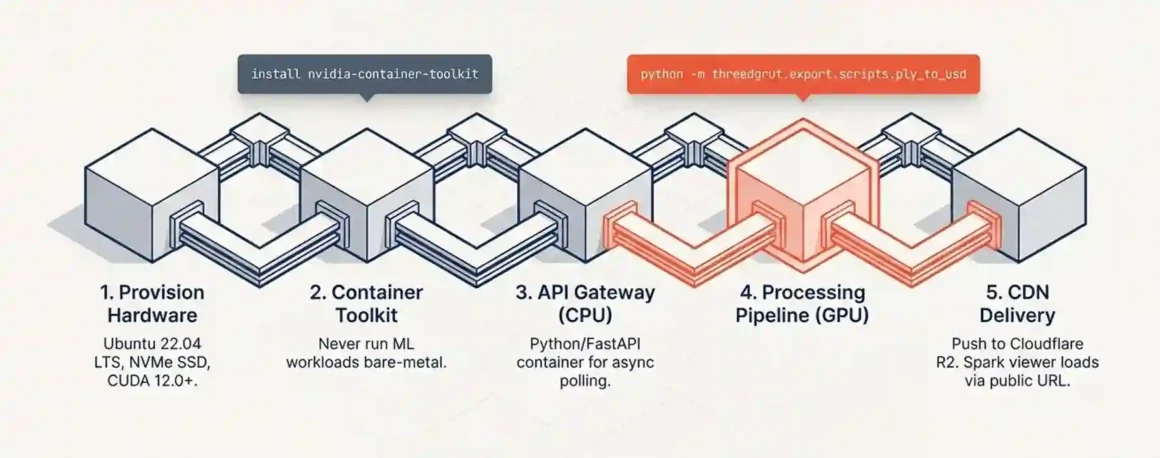
Quick answer: Five steps: provision a GPU VPS with NVIDIA drivers installed, set up NVIDIA Container Toolkit, configure the API integration server, set up the PLY processing pipeline, and configure object storage + CDN for output delivery. The whole stack is operational in under 4 hours.
Step 1: Choose and provision your GPU VPS
For the processing pipeline, use an RTX 4090 (24GB) spot instance from Lambda Labs, RunPod, or CoreWeave. Spot instances cost 30–50% less than on-demand and are fine for conversion jobs (which tolerate interruption via retry logic).
Verify before provisioning:
- NVIDIA driver version 525 or newer (required for NuRec)
- CUDA 12.0 or newer
- Ubuntu 22.04 LTS
- NVMe local storage (not SAN-attached)
- Minimum 32GB RAM (64GB preferred for large scenes)
Step 2: Install NVIDIA Container Toolkit
curl -fsSL https://nvidia.github.io/libnvidia-container/gpgkey | sudo gpg –dearmor -o /usr/share/keyrings/nvidia-container-toolkit-keyring.gpg
curl -s -L https://nvidia.github.io/libnvidia-container/stable/deb/nvidia-container-toolkit.list > /etc/apt/sources.list.d/nvidia-container-toolkit.list
sudo apt-get update && sudo apt-get install -y nvidia-container-toolkit
sudo nvidia-ctk runtime configure –runtime=docker
sudo systemctl restart docker
Verify: docker run –rm –gpus all nvidia/cuda:12.0-base-ubuntu22.04 nvidia-smi should display your GPU.
Step 3: Deploy the API integration container
This is a standard web service. Python with FastAPI works well. The service:
- Accepts user requests with an image URL or file upload
- Calls POST https://api.worldlabs.ai/marble/v1/worlds:generate with your WLT-Api-Key header
- Polls the status endpoint every 15 seconds
- Downloads the PLY + GLB when status is SUCCEEDED
- Pushes output files to object storage (S3 or Cloudflare R2)
- Returns a viewer URL to the user
This container needs no GPU. Deploy it on a separate, cheap CPU VPS or on a managed container service (Fly.io, Railway, Render).
Step 4: Deploy the PLY processing container (GPU VPS)
Use Docker with GPU passthrough:
docker run –gpus all -v /data/scenes:/scenes nvidia/cuda:12.2-devel-ubuntu22.04 /bin/bash
Inside the container, install the 3DGRUT conversion tool from NVIDIA’s GitHub. The conversion command:
python -m threedgrut.export.scripts.ply_to_usd /scenes/input.ply –output_file /scenes/output.usdz
This GPU container should be triggered by a job queue (Redis), not run continuously. Start the container when jobs arrive; shut it down when the queue is empty.
Step 5: Configure CDN delivery for Spark viewer
Upload finished PLY files to Cloudflare R2. Configure a public R2 bucket. Point the Spark viewer at the R2 URL. Users now load 3D worlds from a CDN edge node near them — zero egress cost from R2, fast load times globally.
Total ongoing infrastructure cost for a low-to-moderate volume pipeline: $20–30/month CPU VPS + $0.50/hour GPU VPS on-demand (only when processing jobs are queued) + $0–5/month R2 storage. Realistically, under $100/month for evaluation-scale usage.
4.2 How Do You Optimize VPS Resource Allocation When Running World Labs Models Alongside Traditional Geospatial Workloads?
Quick answer: Separate the workloads by container. The GPU VPS handles only Gaussian splat conversion. Traditional GIS workloads (GDAL, PostGIS, raster processing) run on CPU VPS instances. They compete for RAM but not GPU VRAM, so keep them on separate machines.
The mistake teams make is putting QGIS, PostGIS, and the 3DGRUT conversion pipeline on the same GPU VPS to “maximize utilization.” This creates two problems:
- PostGIS queries eat RAM that the GPU pipeline needs for large PLY loading
- GDAL raster processing uses all CPU cores, starving the OS scheduler that feeds the GPU’s host memory transfers
The rule: GPU VRAM and system RAM on a GPU VPS should be reserved for GPU workloads. Everything else goes on a separate CPU instance.
If you need both to share data, use a shared NFS mount or S3-compatible storage between them. The geospatial pipeline writes processed rasters to S3. The spatial AI pipeline reads input images from S3 and writes PLY outputs back to S3. No direct competition for local resources.
For GPU time-sharing: if you have multiple spatial AI jobs (3D conversion, maybe also Stable Diffusion for texture generation), use NVIDIA’s CUDA Multi-Process Service (MPS). MPS allows multiple processes to share GPU compute time in a way that is more efficient than sequential queuing. Enable it with:
nvidia-cuda-mps-control -d
Note: MPS shares compute, not VRAM. If two jobs together exceed 24GB VRAM, they will still fail.
4.3 Is Containerization (Docker/Kubernetes) Viable for World Labs’ 3D World Generation or Does It Add Unacceptable Overhead?
Quick answer: Docker works well for the processing pipeline. Kubernetes adds meaningful complexity for small teams without proportional benefit until you scale to multiple GPU nodes. The container overhead for GPU workloads is less than 2% — not an issue.
Docker with NVIDIA Container Toolkit is the standard deployment method for GPU workloads. Isaac Sim 5.0 is now accessible through NVIDIA Brev, which provides developers with instant access to NVIDIA RTX-enabled GPU instances across major cloud providers. NVIDIA designs their tooling to run in containers.
Container benefits for this pipeline:
- Reproducible environments (3DGRUT and its Python dependencies are complex to install manually)
- Easy version control of the conversion environment
- Simple rollback when NVIDIA updates the 3DGRUT library
- Layer caching means the 20–30GB NuRec container image only downloads once
The overhead concern is mostly irrelevant for inference/conversion workloads. Container overhead is primarily in CPU scheduling (1–3%) and memory allocation (a few hundred MB for the container runtime). For a job that takes 8 minutes to convert a PLY file, adding 10 seconds of container startup time is immaterial.
Where containers add real overhead: GPU memory layers. If you put the 3DGRUT container image layers on slow SAN storage rather than NVMe, the container startup time grows. Keep container image storage on the same NVMe volume as your data.
Kubernetes for a single GPU VPS: unnecessary. Kubernetes makes sense when you need to schedule jobs across multiple GPU nodes. For a single-node evaluation pipeline, docker run or docker-compose is sufficient. Add Kubernetes (or its lighter alternative K3s) when you genuinely have 3+ GPU instances to coordinate.
4.4 How Do You Implement Auto-Scaling for World Labs Workloads When VPS Resources Are Fixed (Not Cloud)?
Quick answer: You auto-scale the API integration tier (stateless, cheap), but the GPU tier cannot auto-scale on a fixed VPS. Instead, you queue jobs with Redis and batch them. If sustained load exceeds one GPU instance’s throughput, you add a second dedicated GPU VPS manually rather than auto-scaling.
True auto-scaling (Kubernetes HPA, AWS Auto Scaling groups) works on cloud infrastructure where VMs can be provisioned in seconds. Traditional VPS providers do not offer this. RunPod and Lambda Labs offer programmatic instance provisioning via API, which you can script as pseudo-auto-scaling.
Practical approach for VPS-based pipeline:
The API gateway tier (CPU VPS) handles unlimited throughput it just queues jobs. Redis queue absorbs spikes without increasing infrastructure.
The GPU processing tier processes jobs from the queue at a fixed rate (e.g., 6 conversions per hour on one RTX 4090 VPS). When the queue depth exceeds 2–3 hours of backlog, a monitoring script (Grafana + alerting) notifies you to spin up a second GPU instance on RunPod.
This is not instant, but it is practical. The key insight: Marble generation (the slow step) happens on World Labs’ servers. The PLY-to-USDZ conversion on your VPS is faster per-job than the generation step. The queue never grows as fast as naive math suggests.
Queue management configuration:
# Redis job queue check
queue_depth = redis_client.llen(‘conversion_jobs’)
if queue_depth > 20:
# Trigger second GPU instance via RunPod API
runpod.create_pod(gpu_type=”RTX4090″, image=”your-converter-image”)
Shut down the second instance when queue depth drops below 5. Total extra cost: the 2–3 hours of extra GPU time to clear the backlog. At $0.50/hour, that is $1–1.50 per surge event.
SECTION 5: THE COST ANALYSIS — Economic Evaluation
5.1 What Is the True Cost of Evaluating World Labs Technology: $500/Month VPS vs $50,000 On-Premises Setup?
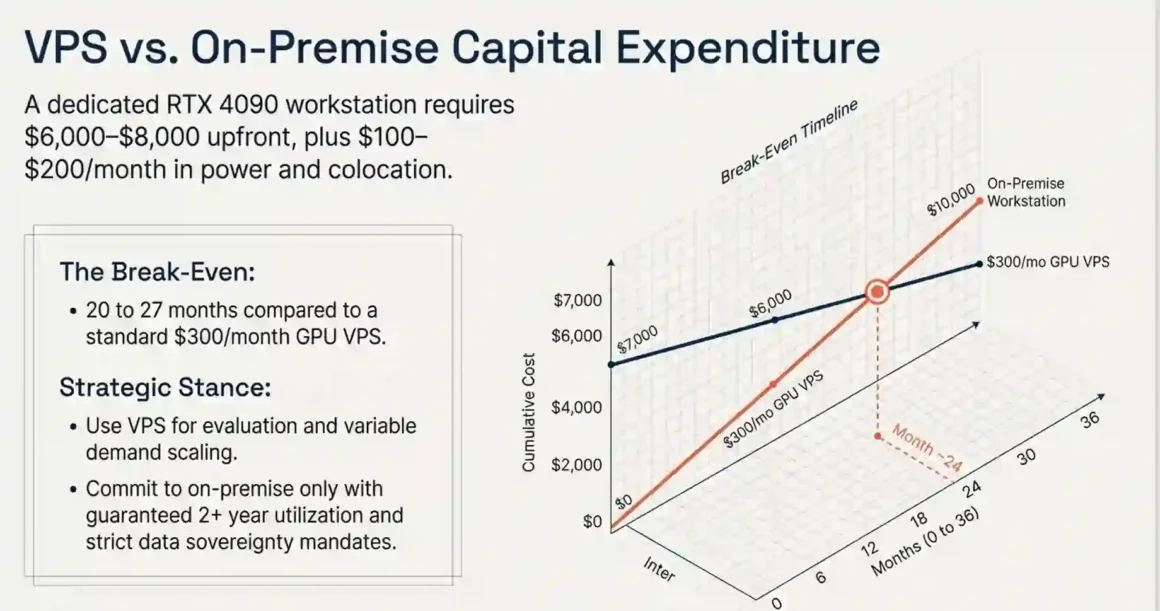
Quick answer: A complete technical evaluation costs $70–300 total (not per month). A production-ready pipeline costs $500–1,500/month. A full on-premises GPU server for the same workload costs $15,000–50,000 upfront plus $200–500/month in electricity. Break-even between VPS and on-prem is 18–36 months depending on utilization.
Evaluation cost (first month, testing only):
- CPU VPS for API integration: $20
- API credits for 40 production-quality world generations: $50
- GPU VPS spot time for 10 NuRec conversions (about 3 hours total): $1.50
- Total: $71.50
That tests quality, integration, and pipeline viability. If it does not fit your use case, you have spent $71.50 finding that out. That is the correct investment before scaling.
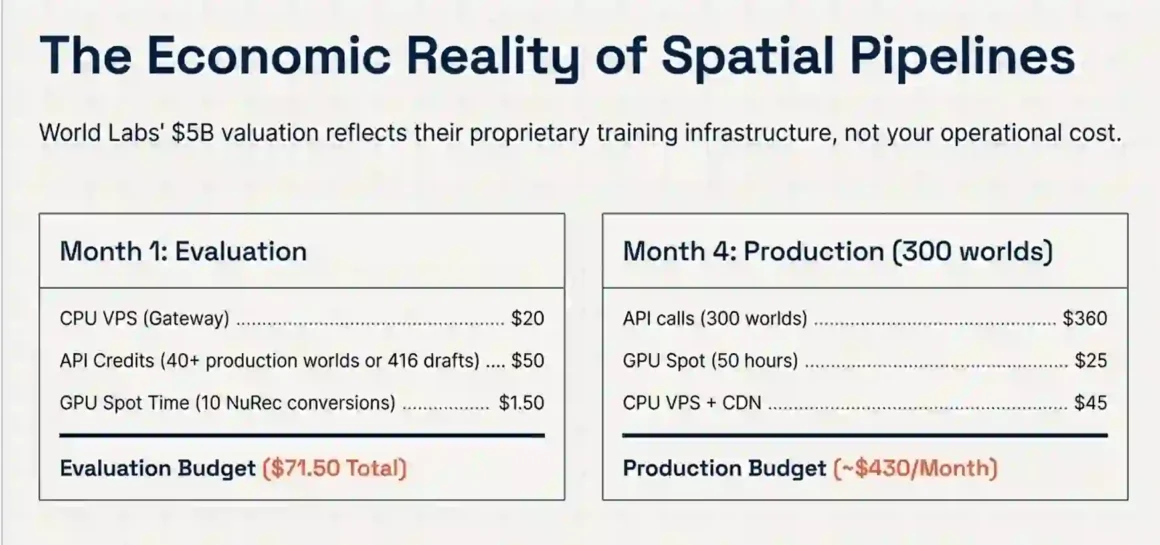
Production pipeline cost (monthly, moderate volume: 300 worlds/month):
- API credits: 300 × 1,500 credits ÷ 1,250 × $1 = $360
- GPU VPS (RTX 4090 on-demand for 50 hours of conversion time): $25
- CPU VPS for API gateway and file serving: $30
- R2 object storage (1TB at $0.015/GB): $15
- Total: ~$430/month
On-premises alternative:
Buying an RTX 4090 workstation for the conversion pipeline:
- Hardware (RTX 4090, 64GB RAM, NVMe workstation): $6,000–8,000
- Hosting/colocation or UPS power at office: $100–200/month
- Break-even vs $300/month GPU VPS cost: 20–27 months
Buy on-prem if you are confident in a 2+ year commitment and run the GPU near-continuously. Use VPS for evaluation and for workloads with variable demand.
5.2 Why Does World Labs’ $5 Billion Valuation Imply Their Technology Cannot Run Cost-Effectively on Standard VPS?
Quick answer: The $5B valuation reflects their training infrastructure costs and proprietary model advantage not the inference cost. Inference via their API is cost-effective for most use cases. The valuation is irrelevant to your operational budget.
World Labs raised $1bn to advance spatial intelligence, backed by investors including Nvidia, AMD, Fidelity Management and Research Company, Autodesk, and others. Reports estimated the valuation at $5 billion.
That valuation prices in:
- The model weights (years of training compute)
- The research team (world-class experts in spatial AI)
- The proprietary training dataset
- Future revenue from API and enterprise licensing
- The strategic position in an emerging market
None of that changes what it costs you to call their API. You pay $1.20 per high-quality world generation. The valuation is a signal about World Labs’ market position and investor confidence not a pricing proxy.
The real implication of the $5B valuation for your VPS strategy: it suggests World Labs is not going anywhere soon. World Labs came out of stealth in 2024, raising a $230M initial round, and in 2026 raised $1B with a valuation that quadrupled in less than two years. A company at this funding stage and valuation has the runway to maintain their API and keep improving Marble. You are not building on a platform that disappears in 6 months.
The concern about cost-effectiveness only arises at very high volumes. If you are generating 50,000 worlds per month, the API cost ($60,000/month) starts to justify building your own spatial AI pipeline. At that scale, discuss enterprise pricing with World Labs directly bulk pricing changes the math substantially.
Build autonomous AI agents tutorial! Step-by-step mastery creates self-running solutions—launch productivity boosters generating ROI instantly!
5.3 How Do You Minimize VPS Costs When Running World Labs-Style Models Using Quantization and Model Compression?
Quick answer: Quantization applies to language models and diffusion models, not directly to Gaussian splatting output files. Instead of quantizing models, you reduce VPS costs for this pipeline by compressing PLY files (using SPZ format), batching conversion jobs, and using spot/preemptible GPU instances.
Quantization reduces model weight precision from FP16 to INT8 or INT4 to shrink memory footprint. That technique applies when you are running the model weights yourself. Since Marble’s weights run on World Labs’ servers, quantization is irrelevant to your VPS cost.
What actually reduces cost:
PLY file compression with SPZ format: OTOY’s OctaneStudio 2026 introduced the SPZ format as a compressed alternative to PLY for Gaussian splats. Octane 2026 supports AI World Model generators like Marble and supports loading .PLY and .SPZ files that contain Gaussian splatting data. SPZ files are 5–10× smaller than PLY files for the same scene. Smaller files = faster downloads from World Labs = lower bandwidth cost = faster conversion times.
Spot/preemptible GPU instances: Lambda Labs, RunPod, and CoreWeave offer spot instances at 30–50% discount versus on-demand. Spot instances can be interrupted, which means your conversion jobs need retry logic. For jobs that take 5–15 minutes, the interruption risk is low. Use spot for non-time-sensitive batch processing.
Batch conversion scheduling: Instead of converting each PLY immediately upon download, queue them and convert in batches during off-peak hours. Cloud GPU spot prices often drop 20–40% between midnight and 6am. Schedule batches via cron to run overnight.
Draft quality for iteration, production quality for finals: Using Marble 0.1-mini at $0.12 per generation for layout testing and iteration, then Marble 0.1-plus at $1.20 only for final exports, reduces API costs by 90% on iterative workflows. This is the single highest-leverage cost optimization available.
5.4 Is There a Viable Path From VPS Evaluation to Production Deployment for World Labs Technology, or Is It Cloud-Only?
Quick answer: The path exists and is straightforward. Evaluation on VPS → production on a hybrid architecture: API calls stay in World Labs’ cloud, processing and serving moves to your VPS or on-premises infrastructure. World Labs is cloud-only for generation; your pipeline is VPS-native.
The migration path from evaluation to production:
Stage 1 — Evaluation (Month 1): CPU VPS + spot GPU instance + manual pipeline. Validate quality, test integration, measure time-per-world.
Stage 2 — Automation (Month 2–3): Add job queue, automate PLY download and conversion, build Spark viewer serving. Still using VPS spot instances. Add monitoring (simple Grafana + Prometheus). This stage handles 50–200 worlds/month.
Stage 3 — Scale (Month 4+): Move API gateway to a managed container service (Fly.io for global reach). Add CDN for PLY delivery. Consider enterprise API pricing with World Labs if volume exceeds 500 worlds/month. Dedicated GPU VPS instance (not spot) if conversion pipeline requires consistent SLA.
The vendor lock-in question: Yes, if you build production workflows around Marble’s API, you depend on World Labs. Mitigation: design your pipeline with an abstraction layer. The conversion and serving steps work with any PLY-format Gaussian splat, regardless of source. If you ever need to replace Marble with an alternative or an open-source tool, you swap only the generation step. The rest of the pipeline (3DGRUT, Isaac Sim, Spark viewer) remains unchanged.
Google Cloud lock-in is World Labs’ concern, not yours. You call their API endpoint. They can change their backend infrastructure without affecting your integration. Your only external dependency is the World API endpoint URL and the WLT-Api-Key authentication system.
SECTION 6: THE COMPETITIVE LANDSCAPE — Comparative VPS Evaluation
6.1 How Does World Labs’ VPS Requirements Compare to Niantic’s Large Geospatial Model on the Same Hardware?
Quick answer: Niantic’s Scaniverse and geospatial models are designed for on-device and edge processing of real-world scans. World Labs Marble is designed for generative world creation from sparse inputs. On VPS, Niantic’s tools are lighter (run on CPU or modest GPU). Marble’s heavy compute lives in their cloud API. Both are VPS-friendly for different reasons.
Niantic built their geospatial AI on a dataset of billions of real-world scans captured through Pokémon GO and Ingress players. Their models focus on recognizing and reconstructing real-world locations from smartphone imagery.
The VPS comparison:
- Niantic Scaniverse processing: CPU-compatible for basic reconstruction; modest GPU (RTX 3090 or better) for quality optimizations. Self-hostable. Works with local data.
- World Labs Marble: Not self-hostable. Heavy compute in their cloud. Your VPS handles only output processing.
If your requirement is reconstructing real-world locations from photos captured on-site, Niantic’s approach is more VPS-friendly and keeps data local. If your requirement is generating entirely new 3D environments from single images or text, Marble has no comparable competitor.
For enterprise geospatial work with sensitive location data (government, defense, infrastructure), Niantic’s self-hostable path is safer. For creative and simulation work where input images are non-sensitive, Marble’s API path is faster and produces higher-quality generative outputs.
6.2 Can You Run World Labs and OpenAI Sora Competitors Side-by-Side on a Single High-End VPS for Comparison?
Quick answer: You can call multiple cloud-hosted AI APIs from a single VPS simultaneously. Resource competition is minimal since the heavy compute happens remotely. On the VPS itself, the comparison workload is just handling multiple API responses in parallel.
Marble (World Labs) generates persistent 3D environments. Sora-style video generation models (OpenAI Sora, Runway Gen-3, Kling) generate video sequences. These are different outputs navigable 3D vs flat video.
The overlap is in the use case: both can show an environment from a given camera angle. The difference is that Marble’s output is interactive and navigable, while video outputs are fixed-perspective sequences you watch.
Running them side-by-side from a VPS:
- Both APIs take image or text input
- Both return file downloads (PLY for Marble, MP4 for video models)
- Both can be called asynchronously from a single API gateway service on your VPS
- Resource usage on the VPS: network bandwidth for downloads (PLY files are larger than MP4s for equivalent scene duration), plus storage
A single 4-core CPU VPS handles parallel API calls to both services comfortably. The bottleneck in this comparison is not your VPS it is the generation time on the remote servers. Set up parallel async polling and collect results from both when ready.
For a concrete evaluation, generate the same scene description in Marble and in a video generation model. Download both. Present both to users and collect preference data. This kind of A/B test runs entirely on a CPU VPS with no GPU required.
6.3 Is World Labs’ Technology More or Less VPS-Compatible Than Traditional Photogrammetry Pipelines (RealityCapture, Metashape)?
Quick answer: Marble is more VPS-compatible for low-input scenarios (single image). Traditional photogrammetry (RealityCapture, Metashape) is more VPS-compatible for dense-input scenarios where data sovereignty matters because the full pipeline runs on your server without any external API dependency.
RealityCapture and Metashape are traditional photogrammetry tools. Input: 50–500 photos. Process: structure-from-motion, dense point cloud reconstruction, mesh generation. Output: mesh, point cloud, textured model.
These run entirely on your VPS or local machine. RealityCapture is commercial software ($3,750/year or per-scene credit). Metashape is $3,500/year enterprise. Both have GPU acceleration modes (CUDA) that benefit from RTX 4090 or A100.
VPS compatibility comparison:
| Criteria | Marble (World Labs API) | RealityCapture / Metashape |
| Minimum input | 1 image | 30+ photos |
| Data stays on-prem | No (sent to World Labs) | Yes |
| GPU needed on VPS | No (for API-only flow) | Yes (for GPU acceleration) |
| Output format | PLY + GLB | Mesh, point cloud, OBJ |
| Per-scene cost | $1.20 (API) | Software license amortized |
| Generative capability | Yes (fills unseen areas) | No (only reconstructs seen areas) |
The choice comes down to input and data. Have 200 photos of a real place and cannot send them to a third party? RealityCapture on your VPS. Have one image and need a completely navigable world? Marble API.
For hybrid workflows: use Marble for generative concept development, then use RealityCapture to capture and reconstruct the final physical environment for production use. Both outputs are PLY or similar formats and feed the same downstream pipeline.
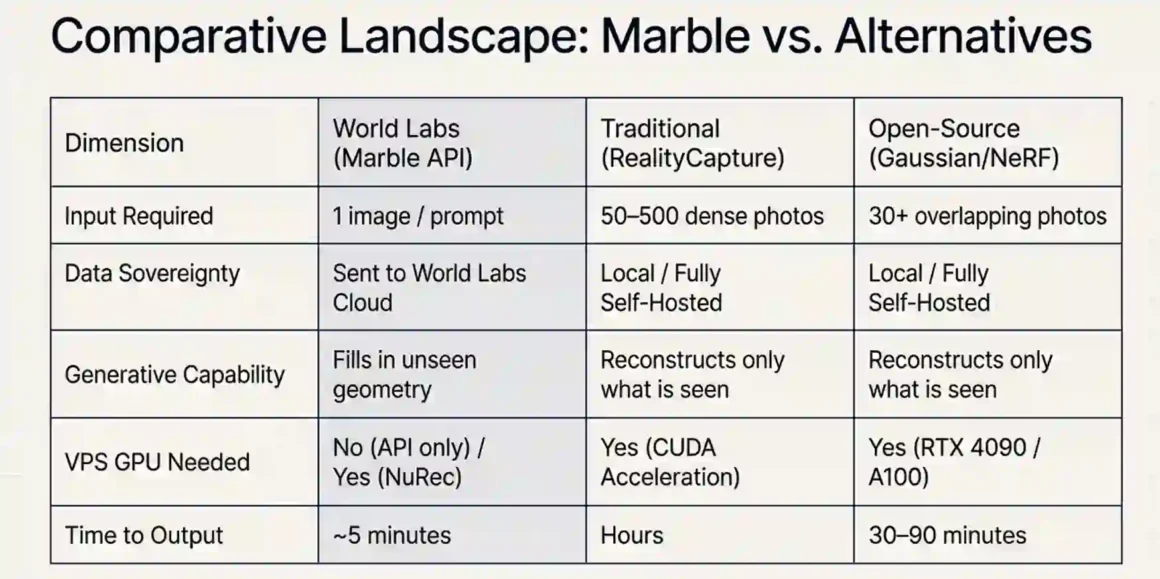
6.4 How Do You Evaluate World Labs Against Open-Source Alternatives (Instant-NGP, Gaussian Splatting) on Limited VPS Resources?
Quick answer: On a budget RTX 4090 VPS, open-source tools (Instant-NGP, INRIA Gaussian Splatting, and NeRFstudio) handle dense photo reconstruction well and cost only GPU time. Marble wins when you have single-image inputs or need generative extrapolation. Use both: Marble for sparse-input generation and open-source for dense-input reconstruction.
Instant-NGP from NVIDIA Research runs on 16–24GB VRAM, converges in 5–10 minutes, and produces excellent quality from 50+ photos. It is free and self-hostable. On a RTX 4090 VPS at $0.50/hour, a reconstruction costs about $0.04–0.08 in GPU time.
The INRIA Gaussian Splatting implementation (the original from the paper “3D Gaussian Splatting for Real-Time Novel View Synthesis”) similarly requires 24GB VRAM for training, takes 30–90 minutes for full quality, and produces outputs compatible with the same PLY-based viewers as Marble.
Where open-source falls short:
- Single-image input: open-source tools cannot reconstruct a scene from one photo. They need multiple views.
- Generative content: they cannot hallucinate geometry for unseen areas. You get only what the photos show.
- Speed for iteration: 30–90 minutes to try a different lighting condition or layout change is slow. Marble 0.1-mini at 45 seconds is 40–120× faster for rapid iteration.
Where open-source wins:
- Full data sovereignty: no pixels leave your server
- Cost at scale: GPU time only, no per-generation API cost
- Customization: modify the training code, adjust output format, integrate custom losses
- No external dependency: pipeline works without internet access
For a thorough evaluation, run both on your VPS for 2 weeks. Use Marble for 20 generations of scenes where you have only single images. Use INRIA Gaussian Splatting for 20 reconstructions of scenes where you have 50+ photos. Compare output quality, pipeline complexity, and total cost. The comparison data from your own scenes is more useful than any generic benchmark.
Review best AI agent frameworks 2026! Agent Zero, LangGraph, CrewAI top charts—select production powerhouses scaling your AI empire profitably!
SECTION 7: THE SECURITY & COMPLIANCE — Enterprise VPS Considerations
7.1 What Data Privacy Risks Exist When Processing Geospatial Data on Third-Party VPS for World Labs Evaluation?
Quick answer: The primary risk is sending sensitive input images to World Labs’ servers via the API. Your VPS itself processes only outputs (PLY files), which are geometry not the raw geospatial data. The data exposure point is the API upload step, not the VPS processing step.
When a user uploads an image to be processed by Marble, that image travels from your VPS to World Labs’ servers for generation. The generated PLY file comes back. The original image and any metadata it carries (GPS EXIF, facility layout, infrastructure details) have touched World Labs’ infrastructure.
Who this matters for:
- Defense contractors’ processing facility imagery: high sensitivity, potentially ITAR-regulated. Do not use the Marble API for classified imagery regardless of VPS architecture.
- Healthcare facilities processing hospital floor plans: HIPAA does not specifically cover floor plan imagery, but review your organization’s data classification policies.
- Real estate agencies processing client property photos: low sensitivity, standard commercial use, fine for Marble API.
- Manufacturing companies processing factory floor scans depend on proprietary machinery visibility. Check with legal.
Review World Labs’ privacy policy before uploading client IP. Confirm data retention and whether words are used for training. This is actionable advice check their current policy at worldlabs.ai/privacy before processing any sensitive data.
Architecture for reducing data exposure:
Strip EXIF metadata from images before uploading to the API. Use ImageMagick on your VPS:
convert input.jpg -strip clean.jpg
This removes GPS coordinates, device information, and timestamps from the image before it reaches World Labs’ servers. The image content (the scene itself) still goes to their servers, but you eliminate metadata leakage.
For truly sensitive geospatial data aerial survey imagery, satellite images, infrastructure scans the only safe approach is a fully self-hosted pipeline using open-source Gaussian splatting tools that never connect to external APIs.
7.2 How Do You Maintain Model Version Control and Reproducibility When Evaluating World Labs on Ephemeral VPS Instances?
Quick answer: Pin API model versions in your code (Marble 0.1-plus, not latest). Store all input images and output PLY files in object storage with content hashes. Use Docker images with pinned dependency versions for the processing pipeline. This gives you reproducible results across any VPS instance.
Ephemeral VPS instances (spot instances, containers) disappear and respawn. If your evaluation pipeline assumes local state persists, you lose data and cannot reproduce results.
Reproducibility checklist:
Infrastructure as code: define your GPU instance configuration in Terraform or Pulumi. Every instance spawns with identical dependencies, packages, and configuration. No manual setup that creates configuration drift.
Input storage: every image you send to the Marble API gets stored in S3 with a SHA-256 hash as the key. The same image always produces the same stored reference, regardless of when it was uploaded.
Output storage: every PLY file downloaded from World Labs gets stored with a job ID linking it to the specific API request parameters (model version, input image hash, prompt text). You can replay any evaluation result exactly.
Model pinning: the World API accepts a model field in the generation request. Always specify “Marble 0.1-plus” or “Marble 0.1-mini” explicitly. Never rely on a default that might silently update.
Conversion pipeline pinning: Docker image for 3DGRUT should use a specific commit SHA, not the latest tag. When NVIDIA updates 3DGRUT, test the update in a staging pipeline before deploying to production.
7.3 Is World Labs’ Technology Subject to Export Control Restrictions When Self-Hosted on International VPS Providers?
Quick answer: World Labs’ API is a commercial web service accessed via standard REST calls no special export licenses are typically required for calling a commercial AI API from an international VPS. However, geospatial data you process may be subject to export controls, separate from the AI tool itself.
Export control regulations (ITAR, EAR) apply to defense articles and dual-use technologies. An AI model that generates 3D indoor environments from photos is not classified as a defense article under current regulations. You can call the World API from a VPS in Europe, Asia, or elsewhere without ITAR/EAR licenses for the API access itself.
What can be subject to export control: the geospatial data you feed into the pipeline. Satellite imagery with sub-0.5m resolution, imagery of specific military installations, or sensor data from export-controlled systems may carry data export restrictions. If you are processing this type of data, consult legal counsel before sending it to any third-party API regardless of jurisdiction.
VPS location considerations:
Using a VPS provider with servers in certain countries creates data sovereignty obligations. GDPR applies if you process EU residents’ personal data on EU-hosted VPS. China-based VPS providers are subject to Chinese data localization laws. For most geospatial evaluation workflows (non-personal, non-classified scene data), provider location is mainly a latency and compliance paperwork question.
Recommendation: use a VPS provider in the same jurisdiction as your organization’s primary data residence. Reduces compliance complexity substantially.
7.4 How Do You Secure GPU VPS Instances Running World Labs Models Against Cryptojacking and AI Model Theft?
Quick answer: GPU VPS instances are primary targets for cryptojacking because they have compute-intensive hardware. The three-layer defense is: disable public GPU access (firewall all ports except SSH), monitor GPU utilization for anomalies, and use container isolation to limit blast radius if a service is compromised.
Cryptojacking on GPU VPS is a real attack vector. Attackers specifically scan for exposed ML-related ports (Jupyter default port 8888, CUDA remote service ports). If they gain access, they run cryptocurrency mining software that uses your GPU 100% of the time. Your bill increases dramatically; your jobs fail. This happens.
Specific hardening steps:
- Firewall everything by default. Only port 22 (SSH) should be open. All other services (API endpoint, web viewer) should be behind a reverse proxy (Nginx, Caddy) or tunnel (Cloudflare Tunnel). Never expose raw application ports to the internet.
- Disable password SSH authentication. Use SSH key pairs only.
# In /etc/ssh/sshd_config
PasswordAuthentication no
PubkeyAuthentication yes
- Monitor GPU utilization. Your conversion jobs run for 5–15 minutes. Outside of conversion jobs, GPU utilization should be 0%. Set up a monitoring alert if GPU utilization exceeds 10% when no jobs are queued:
# Simple monitoring script
while true; do
utilization=$(nvidia-smi –query-gpu=utilization.gpu –format=csv,noheader,nounits)
if [ “$utilization” -gt 10 ] && [ “$(redis-cli llen conversion_jobs)” -eq 0 ]; then
alert “Unexpected GPU usage: $utilization%”
fi
sleep 60
done
- Container isolation. Run each service in a container with –read-only filesystem and explicit volume mounts only where needed. If the API gateway is compromised, the attacker cannot access the GPU container’s filesystem.
- Rotate your World Labs API key regularly. A compromised container that has your API key can generate thousands of worlds at your expense. Key rotation every 30–60 days limits the damage window. Configure auto-refill limits to cap maximum API spend per day.
SECTION 8: THE FUTURE-PROOFING — Long-Term VPS Strategy
8.1 Will World Labs’ Future Models Require Even More Specialized Hardware, Making Current VPS Investments Obsolete?
Quick answer: World Labs’ future models will require more compute for training, which happens on their infrastructure not yours. Your VPS requirements will either stay the same or decrease as model inference becomes more efficient. Current RTX 4090 VPS investments remain valid for at least 2–3 years.
“If AI is to be truly useful, it must understand worlds, not just words. Worlds are governed by geometry, physics, and dynamics, and reconciling the semantic, spatial, and physical is the next great frontier of AI,” said Fei-Fei Li.
World Labs is clearly investing in more capable spatial models. More capable models tend to require more training compute. They also tend to produce better outputs at the same or lower inference cost over time because inference optimization is a parallel track to capability development.
The pattern with other AI models: GPT-4 required enormous training compute, but inference became progressively cheaper and smaller models (GPT-4o-mini) achieved similar quality at a fraction of the cost. Marble will follow the same trajectory. The current Marble 0.1-mini is already substantially faster than Marble 0.1-plus with acceptable quality for many use cases.
For your VPS, the 3DGRUT conversion step may actually become GPU-lighter over time as NVIDIA optimizes the algorithm. Isaac Sim has been getting faster with each release. The Spark viewer already renders in the user’s browser, removing server-side GPU requirements for that step.
Build your VPS pipeline on current stable specs (RTX 4090 / A100 for conversion) with the expectation that future updates will either require the same or less GPU. If World Labs releases a new model format that requires different processing, evaluate the actual requirements before buying new hardware.
8.2 How Do You Build a VPS Evaluation Environment That Adapts to World Labs’ Product Updates and New Releases?
Quick answer: Use versioned Docker images for every component of the pipeline. Maintain a staging environment that tests new releases before production deployment. Version-pin all external dependencies. Write integration tests that validate output format, not output content.
World Labs will update Marble. They will add new models (Marble 0.2, etc.). They will potentially change output formats or API behavior. Your pipeline needs to handle this without breaking.
Adaptation architecture:
Abstract the generation step behind an interface:
class WorldGenerator:
def generate(self, input_image: str, model: str) -> WorldOutput:
# Calls World API
pass
class WorldOutput:
ply_url: str
glb_url: str
model_version: str
generation_timestamp: datetime
When World Labs adds Marble 0.2, you add a new model string to the model parameter. The rest of the pipeline stays the same as long as the output is still PLY + GLB. If the output format changes, you update only the WorldOutput class and the download step.
Automated testing for API changes:
Run a nightly test that:
- Sends a fixed test image to the API with Marble 0.1-plus
- Downloads the PLY output
- Verifies the PLY file parses correctly with open3d
- Verifies the GLB file loads correctly with trimesh
- Runs the 3DGRUT conversion
- Checks the USDZ file is valid USD
If any step fails, you get alerted before users hit the broken pipeline. This catches API changes, new output format versions, or 3DGRUT incompatibilities early.
8.3 Is There a Community or Open-Source Ecosystem Developing Around World Labs-Compatible VPS Deployments?
Quick answer: Yes, a growing ecosystem exists. NVIDIA’s 3DGRUT is open source and actively developed. The Spark viewer library is open source. The Isaac Sim integration tooling is open source. Third-party VPS deployment guides and scripts are emerging on GitHub and Medium. This ecosystem is young but real.
Marble’s PLY splats and GLB colliders were converted to USD/USDZ formats and imported into Isaac Sim by researchers using Omniverse RTX Neural Rendering (NuRec) capabilities, enabling real-time visualization of 3D Gaussian Splats alongside physical interaction. These workflows are being documented publicly.
Key open-source components:
- NVIDIA 3DGRUT (github.com/nv-tlabs/3dgrut): the PLY-to-USDZ conversion tool. Apache 2.0 license. Actively maintained.
- World Labs Spark: the Three.js Gaussian splat renderer. Available through World Labs’ developer portal.
- NVIDIA Isaac Sim 5.0: Isaac Sim is free to use, licensed as open source under Apache 2.0 and available on GitHub.
- graphdeco-inria/gaussian-splatting: the original INRIA Gaussian splatting implementation. Widely used as an open-source alternative for the reconstruction step.
- NeRFstudio: a modular framework for NeRF and Gaussian splatting research. GPU VPS compatible.
Community activity: Medium tutorials on the Marble + Isaac Sim workflow appeared within weeks of the NVIDIA technical blog post. GitHub repositories for automated PLY conversion scripts are being published. Discord communities around Gaussian splatting (like the one at radiancefields.com) are discussing World Labs integration actively.
The ecosystem is 6–12 months old, which means documentation gaps exist. The NVIDIA technical blog and World Labs’ own documentation are the authoritative sources. For edge cases, the NVIDIA Isaac Sim forums are responsive.
8.4 What Is the Exit Strategy If World Labs Technology Proves Unsuitable for Your VPS-Based Workflow?
Quick answer: Exit is straightforward because your pipeline is designed around the PLY format, not around World Labs specifically. Any tool that produces PLY-format Gaussian splats feeds the same downstream pipeline. Replace the generation step; everything else stays.
If Marble’s quality is insufficient, too expensive, or the API reliability is unacceptable, your fallback options are:
Option A: Open-source Gaussian splatting (INRIA, Instant-NGP)
- Requires 30+ input photos instead of single images
- Runs entirely on your GPU VPS
- Produces PLY output compatible with the same 3DGRUT + Isaac Sim pipeline
- Cost: GPU VPS time only
Option B: Alternative commercial spatial AI APIs
- Luma AI (lumalabs.ai) offers a similar API for 3D capture and generation
- Polycam, RealityScan by Epic Games for photogrammetry
- Output formats vary but most support PLY or can convert to it
Option C: Traditional photogrammetry (RealityCapture, Metashape)
- Highest accuracy for reconstructing real-world locations
- Requires dense photo capture
- Fully self-hosted
- Well-documented VPS deployment guides exist
Data portability: All PLY files you have generated with Marble remain yours. They are standard 3D point cloud files readable by open3d, CloudCompare, MeshLab, and dozens of other tools. You do not lose previously generated content when switching providers.
Sunk cost mitigation: The VPS infrastructure you build (3DGRUT pipeline, Isaac Sim setup, Spark viewer serving, Redis queue, object storage) is not World Labs-specific. It works with any Gaussian splat source. The development investment in the pipeline is not lost when you switch the generation step.
Budget 1 week to swap the generation step. Your integration test suite (from Section 8.2) validates that the new generator’s PLY output works correctly in the pipeline before you decommission the Marble integration. Clean transition, minimal risk.
Final Evaluation Checklist
Before building anything, confirm these:
Infrastructure decisions:
- [ ] CPU VPS ($20/month) for API integration + file serving — no GPU needed
- [ ] GPU VPS (RTX 4090, 24GB VRAM) only if you process PLY files with NuRec
- [ ] NVMe storage verified on GPU VPS (run fio benchmark before committing)
- [ ] NVIDIA Container Toolkit installed before any GPU workload
Credential setup:
- [ ] API key from platform.worldlabs.ai (NOT marble.worldlabs.ai — different systems)
- [ ] Auto-refill enabled with daily spend cap configured
- [ ] API key rotation scheduled (every 30–60 days)
Cost estimation:
- [ ] Calculate monthly API credits: (worlds/month) × 1,500 ÷ 1,250 × $1 for production quality
- [ ] Start with Marble 0.1-mini at $0.12/world during development
- [ ] Verify free tier (4 worlds/month) before any spend
Data handling:
- [ ] Strip EXIF metadata from input images before API upload
- [ ] Review worldlabs.ai/privacy policy for data retention terms
- [ ] Classified or sensitive imagery: use self-hosted open-source tools instead
Legal:
- [ ] Commercial use requires Pro tier minimum ($35/month) — free and Standard tiers are personal use only
- [ ] Enterprise contracts needed for volume commitments and SLA guarantees


