
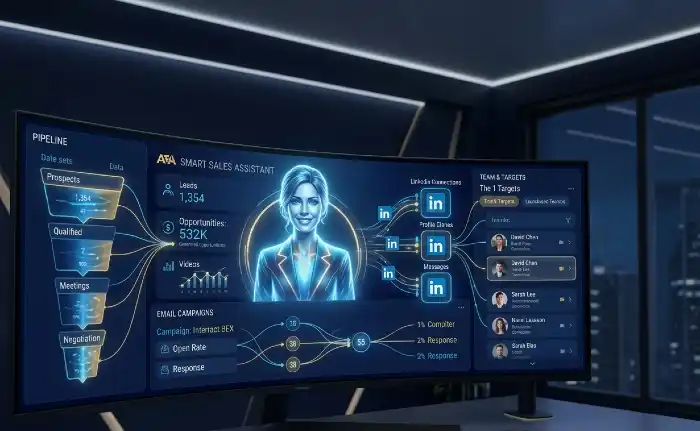
Artisan AI is a B2B outbound automation platform built around an AI sales agent called Ava. She finds leads, writes emails, follows up, and manages your deliverability all on autopilot. It works best for teams with a clear ICP and standard B2B outreach. It struggles with niche markets, complex messaging, and buyers who expect deep personalization. Pricing starts around $2,000/month and goes up based on lead volume.
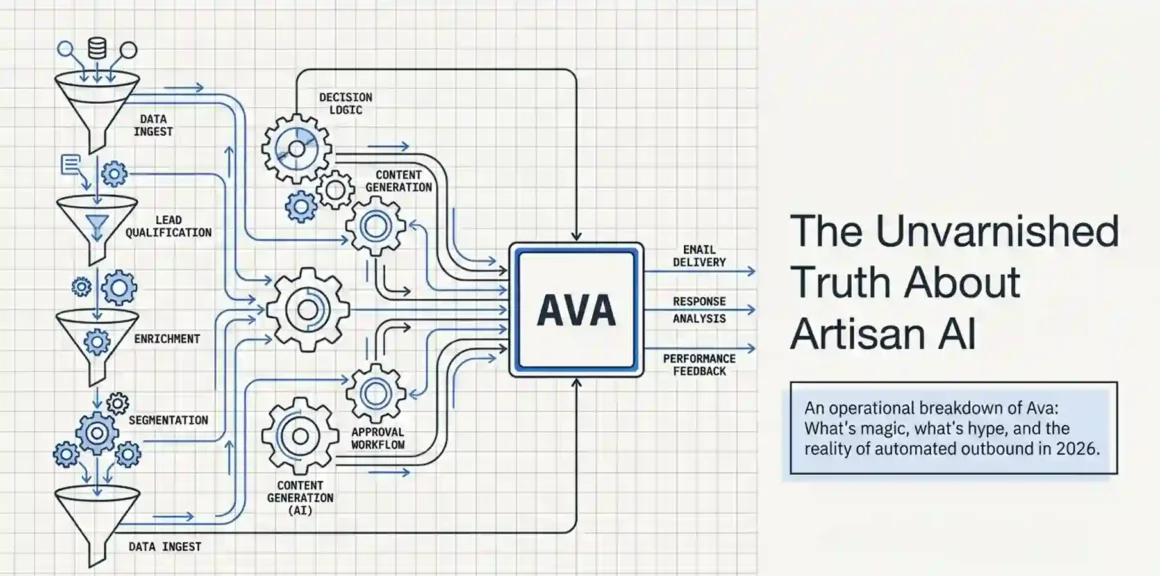
What Is Artisan AI and What Does Ava Actually Do?
Artisan AI is a sales automation platform. Its main product is Ava, an AI-powered SDR (Sales Development Representative) that runs your entire outbound sales process from start to finish without you having to manage each step manually.
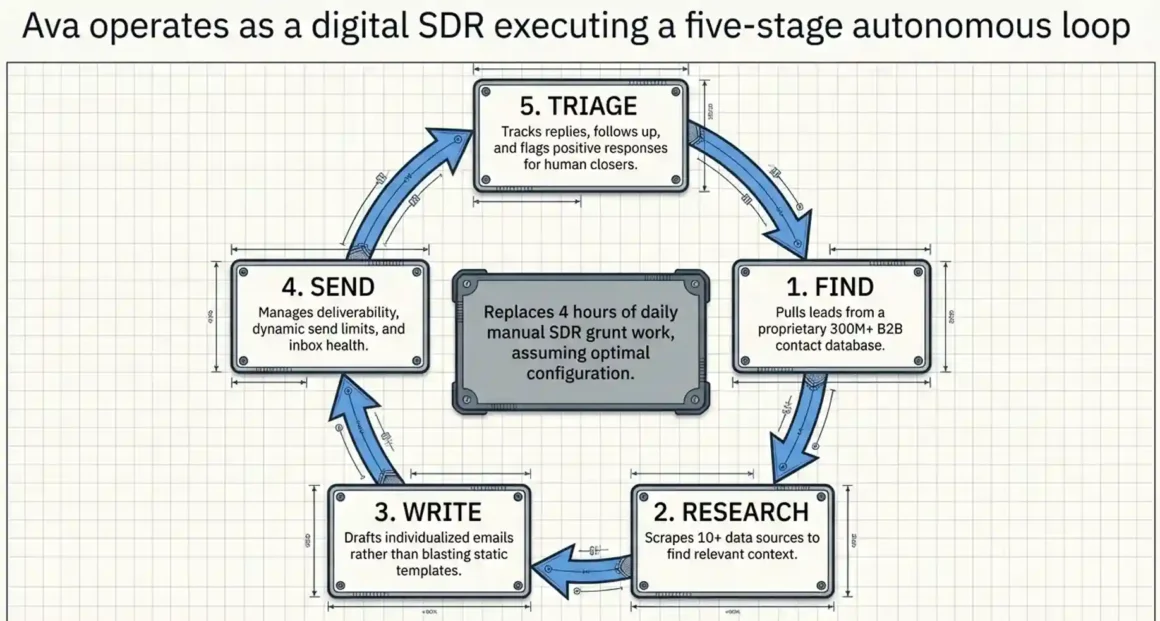
What does “entire outbound process” mean exactly? It means:
- Ava finds leads from a database of 300M+ verified B2B contacts
- She researches each prospect using 10+ data sources
- She writes a personalized email for each lead (not a template blast)
- She sends the emails, tracks replies, and follows up automatically
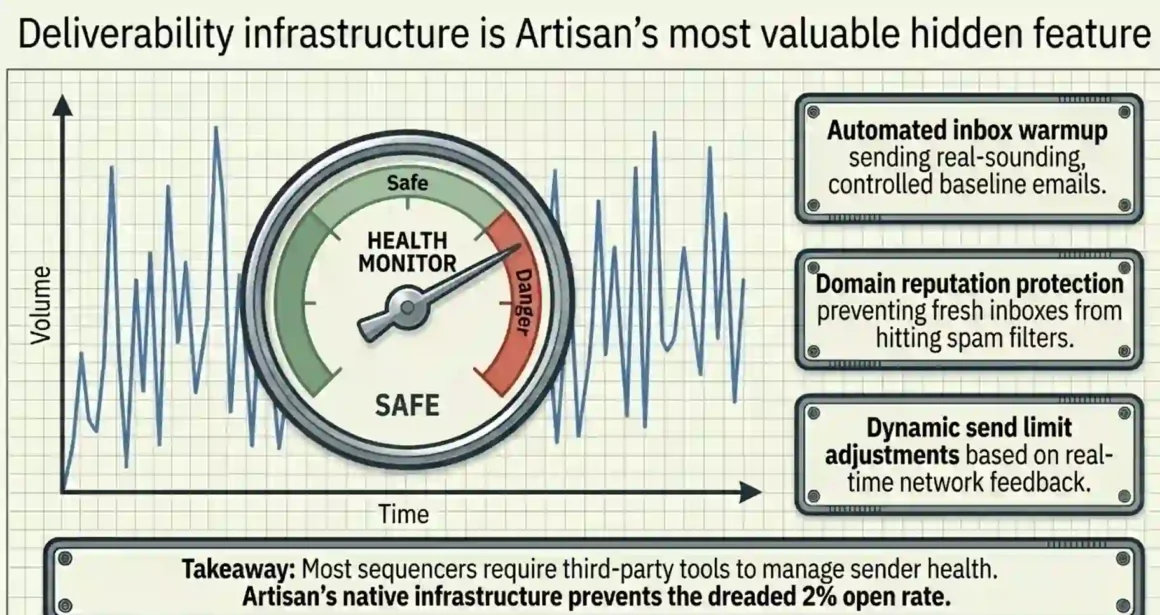
- She handles deliverability warming up your inbox, monitoring health, adjusting send limits
- She flags positive responses and passes them to your human team to close
So instead of your SDR spending 4 hours a day finding contacts, writing emails, and managing follow-ups Ava does all of that while your team focuses on actual conversations and closing.
That’s the idea. And on paper, it’s a strong one.
Discover Clearslide AI agents for sales! Real-time buyer insights and personalized pitches boost win rates 43%—transform sales teams into revenue powerhouses with intelligent automation!
How Ava Works Step by Step From Setup to First Campaign
This is the part most reviews skip over. They say “Ava runs your outbound” and leave it at that. Here’s what actually happens when you sign up and get started.
Step 1: Define Your ICP (Ideal Customer Profile)
When you first log into the Artisan platform, Ava doesn’t start sending emails immediately. She asks you a series of questions first:
- Who are you targeting? (industry, company size, job titles, geography)
- What is your product or service?
- What pain point does your product solve?
- What is the angle or goal for this outreach? (demo booking, webinar registration, partnership, etc.)
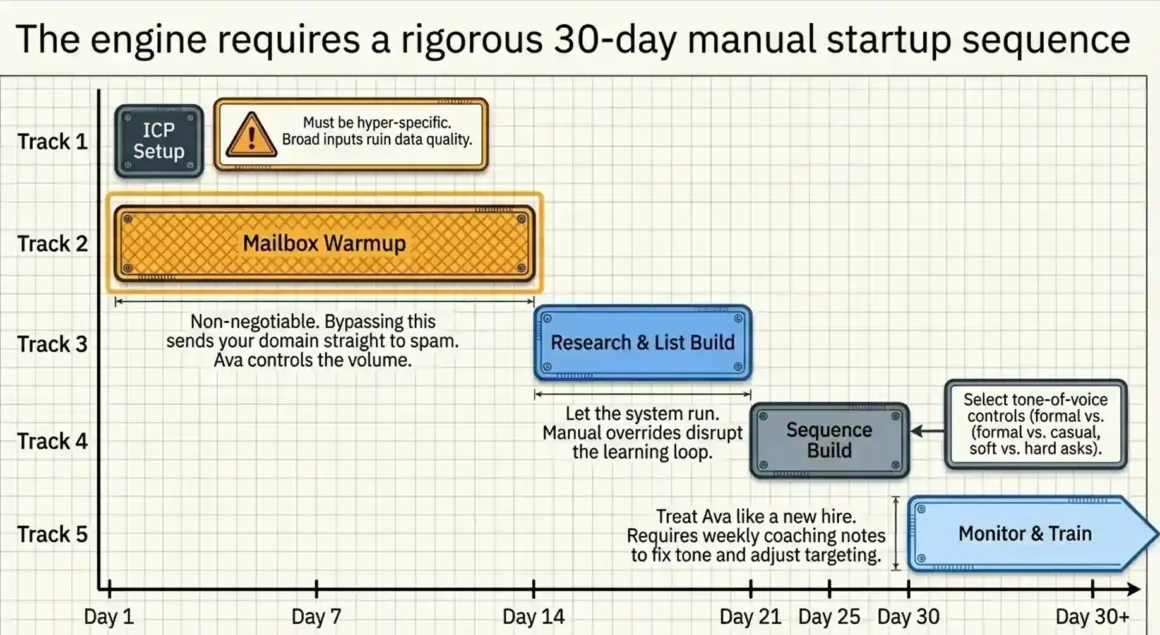
What to do: Be specific. If you say “targeting SaaS companies,” that’s too broad. Say “targeting SaaS companies in the US with 10–50 employees, Series A or B funded, that use Salesforce.” The more precise your ICP, the better Ava’s lead quality.
What NOT to do: Don’t rush through this step thinking you can fix it later. If your ICP input is vague, Ava will pull vague leads. And you’ll waste the first 2–3 weeks of your contract on bad data.
Step 2: Connect Your Mailbox and Let Ava Warm It Up
Ava has a built-in email deliverability system. The moment you connect your mailbox (Gmail or Outlook), she starts warming it up automatically. This means she sends small, controlled volumes of real-sounding emails to build your domain’s sender reputation before your actual campaign goes out.
Why this matters: Cold outreach from a fresh domain or unwarmed inbox goes straight to spam. Most people skip this step with other tools and then wonder why their open rates are 2%. Ava handles this automatically which is one of the genuinely good things about the platform.
Timeline: Expect 1–2 weeks of warmup before your first campaign goes live at full volume. Don’t try to skip this. Some users push their outbound team to start immediately and then get their domain flagged. That’s a painful and slow fix.
Step 3: Let Ava Research and Build Your Lead List
Once your ICP is set, Ava starts prospecting. She uses Artisan’s proprietary B2B database (300M+ contacts) plus external sources like:
- LinkedIn activity and job changes
- Funding announcements (e.g., Series A or B raises)
- Hiring news
- Press releases
- Website visitor tracking
- Google search signals
This combination of data sources is called Data Miner inside Artisan. It’s what separates Ava from a basic email sequencer. She doesn’t just pull contact info she finds context she can use to personalize the email.
For example, if a target company just raised a funding round, Ava can reference that in the opening line. If a prospect recently posted about a challenge on LinkedIn, she can acknowledge it. This is the personalization engine that Artisan calls the Personalization Waterfall.
What to do: Let Ava run for at least 2 weeks before judging lead quality. The system learns from your engagement data and refines its targeting over time.
What NOT to do: Don’t manually override her lead list every other day. It disrupts the learning loop. Trust the process for the first month, then make adjustments based on actual reply data.
Explore Showpad AI agents for sales! Dynamic content delivery plus rep coaching explode conversions—unlock peak performance across entire sales pipelines effortlessly!
Step 4: Review and Approve the Email Sequences
Ava writes the email sequences herself based on your ICP and product information. You can:
- Review the email drafts before they go out
- Edit tone, messaging, CTAs
- Set the number of follow-ups (typically 3–5 touches over 2–3 weeks)
- Choose the channel mix email only, or email + LinkedIn
Inside the platform there’s a Sequence Builder a drag-and-drop tool where you can design multi-step outreach flows. You can set timing between touches, conditions (e.g., “if no reply after 5 days, send follow-up 2”), and channel-specific variations.
One important setting most users miss: The tone-of-voice control. Artisan lets you choose how formal or casual Ava’s writing sounds, what kind of CTA she uses (soft ask vs. hard ask for a meeting), and even which pain points to lead with. Dialing this in correctly is the difference between a 1% reply rate and a 4% reply rate.
Step 5: Monitor, Train, and Improve Ava Over Time
Ava is not a set-it-and-forget-it system. She learns from what happens inside the platform. When emails get replies, she tracks what language worked. When leads unsubscribe, she adjusts.
But she also responds to coaching. You can give Ava explicit instructions things like “avoid mentioning competitors” or “always open with a question” or “don’t use the word ‘innovative.'” These coaching points are stored and applied to all future emails.
What to do: Review her output every 1–2 weeks for the first 2 months. Leave coaching notes. The teams that treat Ava like a new hire who needs onboarding get much better results than teams that walk away after day one.
What NOT to do: Don’t assume she’ll figure it all out on her own in week one. One of the biggest complaints from users is that they signed up, expected magic, got mediocre emails, and gave up. The first 30 days require active involvement.
Learn AI agents vs agentic AI! Task-based agents follow rules while agentic AI reasons autonomously—upgrade to self-planning systems revolutionizing complex workflows!
The Database: 300M Contacts How Good Is It Really?
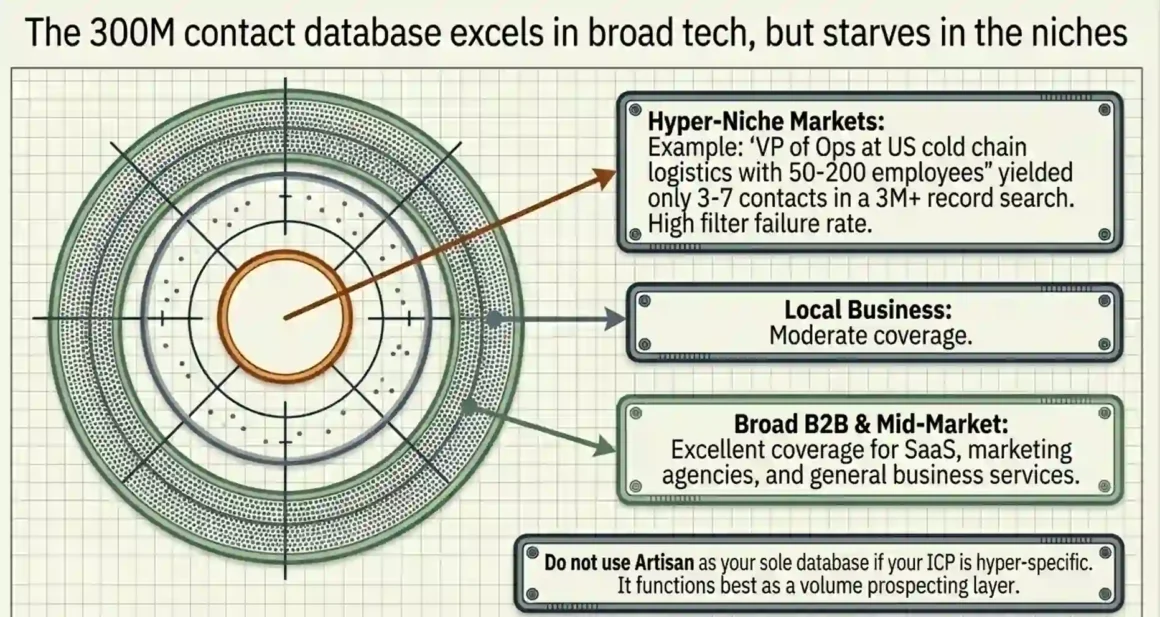
Artisan’s B2B database is one of its biggest selling points. 300 million verified contacts across 200+ countries sounds massive. And in some comparisons, it actually does outperform tools like Apollo and Lusha especially for broader markets and mid-market companies.
But here’s what the marketing doesn’t say clearly:
The database struggles in niche markets. One reported case from a G2 user showed that a search across 3 million+ records returned just 3–7 C-level contacts matching their specific niche. That’s not a data coverage problem in volume it’s a filtering accuracy problem. When your ICP is narrow (say, “VP of Operations at US-based cold chain logistics companies with 50–200 employees”), Ava’s results can get thin fast.
For local business outreach and broader B2B markets, it performs well. Multiple testers confirmed that for industries like SaaS, marketing agencies, and general B2B services the contact quality is solid and the volume is there.
The honest takeaway: Don’t use Artisan as your primary database tool if your ICP is hyper-specific. Use it as a volume prospecting layer and combine it with a more targeted data provider for your top-tier accounts.
Email Personalization: When It’s Good and When It Sounds Like a Robot Wrote It
The personalization engine is what Artisan markets most aggressively. And it does work to a degree.
When Ava has good data to work with (a recent LinkedIn post, a funding announcement, a job change), the emails she writes can feel genuinely personalized. They reference something real, they open naturally, and they don’t sound like a template.
The problem shows up when there’s not enough personalization data. When Ava can’t find a strong signal, she falls back to generic openers things like referencing company size or industry. And those emails sound exactly like what they are: AI-generated. Prospects notice, and they don’t reply.
The fix: In your ICP setup and coaching notes, tell Ava to skip the email and flag the lead if she can’t find a strong personalization angle. It’s better to contact 500 leads with genuinely personalized emails than 2,000 leads with half-generic ones. The reply rate math works out better.
What Artisan AI Does Well (And Where the Real Value Is)
Let’s be straight about where this platform actually delivers.
1. Deliverability management is genuinely strong. The automated inbox warmup, mailbox health monitoring, and dynamic sending limit adjustment work as described. Most cold email tools make you manage this separately. Artisan bundles it in, and it works.
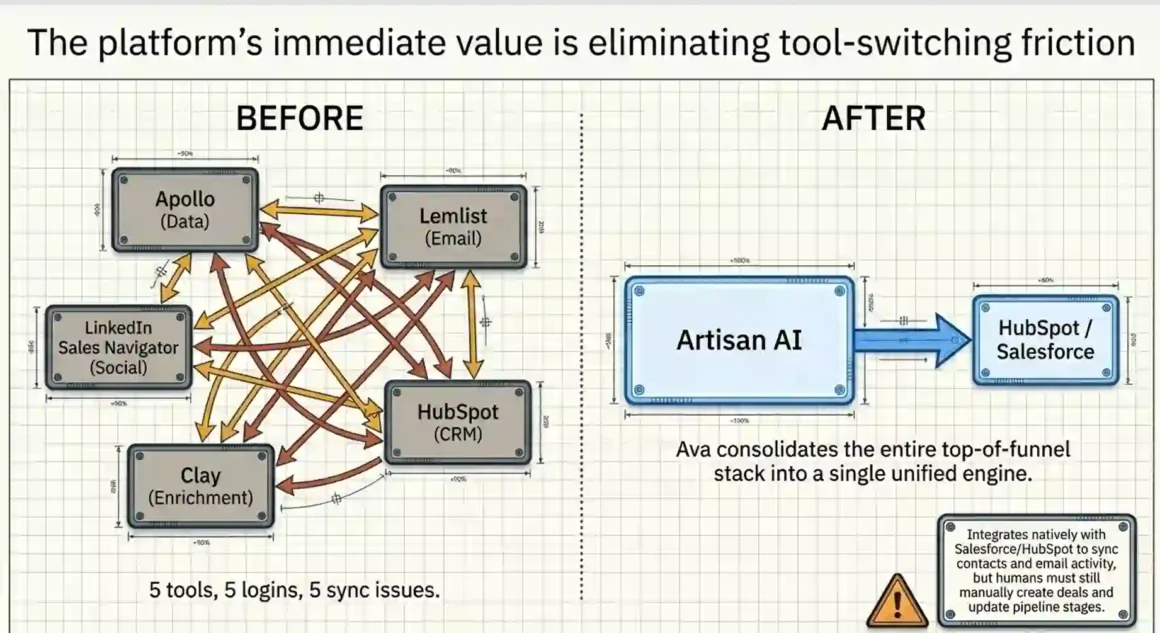
2. The all-in-one setup removes tool-switching friction. Before Artisan, a typical outbound stack looked like: Apollo (data) + Instantly or Lemlist (email) + LinkedIn Sales Navigator + Clay (enrichment) + HubSpot (CRM). That’s 5 tools, 5 logins, and 5 sync issues. Artisan consolidates this into one platform. For teams that value simplicity and don’t want to manage an outbound tech stack, this is a real benefit.
3. Intent signals actually improve timing. Ava’s use of hiring signals and funding announcements to trigger outreach is smart. Reaching out to a company the week they announce a new VP of Sales or raise a Series B is 3–4x more likely to get a response than cold outreach with no context. This feature alone, when set up correctly, can justify the platform.
4. Onboarding support is faster than expected. Multiple users noted that Artisan’s support team responds in minutes, not days. They also offer a white-glove onboarding option where a dedicated outbound expert helps you set up your first campaign. That’s unusual for a SaaS product and actually useful for teams new to outbound.
Discover best AI agent frameworks 2026! LangGraph, CrewAI, Agent Zero dominate rankings—deploy production-ready winners scaling AI operations profitably!
Where Artisan AI Falls Short The Problems Real Users Hit
These are patterns pulled from verified G2 reviews, Reddit threads, and user feedback not from the marketing page.
The “AI slop” email problem. Multiple users reported that despite the personalization claims, the emails often feel robotic, overly formal, or slightly off-tone. The issue is that Ava optimizes for volume across many leads, and deep personalization at scale is still a hard problem. When the emails miss, they miss noticeably and a bad first impression from a cold email is very hard to recover from.
Meetings booked, pipeline not built. A recurring complaint: Ava books meetings, but those meetings don’t convert. The leads that respond are sometimes not the right fit they’re just curious about the AI angle, or they’re doing competitive research. This isn’t entirely Artisan’s fault (ICP quality matters), but it points to a broader issue booking a meeting and booking a qualified meeting are two different things.
The bug problem in the first 6 months. Earlier in 2024, users frequently reported DNS errors, broken inbox warmup timers, and UI glitches. Artisan has improved significantly since then (their Series A funding in 2025 went partly toward product stability), but if you’re evaluating the tool in 2026, ask specifically about current system reliability before signing an annual contract.
Zero results on some campaigns. One widely cited case on Reddit: a user sent 1,400 emails through Artisan and received zero replies. That’s an extreme outcome and likely reflects a combination of bad ICP targeting, poor personalization, and possibly deliverability issues. But it’s not isolated it’s a pattern that shows up when teams don’t actively manage the setup.
Explore agentic AI leading companies! xAI, Anthropic pioneer self-evolving systems—partner innovators building autonomous future dominating enterprises globally!
Artisan AI Pricing: What You’re Actually Paying For
Artisan does not publish pricing publicly. You have to contact their sales team and go through a demo to get a quote.
Based on market reports and user disclosures as of early 2026:
- Entry-level plans start around $2,000/month
- Mid-tier plans run $3,000–$5,000/month depending on lead volume and feature scope
- Annual contracts are standard — monthly billing is not typically offered
- Some users have flagged difficulty canceling — ask about cancellation terms upfront before signing
The pricing is based on the volume of leads you’re doing outreach to, not on a flat per-seat model. This means as you scale your outreach, your cost scales with it.
Is it worth it? For a team replacing one junior SDR (who costs $5,000–$7,000/month when you factor in salary, benefits, tools, and ramp time), a $2,000–$3,000/month Artisan plan is defensible math IF the system produces a qualified pipeline. If it produces meetings that don’t convert, you’ve spent the same money with less to show for it.
The honest answer: Artisan is worth it for teams with a proven outbound playbook who want to scale without headcount. It’s risky for teams still figuring out their ICP or testing outbound for the first time.
Who Should Actually Use Artisan AI
Use Artisan if:
- You already know your ICP cold and have messaging that converts
- You have a human sales team to handle demos and closing Ava fills the top of funnel, humans close the bottom
- You’re in a broad B2B market (SaaS, marketing services, business services) where the database has good coverage
- You want to consolidate your outbound stack and reduce tool-switching
- You’re a mid-market company or funded startup that can absorb $2,000+/month and evaluate ROI over a quarter
Don’t use Artisan if:
- Your ICP is narrow or niche the database may not have enough quality leads in your segment
- You’re a solo founder or very early-stage startup trying outbound for the first time the cost-to-learning ratio is poor
- You expect the tool to run without any human oversight; it won’t deliver results without active management for the first 2 months
- You need deep LinkedIn automation as your primary channel. Artisan’s LinkedIn functionality exists but is secondary to email
How Artisan Compares to the Main Alternatives
Before spending $2,000/month, it’s reasonable to know what else is in the space.
Salesforge (Agent Frank) — Better for multi-channel outreach including LinkedIn as a primary channel. More flexibility in follow-up personalization. Better deliverability controls. Pricing is more transparent.
11x.ai — Positioned for enterprise teams with larger budgets. More powerful AI reasoning for complex outreach scenarios, but even more expensive.
Apollo.io — Not a full AI agent, but a strong prospecting and sequencing tool at a fraction of the price. If you want a human SDR to write the emails and just need data + sending infrastructure, Apollo is far more cost-effective.
Clay — Not a sending tool but an enrichment powerhouse. Best combined with a human SDR who writes personalized emails using Clay’s enriched data. More work, but more control over quality.
The difference between Artisan and these alternatives comes down to one thing: autonomy vs. control. Artisan gives you the most autonomous AI it runs itself. The tradeoff is that you lose control over message quality. If quality is your priority, a semi-automated tool where humans review and approve every email will outperform Artisan in conversion rate, even if it scales less.
Transform AI agents content marketing revolution! Auto-research, writing, optimization at scale—produce viral content dominating search while focusing on strategy growth!
The Setup Mistake That Kills Most Artisan Campaigns
There is one mistake that shows up repeatedly in failed Artisan campaigns, and it’s worth calling out directly.
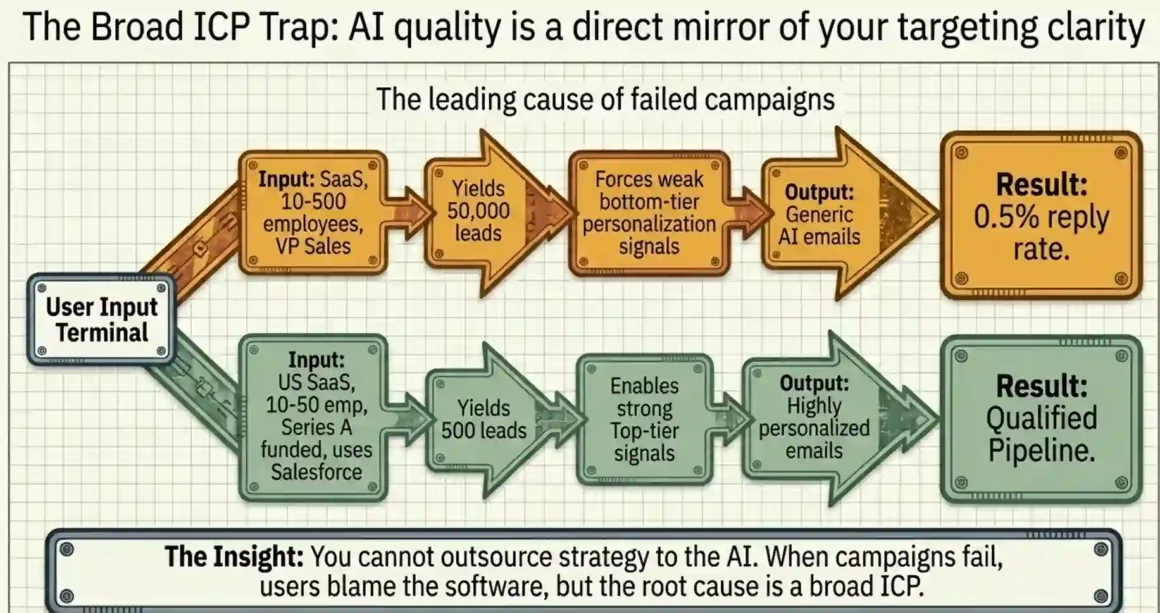
Teams define their ICP too broadly and then blame the AI.
Here’s what happens: A sales manager sets up Artisan and enters something like “SaaS companies, 10–500 employees, US-based, VP Sales or VP Marketing.” That’s technically an ICP, but it covers hundreds of thousands of companies across wildly different contexts. Ava finds 50,000 matching leads. She starts sending emails with personalization pulled from whatever signals she can find. The emails are decent but not sharp. Reply rates are 0.5–1%.
The team calls it a failure. But the real problem was the ICP.
The fix: Before you launch your first campaign, spend one hour writing out your single best-fit customer profile. Not your broad market — your best customer. What industry? What size? What tech stack do they use? What problem are they actively trying to solve right now? What buying trigger would make them ready to talk?
Feed that into Artisan’s setup, and the math changes. Campaigns targeting 500 well-defined leads with strong personalization signals outperform campaigns targeting 5,000 vague ones every time.
Ava’s Sentiment Detection The Feature That Handles Replies Automatically
One feature that doesn’t get enough attention: Ava uses sentiment analysis to read incoming email replies.
When a reply comes in, Ava categorizes it as:
- Positive — interested, wants to schedule, asking for more info
- Negative — not interested, unsubscribe request, wrong person
- Neutral/Unclear — question, conditional interest, objection
For negative replies, Ava automatically removes the contact from the sequence and unsubscribes them. For positive replies, she flags them and sends a real-time notification to your team via email or Slack so a human can take over.
This is important because one of the biggest time-wasters in cold outreach is manually sorting through replies and figuring out what needs a human response. Ava handles the first layer of triage automatically.
What the sentiment detection doesn’t do well: Nuanced objections. A reply like “Not the right time, maybe Q3?” gets tricky it’s not a yes or a no. Ava may flag it as negative or neutral, but a human SDR would recognize that as a warm lead worth re-engaging in 6–8 weeks. Always review the “neutral” pile yourself.
Boost AI chatbots exploding website conversions! Smart conversational AI qualifies leads 24/7—slash bounce rates, skyrocket revenue automatically!
CRM Integration: What Syncs and What You Still Do Manually
Artisan integrates with HubSpot and Salesforce natively. The integration syncs:
- Lead contact data
- Email activity (opens, clicks, replies)
- Sequence status
- Meeting bookings (when connected to your calendar)
What you still do manually: Deal creation and pipeline stage updates. Ava doesn’t push a new deal into HubSpot when a prospect books a meeting. She hands the lead to your team, and your team creates the deal. This is a gap that matters for teams relying on CRM data for revenue forecasting.
Also: CSV uploads work if your CRM isn’t HubSpot or Salesforce. You can manually upload lead lists in CSV format and Ava will run campaigns against them. Useful if you have a curated list from an event, webinar, or partner referral.
A Realistic Expectation: What Results Look Like in the First 90 Days
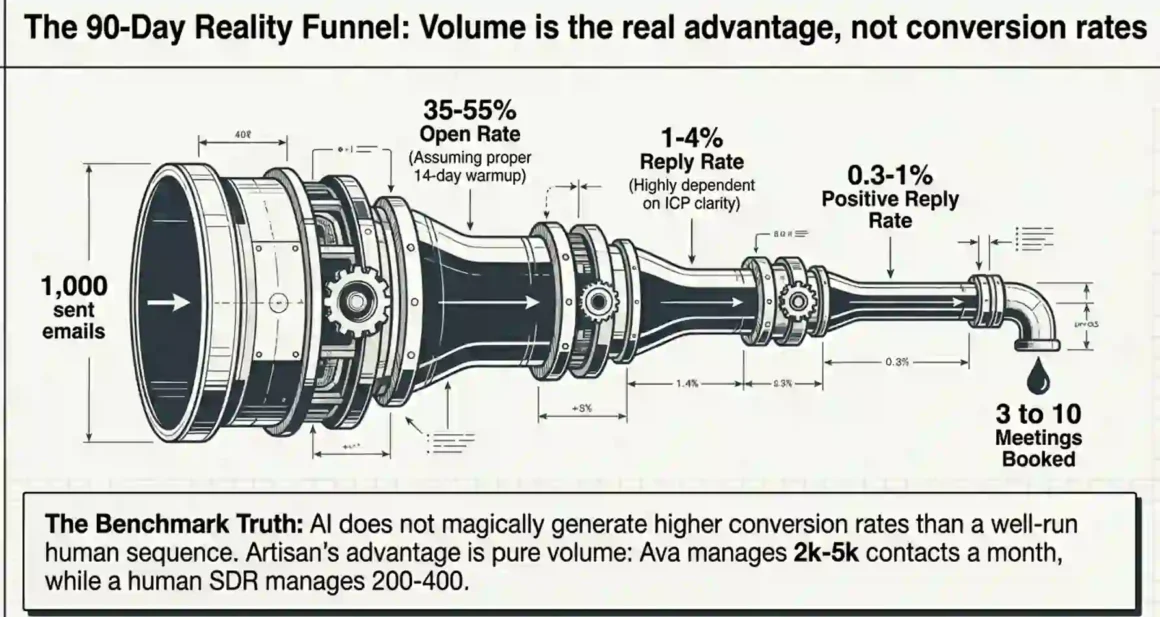
Based on aggregated user reports and realistic benchmarks for cold outbound in 2026:
| Metric | Typical Range with Artisan |
| Email open rate | 35–55% (with good warmup) |
| Reply rate | 1–4% (highly ICP-dependent) |
| Positive reply rate | 0.3–1% |
| Meetings booked per 1,000 emails | 3–10 |
| Time to first results | 4–6 weeks (including warmup) |
These are not Artisan’s marketing numbers. These are realistic benchmarks from actual outbound campaigns.
A reply rate of 1% on 1,000 emails means 10 replies. Of those, 3–4 might be genuinely interested. Of those, 1–2 might book a meeting. That’s the reality of cold outbound at scale in 2026, AI-powered or not.
Where Artisan wins is volume. A human SDR can manage outreach to 200–400 contacts per month with quality personalization. Ava can handle 2,000–5,000. The volume advantage is real the conversion rate is not dramatically different from a well-run manual process.
Final Take: Artisan AI Is Infrastructure, Not Magic
The biggest misconception about Artisan AI is that it’s a magic button set it up, walk away, and watch meetings appear. That’s not how it works in practice, and any review that tells you it is is selling you something.
Ava is better described as outbound infrastructure. She replaces the manual grunt work of prospecting, email writing, and follow-up. She runs consistently, doesn’t take days off, and scales without headcount. That’s genuinely valuable.
But she still needs a well-defined ICP, a clear message, active oversight in the first 60 days, and a human team to close what she opens. Without those inputs, the output is mediocre at best.
The teams getting the best results with Artisan are the ones treating Ava like a new SDR hire training her, reviewing her work, correcting her, and giving her better inputs over time. The teams burning through their contracts are the ones who handed her a vague brief and expected enterprise results.
If you go in with that understanding, Artisan is a legitimate tool for scaling outbound without scaling headcount. If you go in expecting it to replace your entire sales function, you’ll be disappointed by month two.
Before You Book That Demo: Questions to Ask Artisan’s Sales Team
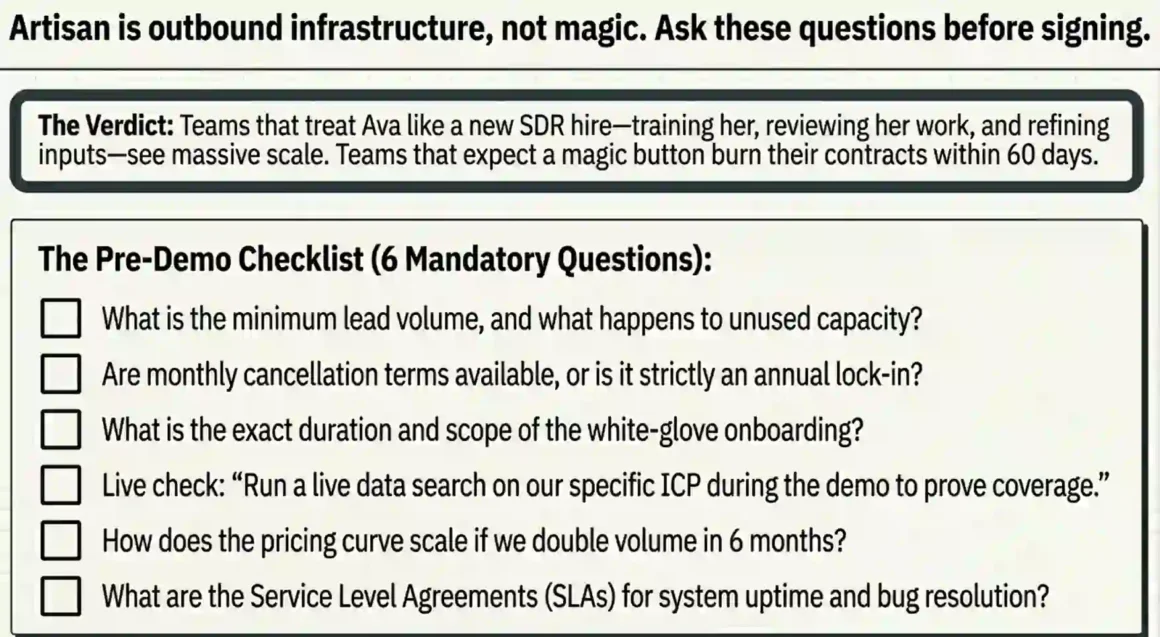
If you’re considering Artisan, ask these specific questions before signing:
- What is the minimum monthly lead volume in my contract, and what happens if I don’t use it?
- Can I cancel monthly, or am I locked into an annual contract from day one?
- What does onboarding look like do I get a dedicated person, and for how long?
- What is the current data coverage for my specific industry and geography? (Ask them to run a sample search live on your call.)
- How does pricing scale if I want to double my lead volume in 6 months?
- What is the current system uptime, and how do you handle bugs during active campaigns?
The answers to these six questions will tell you more about whether Artisan is right for your business than any marketing page will.


